
Gibt es hier eine #Gruppe aus dem Raum #Chemnitz #Freiberg #Erzgebirge für #Linuxuser #Linux #Raspberry
Ich könnte mir vorstellen, mich da mit zu engagieren.
Seit ca. 20 Jahren bin ich von #suselinux #Fedora #siduction bis aktuell #endeavouros unterwegs.
Ich bin kein Freak und kein Nerd, aber gerne dabei
#SuseLinux

@joansanchis Hello. #debian is a good choice because it does not depend on a company. But #linuxmint #suselinux #ubuntu #zorin #manjaro are good choices for a "European" distro.

Beim Aufräumen habe ich die Installations CDs und Handbücher zu meinen ersten Linux Versuchen gefunden. Muss um 2001 / 2002 gewesen sein. Kann mich noch dunkel dran erinnern. Zwecks Technikerschule und 3D CAD bin ich dann wieder zurück zu Windows.
Aber toll wie damals die Handbücher aussahen. Ach..... lang ist es her.
#Linux #Suse #Suselinux



@chris Great to see.
In May 2026, I will be also using Linux on Desktop consecutively for 30 years. I started with S.u.S.E Linux 4.2 in 1996. And: I am just a user, no programmer.
https://de-academic.com/dic.nsf/dewiki/1348220
#opensuse #suselinux #linux #desktoplinux #linuxdesktop #floss #foss #opensource


SUSE Linux Enterprise Server 16: KI und langfristige Enterprise Stabilität https://fosstopia.de/sles-16/ #EnterpriseLinux #Linux #LinuxNews #SLES #SLES16 #suse #SuseLinux #SuseLinuxEnterprise #SUSELinuxEnterprise16 #SuseLinuxEnterpriseServer #SUSELinuxEnterpriseServer16 #SUSENews

SUSE Linux Enterprise Server (SLES) ha sido reconocida oficialmente como Bien Público Digital (Digital Public Good) por la Digital Public Goods Alliance.
#suselinux #gnulinux
https://www.muylinux.com/2025/10/29/suse-linux-enterprise-bien-publico-digital/

DiraQ :O Linux de bolso para computação quântica | Assunto NERD:
O DiraQ foi idealizado por Wilson Fonseca e Alessandro “Cabelo” de Oliveira Faria, mas para que ele alcance seu verdadeiro potencial, é essencial que a comunidade científica, entusiastas e desenvolvedores façam parte.
Se você domina Python, quiser testar frameworks quânticos ou ajudar a documentar, tu tens um lugar garantido nesse projeto. Queremos tornar computação quântica mais acessível, e juntos podemos construir uma plataforma brasileira, aberta e robusta.
https://assuntonerd.com.br/2025/10/12/diraq-o-linux-de-bolso-para-computacao-quantica/
#SoftwareLivre #CodigoAberto #SuseLinux #computacaoquantica #brasil #diraq

openSUSE Leap 16: 24 months support for all
openSUSE Leap 16 offers 24 months of maintenance and support, now available not only to paying organizations but also to community users for the first time.
#Systemverwaltung #Betriebssystem #IT #Linux #OpenSource #Opensuse #SuseLinux #news

openSUSE Leap 16: 24 Monate Support für alle
openSUSE Leap 16 bietet erstmals volle 24 Monate Maintenance und Support pro Version – auch für Community-Nutzer, nicht nur für zahlende Unternehmen.
#Systemverwaltung #Betriebssystem #IT #Linux #OpenSource #Opensuse #SuseLinux #news

Installing openSUSE 16 Leap RC on VMware
Welcome to yet another installation article regarding a Linux distribution. This time, we’ve selected the release candidate of the openSUSE 16 that will be released later, to showcase the new installer and to put it to the test. We have downloaded the release candidate ISO of openSUSE Leap 16 RC from this page below.
Download the ISOThe virtual machine configuration is used as in below:
First, we’ve allocated 8 GB of RAM to ensure stability, since we’re going to install the fully-fledged desktop environment. Then, we’ve allocated 200 GB of hard drive space to be able to install programs, but it’s out of scope for this article. In addition to that, we’ve allocated 4 processor cores.
We’ve started the virtual machine, and we’re greeted with this awesome GRUB bootloader screen that looks like this:
After we pressed ENTER to allow the installer to start, we’re greeted with the gorgeous web-based Agama installer that replaces the older YaST installer system.
In this case, we’re promoted to choose one of the two products: Leap 16.0 Beta and openSUSE Leap Micro 6.2 Beta. Since we wanted a fully-fledged desktop, we chose the first option.
After that, we’re greeted with a loading screen that said that it’s configuring the product.
At this stage, we’re finally taken to the Overview screen, just like below.
From here, we’ll showcase some of the most common installer features. First, we set up the system hostname that will be set for our new installation.
Second, we’ve opened the localization settings, and two of the three settings appeared to be OK, so we’ve changed the time zone to make sure that it aligns with our environment.
Afterwards, we went to the Network settings. Since we are running off the wired internet connection on the guest side, there’s no need to configure anything there. Additionally, the IP address has been obtained using DHCP with the network mask of /24 for IPv4.
Next, we went to the storage part of the installation. Since this is a new installation, we’ve accepted the default partition setting that the Agama installer automatically chosen for convenience.
Next, we went to the software section. Here, no desktop environment was going to be installed, and we wanted one for completeness, so we’ve decided to press the Change selection button.
Afterwards, we’ve chosen the KDE Plasma desktop to be installed in the Graphical Environments section of the software selection screen.
Closing this screen gave us this result. Notice that both the multimedia and the office suite, as well as possibly other collections, have been automatically selected to be installed to the final installation in the hard drive.
Finally, we went to the Authentication section of the installer, and added a new user.
Afterwards, we’re taken back to the Authentication screen that told us that the root password has not been assigned.
We’ve changed this by pressing the Edit button in the Root user group box, and assigned the root password. Now, the end result is satisfactory.
We went ahead to press the Install button at the top of the screen, and we’re shown the fancy looking circular progress bar inside the stage graph. As usual, it goes through preparing the disks and creating new filesystems.
The package installation then followed, and it took no more than 10 minutes to perform the installation of 2,182 packages.
After that, we’ve rebooted the system, and got a nice bootloader screen that looks like this:
We let it boot to the login screen that was provided by SDDM.
As soon as we logged in, the KDE splash screen appeared, but with one spinning gear at the bottom and a familiar openSUSE lamp figure at the top, as shown below.
Afterwards, we’re taken to the desktop with the introductory screen that showed us the welcome window for openSUSE.
We went to th About screen in the system settings application from the KDE desktop environment, and we got this:
openSUSE Leap 16.0 RC ran with KDE Plasma 6.3.4, along with the KDE Frameworks version of 6.13.0, and it ran on the legacy X11 windowing system instead of the more modern Wayland system.
The system ran smoothly, but the graphics acceleration on VMware introduced some stuttering, with the most noticeable ones being at the KDE splash screen.
#news #OpenSUSE #OpenSUSE16 #OpenSUSE160 #SUSE #SUSELinux #Tech #Technology #update


We've installed openSUSE Leap 16.0 RC on VMware!
#openSUSE #SUSE #SUSELinux #Linux #KDE #KDEPlasma #Computers #Laptops #TechNews #TechUpdates
https://officialaptivi.wordpress.com/2025/08/15/installing-opensuse-16-leap-rc-on-vmware/
Zwei Jahrzehnte openSUSE – das Chamäleon bleibt auf Erfolgskurs https://fosstopia.de/opensuse-wird-20/ #Novell #openSuSE #OpenSuSELeap #OpenSUSENews #OpenSuSETumbleweed #SuseLinux

openSUSE 16.0 reached the release candidate stage!
The release candidate for the upcoming openSUSE Linux distribution has just begun, and it features changes that were made from the beta version to incorporate bug fixes and general improvements to different parts of the system. openSUSE and SUSE Linux Enterprise 16.0 will make their way to the final version later this year.
At the same time, openSUSE Tumbleweed and Leap 16.0 are currently in the process of having their sources transitioned from OBS SCM to the more powerful Git version controlling system. We expect that the final release of openSUSE 16.0 be at the end of September so that more stability is guaranteed.
openSUSE Leap 16.0 is also one of the first Linux distributions that delivers the XFCE desktop running on the newer Wayland protocol instead of the antiquated X11 desktop. However, it’s in a state where it’s not yet production-ready. Among many other changes, such as the new Agama installer that enhances the operating system installation experience and to improve stability.
You can learn more about the release candidate of openSUSE 16 here.
Learn more#Linux #LinuxDistro #news #OpenSUSE #SUSE #SUSELinux #Tech #Technology #update


openSUSE 16.0 RC is now live! This is only one step closer to the September release!
#openSUSE #SUSELinux #SUSE #Linux #Computers #Laptops #TechNews #TechUpdates #XFCE #xfwm
https://officialaptivi.wordpress.com/2025/08/05/opensuse-16-0-reached-the-release-candidate-stage/
My childhood in one picture.
My very first PC: a Compaq machine with a Pentium I (166 MHz) - slow by today’s standards, and honestly, even back then. Most kids already had Pentium 4s, but I made the most of what I had.
I started out playing DOS games like DOOM on Windows 98 - and I loved every second. But everything changed when I saw SuSE Linux 8.0 at a friend’s house.
His dad worked at AMD in Germany at the time - so of course they had Linux. I didn’t fully understand what it was… but I knew I needed it too.
So I got SuSE Linux 7.3. I installed it from CD1 - the other 6 CDs and 1 DVD just held software packages. Two boot floppies were needed just to start the installer.
I installed a Sound Blaster card myself at age 10, using the original driver CD. And since my CD-ROM drive was added later, I had to boot from a floppy with DOS CD-ROM drivers first. It was all a bit chaotic – but it worked.
Also pictured: my LEGO Mindstorms grabber arm - the first robot I ever built, following online instructions I hunted down with endless patience.
And of course: PC Games 11/02, featuring Unreal Tournament 2003 (and also No One Lives Forever 2, one of the most underrated gems of its time.) - a game (and series) I still love to this day.
Today, this very machine still works - and after some experiments with Minix and FreeDOS over the years, it’s once again running SuSE Linux 7.3. Just like back then.
What’s missing? My old bike. I didn’t bring it down from the attic.
#RetroPC #Pentium1 #SuSELinux #FOSS #LEGOmindstorms #SoundBlaster #PCGames #UT2003 #FloppyDisk #DOSGames #Minix #FreeDOS #NerdLife #TechNostalgia #FrüherWarMehrFloppy #MeinErsterPC #Kindheitserinnerung #Pixelfed #RetroLiebe #ComputerHistory #RetroHardware #OldHardwareStillRuns #CompaqLegend #SuSE73 #Linux
My very first PC: a Compaq machine with a Pentium I (166 MHz) - slow by today’s standards, and honestly, even back then. Most kids already had Pentium 4s, but I made the most of what I had.
I started out playing DOS games like DOOM on Windows 98 - and I loved every second. But everything changed when I saw SuSE Linux 8.0 at a friend’s house.
His dad worked at AMD in Germany at the time - so of course they had Linux. I didn’t fully understand what it was… but I knew I needed it too.
So I got SuSE Linux 7.3. I installed it from CD1 - the other 6 CDs and 1 DVD just held software packages. Two boot floppies were needed just to start the installer.
I installed a Sound Blaster card myself at age 10, using the original driver CD. And since my CD-ROM drive was added later, I had to boot from a floppy with DOS CD-ROM drivers first. It was all a bit chaotic – but it worked.
Also pictured: my LEGO Mindstorms grabber arm - the first robot I ever built, following online instructions I hunted down with endless patience.
And of course: PC Games 11/02, featuring Unreal Tournament 2003 (and also No One Lives Forever 2, one of the most underrated gems of its time.) - a game (and series) I still love to this day.
Today, this very machine still works - and after some experiments with Minix and FreeDOS over the years, it’s once again running SuSE Linux 7.3. Just like back then.
What’s missing? My old bike. I didn’t bring it down from the attic.
#RetroPC #Pentium1 #SuSELinux #FOSS #LEGOmindstorms #SoundBlaster #PCGames #UT2003 #FloppyDisk #DOSGames #Minix #FreeDOS #NerdLife #TechNostalgia #FrüherWarMehrFloppy #MeinErsterPC #Kindheitserinnerung #Pixelfed #RetroLiebe #ComputerHistory #RetroHardware #OldHardwareStillRuns #CompaqLegend #SuSE73 #Linux
@gpowerf @artfulrobot but isn't project's region of origin only concern if you want to financially support given project? Off top of my head I can't recall anything that would be US specific change in #fedora and #gnome desktop developement. I guess something something #redhat or #ibm but I feel like that is a streach, but if you are still concerned, just prepare some transfer plans into diffrent distros if stuff were to blow up.
Also wasn't #suselinux was from #germany

Che pacchia fare i sistemisti una volta. “Sto installando, chiamami tra due giorni” 💚


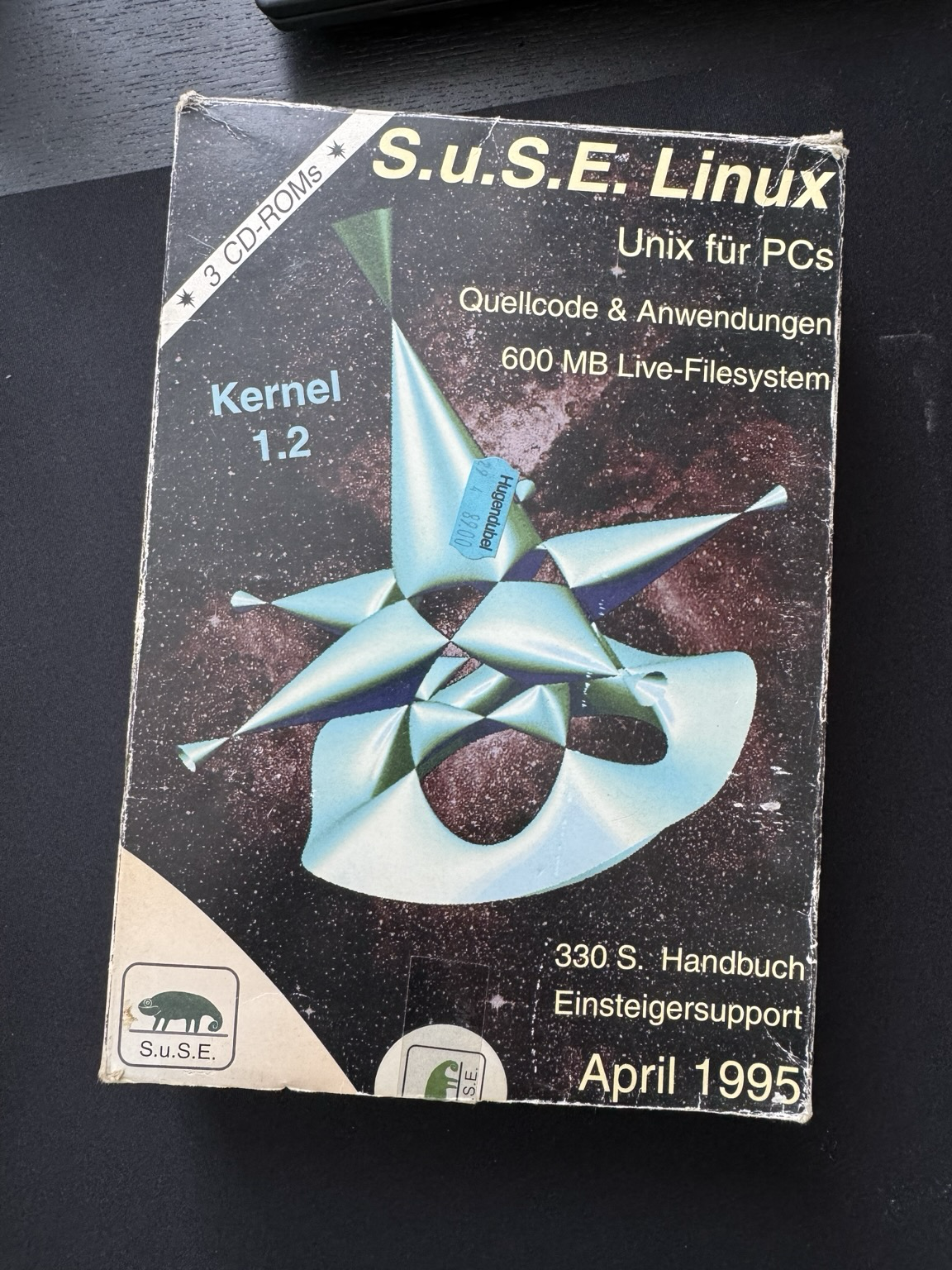
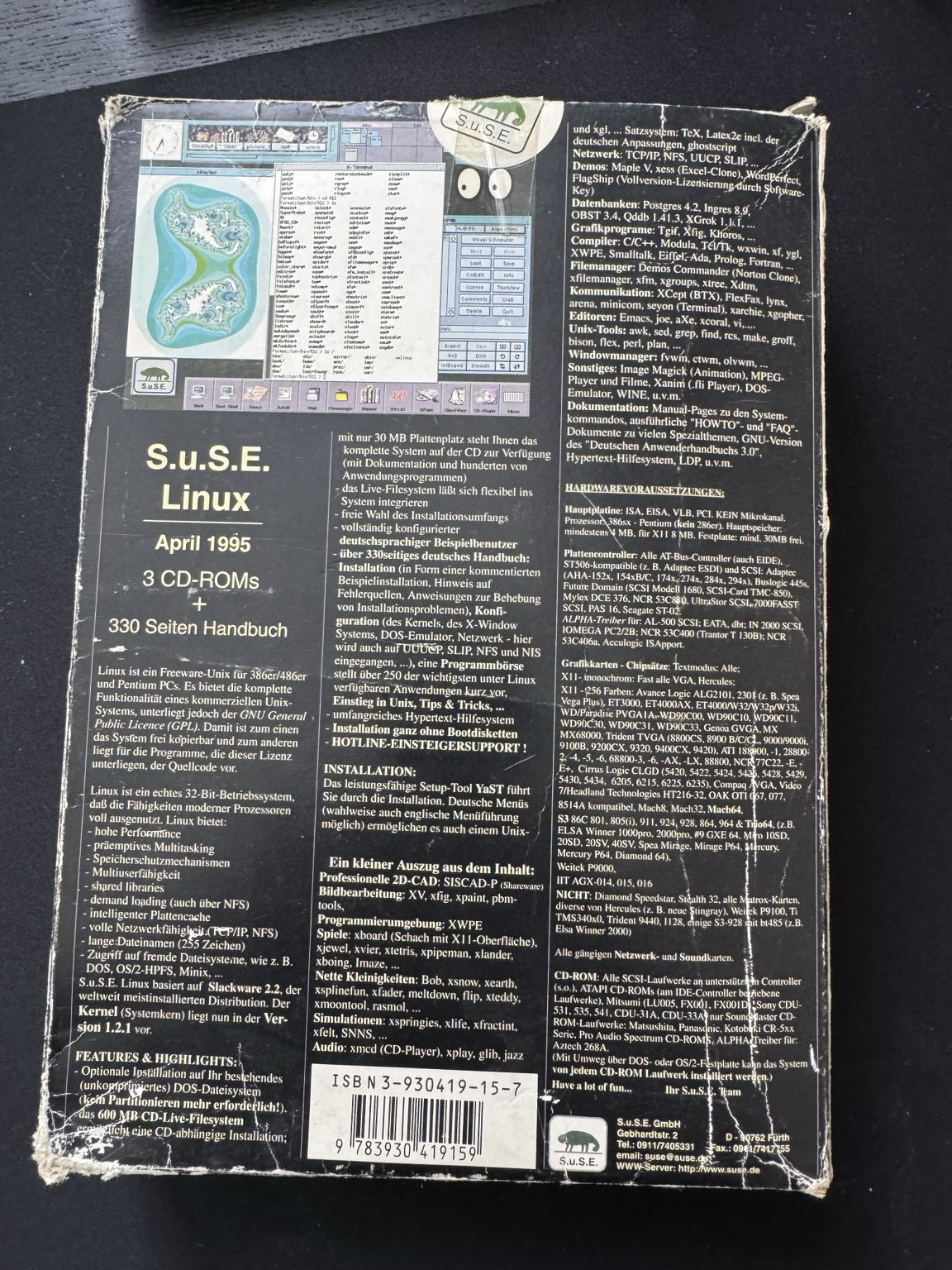
Look what falls out of old moving boxes... my First contact with Linux and SUSE („S.u.S.E.“ back then)
Now I feel old 😅 @opensuse


Lo and behold, SuSE Linux 6.4 running on the Pentium 133. 🥳
This was surprisingly easy, including the XFree86 configuration (there was no X.Org yet). Looks like I happen to have very compatible hardware.
The distribution feels massive. There is a ton of software on those 6 CDs.
I plan to use this box/setup for the “upcoming” Advent of Code.


Client Info
Server: https://mastodon.social
Version: 2025.07
Repository: https://github.com/cyevgeniy/lmst