#PersonalKnowledgeManagement

2026-02-02

New on CTNET: AI PKM Framework Levels 1-2

Level 1 = Critical Refinement
Use AI summaries as starting points, never endpoints. Still engage with source material and write your own notes.

Level 2 = Socratic Interrogation
AI as thinking partner, not answer machine. Challenge assumptions, explore alternatives.

The red lines from Level 0 still apply.

ctnet.co.uk/ai-knowledge-frame

#AI #PKM #Zettelkasten #PersonalKnowledgeManagement

2026-01-26

New post: How do you know when your PKM is ready for AI?

The expertise paradox: you need cognitive skills to use AI effectively with PKM, but AI can undermine those very skills during development.

I've built five diagnostic questions and a readiness checklist to help you assess honestly whether you're ready for advanced AI integration—or need more time building foundations.

ctnet.co.uk/how-will-you-know-

#PKM #Zettelkasten #KnowledgeManagement #AI #PersonalKnowledgeManagement

2026-01-14

Why 2026 Is the Year to Build a Second Brain
The 2026 data flood is real. 🌊 If you aren't building a Second Brain, you're drowning in information you can't use.
With Agentic AI now able to "express intent" rather than just write code, your value lies in how you curate and connect ideas.

technology-news-channel.com/wh

2025-12-29

The central question I've wrestled with all year:
How do I use AI to enhance my thinking without it doing the thinking FOR me?
In my 2026 predictions, I explore why AI agents + long-term memory might finally solve this cognitive augmentation puzzle.
It's about expanding consciousness, not offloading it.
ctnet.co.uk/ctnet-review-of-20
#PersonalKnowledgeManagement #Zettelkasten #CognitiveScience #AI #KnowledgeWork

2025-12-28

Last year I made 4 tech predictions for 2025. I got all 4 right - including the long-awaited Spotify HiFi! 🎵
Tomorrow I'm publishing my annual review + making even bolder predictions for 2026.
Spoiler: AI agents are about to fundamentally change how we work with knowledge.
#AI #TechPredictions #PersonalKnowledgeManagement #ArtificialIntelligence

Tommi 🤯tommi@pan.rent
2025-12-26

Federating knowledge: exploring ways to bridge wikis and notes

Join the workshop at #39C3!

NEW DATE: day 4, TODAY at 13:40 @ Free Knowledge Habitat Workshop Area.

Most people and organisations have their very own way of acquiring, organising, archiving, sharing, and collaborating on knowledge repositories. A broad spectrum of opinions and approaches resulted in a diverse and rich ecosystem of knowledge management solutions. Nevertheless, this also implies scattered and disconnected knowledge sources. What would it mean to build bridges among wikis and federate knowledge?

This workshop is going to be heavily centred on a twofold discussion, exploring the challenge of federated knowledge starting from two questions.

  • What does it mean to federate knowledge repositories?
  • Instead of pursuing a silver-bullet solution to embrace all use-cases, what would it mean to foster and enable interoperability for different software?

These questions stem from years of questioning and wondering how to integrate my personal note-taking and collective, participatory knowledge management at work, in organisations, institutions, and informal collectives. Recently, I began actively researching this topic as I started playing with the MediaWiki API to cross-synchronise my local Markdown notes and the XPUB wiki, the public learning wiki of the Experimental Publishing master. I am puzzled by taking advantage of the potential of a specific software (in this case, MediaWiki) while fearing of being locked-in.

Some further, more specific, insights and questions:

  • Local-first approaches and software (e.g. Reflection)
  • Interesting experiments based on existing protocols, such as Ibis
  • What do we take of semi-open and obscure yet very cool initiatives like Anytype
  • The power and the limits of plain-text: how to enable collaboration on simple Markdown files and build on top of it, as Obsidian does

Cc: @modal @p2panda @obsidian @wikimediaDE @dweb

#knowledge #FreeKnowledge #wiki #MediaWiki #API #Obsidian #Anytype #Ibis #IbisWiki #Reflection #CCC #Federation #federatedKnowledge #docs #PKM #knowledgeManagement #personalKnowledgeManagement #collectiveKnowledgeManagement #DWeb #decentralization #ActivityPub

Adrian SegarASegar
2025-12-22

Here's a great introduction to working smarter: Harold Jarche's "Working Smarter with Personal Knowledge Mastery" free downloadable guide.

conferencesthatwork.com/index.

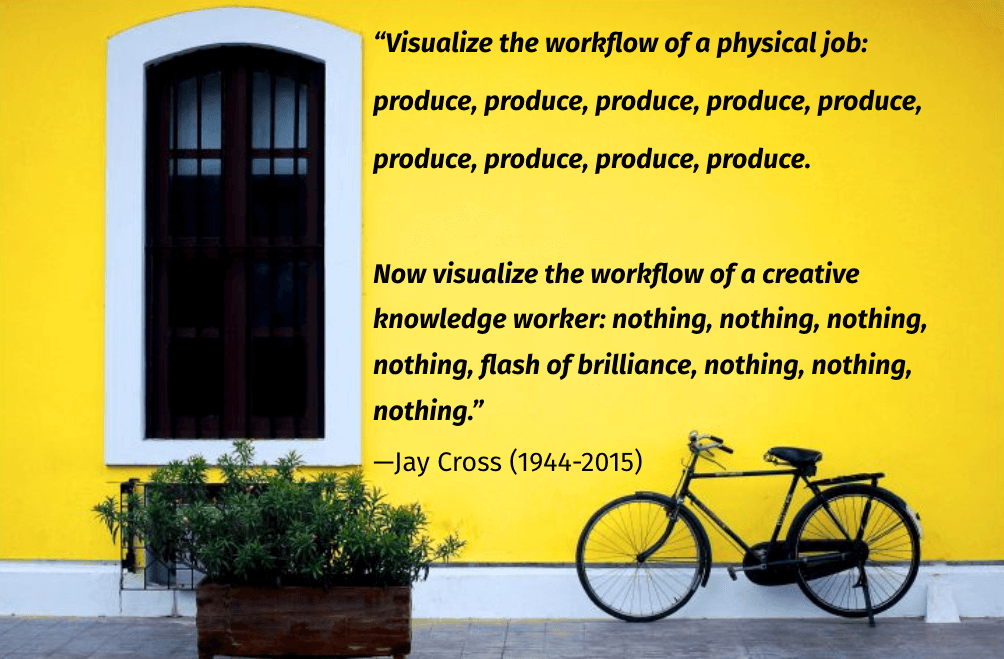
working smarter: An image of a window, a bicycle, and a plant box in front of a yellow wall. On the wall is a quote from Jay Cross: "Visualize the workflow of a physical job: produce, produce, produce, produce, produce, produce, produce, produce, produce. Now visualize the workflow of a creative knowledge worker: nothing, nothing, nothing, nothing, flash of brilliance, nothing, nothing, nothing."
2025-11-30

I added support for dark mode for the AI-assistant that I'm developing for Logseq.

#Logseq #PersonalknowledgeManagement #PKM #AI #ArtificialIntelligence

A dark-themed Logseq interface is open. On the left sidebar, the “Journals” page is selected. The main panel shows a journal entry dated “Nov 23rd, 2025” with bullet-point notes about commit counts, a GitHub repository link, and milestone progress on a task runner. On the right, a chat-like “History” panel displays a conversation where a user asks about commit totals and the repository URL, and the assistant responds with the numbers and the GitHub link.
2025-11-28

So for the Logseq AI plugin, just for fun, I added the ability to generate images.

#Logseq #personalknowledgeManagement #PKM #AI #ArtificialIntelligence

A screenshot of a note-taking app showing journal entries dated November 25th and 24th, 2025. The left sidebar lists sections like Journals, Whiteboards, Flashcards, and Graph view. The main panel displays bullet-point notes about a RAG system and indexing performance. On the right side, a chat panel shows an AI-generated response titled ‘Image of a cat in a park,’ along with a photo of a tabby cat sitting in grass with warm sunlight filtering through trees.
2025-11-28
2025-11-25

So I've been working on an AI assistant for Logseq, a note taking app. Think of this like a "Cursor for Logseq".

I'm quite happy as to where it's at right now, but I have a long way to go.

#ToolsForThought #Logseq #PersonalKnowledgeManagement #PKM

A screenshot of a note-taking app with a two-pane layout. On the left, there’s a sidebar showing sections such as Journals, Whiteboards, Flashcards, Graph view, and All pages. The main pane displays a journal entry dated Nov 23rd, 2025, containing bullet-point notes about commit counts, GitHub links, and progress on refactoring a task runner. On the right side of the screen, a chat interface shows a conversation where the user asks about the number of commits and the repository URL, and the assistant replies with information pulled from the notes.
2025-10-27

It's live! 🎉 My latest article, "Note-Taking vs. Personal Knowledge Management: Why Your Brain Will Thank You," is now published.

Dive into the fundamental differences between basic note-taking and a robust PKM system. Discover why adopting a PKM is crucial for your cognitive abilities, particularly as AI advances.

Read it here: ctnet.co.uk/note-taking-vs-per

#PersonalKnowledgeManagement #PKM #NoteTaking #KnowledgeWorker #LearningStrategy #AI #ProductivityTips #Zettelkasten

Adrian SegarASegar
2025-09-27

Here's a great introduction to working smarter: Harold Jarche's "Working Smarter with Personal Knowledge Mastery" free downloadable guide.

conferencesthatwork.com/index.

working smarter: An image of a window, a bicycle, and a plant box in front of a yellow wall. On the wall is a quote from Jay Cross: "Visualize the workflow of a physical job: produce, produce, produce, produce, produce, produce, produce, produce, produce. Now visualize the workflow of a creative knowledge worker: nothing, nothing, nothing, nothing, flash of brilliance, nothing, nothing, nothing."
2025-09-08

My new blog post is live! 'PKM for Beginners: Taming the Information Beast' is a practical guide to building your own Personal Knowledge Management system. Read it here: ctnet.co.uk/taming-the-informa #PKM #PersonalKnowledgeManagement #Productivity #Obsidian #BeginnersGuide

2025-09-07

Feeling overwhelmed by the constant stream of information? Tomorrow, I'm sharing a beginner-friendly guide to Personal Knowledge Management (PKM) and how it can help you regain control. #PKM #InformationOverload #Productivity #PersonalKnowledgeManagement

razzlom is always sadrazzlom@quietplace.xyz
2025-09-03

My dear personal knowledge base managers, how do you group/split your notes?

Let me explain.

1. We have a note "Python" and a link to "Python Tutorial" a note where we have everything about Python syntax (variable definition, functions, classes, if/else, for, etc.).

Or

2. We have a note "Python" and links to many other notes like "Python variables", "Python functions", "Python classes", "Python if/else", "Python for", etc.

Or maybe

3. We have a note "Python" and a link to "Python Tutorial" note that has links to many other notes like "Python variables", "Python functions", "Python classes", "Python if/else", "Python for", etc.

Now I'm thinking about how to make it comfortable to search/read it in the future.

#orgroam #logseq #obsidian #personalknowledgebase #personalknowledgemanagement

रञ्जित (Ranjit Mathew)rmathew
2025-06-30
Adrian SegarASegar
2025-06-18

Here's a great introduction to working smarter: Harold Jarche's "Working Smarter with Personal Knowledge Mastery" free downloadable guide.

conferencesthatwork.com/index.

working smarter: An image of a window, a bicycle, and a plant box in front of a yellow wall. On the wall is a quote from Jay Cross: "Visualize the workflow of a physical job: produce, produce, produce, produce, produce, produce, produce, produce, produce. Now visualize the workflow of a creative knowledge worker: nothing, nothing, nothing, nothing, flash of brilliance, nothing, nothing, nothing."
AI Gardenrogyapp
2025-06-13

I just published a How to use Remember guide — step-by-step walkthrough of the app.
It shows how to capture & label your memories, browse & search them, and keep everything private and on your device.

👉 rogy.app/remember-help

Save your memory for what matters.

Client Info

Server: https://mastodon.social
Version: 2025.07
Repository: https://github.com/cyevgeniy/lmst