#proxyjump

KipJayChou ⁂ :neocat_cofe:admin@mstdn.feddit.social
2026-02-04

找了个时间优化了服务器便利性和“安全性”

1. Termius访问
Termius生成三个密钥分配给三台服务器
export到~/.ssh/authorized_keys
检查authorized_keys内容正确
测试密钥&无密码登录

2. 配置ufw
sudo ufw default deny incoming
sudo ufw default allow outgoing
sudo ufw allow http
sudo ufw allow https
sudo ufw allow 特殊端口/tcp
sudo ufw enable
sudo ufw status verbose

3. 配置fail2ban
sudo nano /etc/fail2ban/jail.local
[DEFAULT]
bantime = 1h
findtime = 10m
maxretry = 5
banaction = ufw
ignoreip = 127.0.0.1/8 ::1 X Y Z
[sshd]
enabled = true
port = 特殊端口
backend = systemd

sudo apt update && sudo apt install python3-systemd -y
sudo systemctl enable --now fail2ban
sudo systemctl restart fail2ban
sudo fail2ban-client status sshd

3. 配置sshd_config
sudo nano /etc/ssh/sshd_config
Port 特殊端口
PermitRootLogin no
PubkeyAuthentication yes
PasswordAuthentication no

sudo sshd -t
sudo systemctl restart ssh

4. 更改hostname
sudo hostnamectl set-hostname xxx
sudo nano /etc/hosts
修改127.0.1.1 后主机名为xxx
hostnamectl status

5. 配置互通
ssh-keygen -t ed25519 -C "from_$(hostname)" -N "" -f ~/.ssh/id_ed25519
cat id_ed25519.pub
nano ~/.ssh/authorized_keys
一共三行,Termius pub、其他两台服务器的pub

6. 配置Alias
nano ~/.bashrc
alias nc='ssh -p 特殊端口 jay@ipX'
alias cc='ssh -p 特殊端口 jay@ipY'
alias hd='ssh -p 特殊端口 jay@ipZ'
source ~/.bashrc
nc (netcup)
cc (clawcloud)
hd (hostdzire)
或者
nano ~/.ssh/config
Host nc
HostName X
Port 特殊端口
User jay
Host cc
HostName Y
Port 特殊端口
User jay
Host hd
HostName Z
Port 特殊端口
User jay
ssh nc
ssh cc
ssh hd
还可以加上“ProxyJump cc”连 xxx 之前先跳到 cc

#ssh #sshd #pub #alias #ProxyJump #authorized_keys #termius #ufw #fail2ban
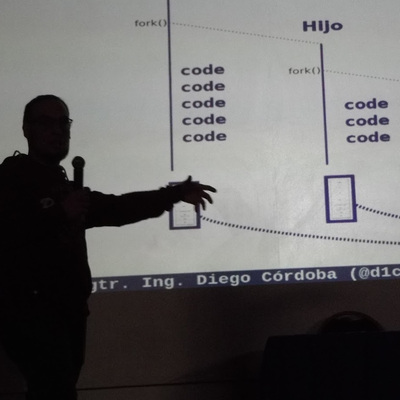
Diego Córdoba 🇦🇷d1cor@mstdn.io
2026-02-01

¿Sabías que podés acceder via SSH a tus servers privados sin exponerlos directamente a Internet? 🐧💻

Podrías tener toda una red de servidores privados y un sólo punto de acceso público en Internet, a modo de "salto hacia adentro".

Hoy te enseño a usar un Jump Server (Proxy Jump) en SSH.

Aprovechá el domingo para jugar un poco con tu terminal de comandos! 🚀

youtu.be/ep5kBThF9ic

#LinuxTips #SSH #JuncoTIC #AprenderLinux #SysAdmin #gnu #linux #devops #jumpserver #proxyjump

Diego Córdoba 🇦🇷d1cor@mstdn.io
2026-01-28

Ayer estuve grabando nuevas clases para JuncoTIC... y estuve jugando con #ssh y los #proxyjump's, y grabé un videito práctico explicando estas cositas... parece que se viene nuevo contenido en el canal de #youtube 😜

Sí, y en los cursos de SSH y de Hardening Linux (próximamente) [*]

Todavía no nos están siguiendo por ahí? 🔔

youtube.com/juncotic?sub_confi

[*] Nuestros cursos:

🎓 juncotic.com/cursos/

#gnu #linux #video #clase #curso #juncotic #hardening

Captura de pantalla de video clase
2025-11-09
As a old chap i'm used to ssh'ing with **ProxyAgent** , but clearly this is really something to avoid if you can't trust remote host users.

Whenever possible use **ProxyJump** that is implemented since 2016.

The best tutorial i found about that is :

https://smallstep.com/blog/ssh-agent-explained/

it worth reading

#ssh #proxAgent #proxyJump

Does anyone know an #SSH client for #Android that can #ProxyJump?

So far I only know Terminus but they want a subscription :rm_disappointed:

2023-01-27

SSH mit Jump-Host nutzen

Durch die Nutzung eines Jump-Hosts kann eine SSH-Verbindung in Servernetzwerke zusätzlich abgesichert werden.

#SSH #ProxyJump #Linux

gnulinux.ch/ssh-mit-jump-host-

2020-10-13
I did a technical write-up on my recent experiences with SSH-CA and ProxyJump, combining them with Yubikey or Nitrokey (including the CA).

https://secdiary.com/2020-10-13-ssh-ca-proxyjump.html

#architecture #ssh #sshca #proxyjump #smartcards #nitrokey #yubikey #technical

Client Info

Server: https://mastodon.social
Version: 2025.07
Repository: https://github.com/cyevgeniy/lmst