#flip6

Samsung releases the January 2026 security patch for the Galaxy Z Fold/Flip6 series

January 2026 is here, and Samsung have focused on releasing the January 2026 security patch for the majority of Galaxy users worldwide. As per their rollout schedule for security updates, Samsung have released the January 2026 security patch to the Galaxy Z Fold6 and Flip6 users, as well as the Korea-exclusive Special Edition, starting from the Korean version.

The following firmware information is found:

To update your Galaxy to this security update, follow these steps:

  1. Open Settings, and navigate to System Update
  2. Tap on Check for Updates
  3. Press Download and Install
  4. Wait until the download and the installation is complete, then press Reboot Now
  5. Wait until the phone reboots successfully

Make sure that you’re connected to a stable and fast Wi-Fi network to avoid high mobile data fees. Never interrupt the update in any way, or problems could occur later. Make sure that you apply all available updates once you update your phone for maximum stability. An update might take 5 to 10 minutes to apply, depending on the device and the type of the update being applied.

If you’re seeing “Your software is up to date,” this means that the update hasn’t reached your device yet. Keep checking for updates, as Samsung rolls it out gradually to all devices from country to country, usually starting from Korea.

#Android #Android16 #AndroidB #AndroidBaklava #Flip6 #Fold6 #GalaxyZFlip6 #GalaxyZFold6 #news #oneUi #Samsung #SamsungGalaxyZFlip6 #SamsungGalaxyZFold6 #smartphone #Tech #Technology #update #ZFlip6 #ZFold6

Samsung Galaxy Z Fold Special Edition for Korea gets the One UI 8 update again!

We are excited to announce that starting from today, users can now download the One UI 8 update to their Galaxy Z Fold Special Edition for Korea foldables again as Samsung has finally released this exciting version of One UI. The rollout was paused for the CYI7 version due to issues surrounding the touchpad interface, which is a serious issue that forced Samsung to pause the rollout. Your Galaxy has now become more powerful as One UI 8 brings more powerful features.

The firmware information states:

  • Galaxy Fold Special Edition for Korea: CYI9 [KOO]

To obtain the update, perform the following steps:

  1. Open the Settings app
  2. Navigate to Software Updates
  3. Tap on Download and Install
  4. Wait until you see One UI 8 at the top of the page, then tap on Download
  5. Wait for the download to complete, then tap on Install

After you perform the above steps, your phone will be running One UI 8 based on Android 16, and you can enjoy its new features and with many improvements on place. This makes sure that your experience gets improved.

If you still didn’t get the update for your device, wait for a few days or a few weeks, then check for updates again. If you still see “Your software is up to date,” this means that the update didn’t reach your region yet.

Note that the update process may take 15 to 20 minutes, and this can vary from device to device. The download process may incur extra charges if you’re using the cellular network as the update size is around 5 GB, depending on the device, so we recommend downloading it through Wi-Fi. Never interrupt the update process in any way, or problems may occur. Make sure that your phone gets charged before you initiate the installation process.

#Android #Android16 #AndroidB #AndroidBaklava #Flip6 #Fold6 #GalaxyZFlip6 #GalaxyZFold6 #news #oneUi #OneUI8 #OneUI80 #Samsung #SamsungGalaxyZFlip6 #SamsungGalaxyZFold6 #smartphone #Tech #Technology #ZFlip6 #ZFold6

Samsung Galaxy Z Fold/Flip 6 gets the One UI 8 update globally!

We are excited to announce that starting from today, users can now download the One UI 8 update to their Galaxy Z Fold6 and Flip6 foldables globally as Samsung has finally released this exciting version of One UI. Your Galaxy has now become more powerful as One UI 8 brings more powerful features.

The firmware information states:

  • Galaxy Fold6: CYI7
  • Galaxy Flip6: CYI6

To obtain the update, perform the following steps:

  1. Open the Settings app
  2. Navigate to Software Updates
  3. Tap on Download and Install
  4. Wait until you see One UI 8 at the top of the page, then tap on Download
  5. Wait for the download to complete, then tap on Install

After you perform the above steps, your phone will be running One UI 8 based on Android 16, and you can enjoy its new features and with many improvements on place. This makes sure that your experience gets improved.

If you still didn’t get the update for your device, wait for a few days or a few weeks, then check for updates again. If you still see “Your software is up to date,” this means that the update didn’t reach your region yet.

Note that the update process may take 15 to 20 minutes, and this can vary from device to device. The download process may incur extra charges if you’re using the cellular network as the update size is around 5 GB, depending on the device, so we recommend downloading it through Wi-Fi. Never interrupt the update process in any way, or problems may occur. Make sure that your phone gets charged before you initiate the installation process.

#Android #Android16 #AndroidB #AndroidBaklava #Flip6 #Fold6 #GalaxyZFlip6 #GalaxyZFold6 #news #oneUi #OneUI8 #OneUI80 #Samsung #SamsungGalaxyZFlip6 #SamsungGalaxyZFold6 #smartphone #Tech #Technology #ZFlip6 #ZFold6
Samsung Galaxy Z Fold/Flip 6 gets the One UI 8 update!

We are excited to announce that starting from today, users can now download the One UI 8 update to their Galaxy Z Fold6 and Flip6 foldables as Samsung has finally released this exciting version of One UI. Your Galaxy has now become more powerful as One UI 8 brings more powerful features.

The firmware information states:

  • Galaxy Fold6: CYI7 [KOO]
  • Galaxy Flip6: CYI6 [KOO]

To obtain the update, perform the following steps:

  1. Open the Settings app
  2. Navigate to Software Updates
  3. Tap on Download and Install
  4. Wait until you see One UI 8 at the top of the page, then tap on Download
  5. Wait for the download to complete, then tap on Install

After you perform the above steps, your phone will be running One UI 8 based on Android 16, and you can enjoy its new features and with many improvements on place. This makes sure that your experience gets improved.

If you still didn’t get the update for your device, wait for a few days or a few weeks, then check for updates again. If you still see “Your software is up to date,” this means that the update didn’t reach your region yet.

Note that the update process may take 15 to 20 minutes, and this can vary from device to device. The download process may incur extra charges if you’re using the cellular network as the update size is around 5 GB, depending on the device, so we recommend downloading it through Wi-Fi. Never interrupt the update process in any way, or problems may occur. Make sure that your phone gets charged before you initiate the installation process.

#Android #Android16 #AndroidB #AndroidBaklava #Flip6 #Fold6 #GalaxyZFlip6 #GalaxyZFold6 #news #oneUi #OneUI8 #OneUI80 #Samsung #SamsungGalaxyZFlip6 #SamsungGalaxyZFold6 #smartphone #Tech #Technology #ZFlip6 #ZFold6

Samsung Galaxy Z Fold Special Edition for Korea gets the One UI 8 update!

We are excited to announce that starting from today, users can now download the One UI 8 update to their Galaxy Z Fold Special Edition for Korea foldables as Samsung has finally released this exciting version of One UI. Your Galaxy has now become more powerful as One UI 8 brings more powerful features.

The firmware information states:

  • Galaxy Fold Special Edition for Korea: CYI7 [KOO]

To obtain the update, perform the following steps:

  1. Open the Settings app
  2. Navigate to Software Updates
  3. Tap on Download and Install
  4. Wait until you see One UI 8 at the top of the page, then tap on Download
  5. Wait for the download to complete, then tap on Install

After you perform the above steps, your phone will be running One UI 8 based on Android 16, and you can enjoy its new features and with many improvements on place. This makes sure that your experience gets improved.

If you still didn’t get the update for your device, wait for a few days or a few weeks, then check for updates again. If you still see “Your software is up to date,” this means that the update didn’t reach your region yet.

Note that the update process may take 15 to 20 minutes, and this can vary from device to device. The download process may incur extra charges if you’re using the cellular network as the update size is around 5 GB, depending on the device, so we recommend downloading it through Wi-Fi. Never interrupt the update process in any way, or problems may occur. Make sure that your phone gets charged before you initiate the installation process.

#Android #Android16 #AndroidB #AndroidBaklava #Flip6 #Fold6 #GalaxyZFlip6 #GalaxyZFold6 #news #oneUi #OneUI8 #OneUI80 #Samsung #SamsungGalaxyZFlip6 #SamsungGalaxyZFold6 #smartphone #Tech #Technology #ZFlip6 #ZFold6

Samsung shuts down the One UI 8 Beta program for Korea [Galaxy Z6]

We are excited to announce that starting from today, One UI 8 Beta users in Korea can now download the One UI 8 update to their Galaxy Z Fold6 and Flip6 foldables as Samsung has finally released this version of One UI. Your Galaxy has now become more powerful as One UI 8 brings more powerful features.

The firmware information states:

  • Galaxy Z Fold6: CYI7
  • Galaxy Z Flip6: CYI6

To obtain the update, perform the following steps:

  1. Open the Settings app
  2. Navigate to Software Updates
  3. Tap on Download and Install
  4. Wait until you see One UI 8 at the top of the page, then tap on Download
  5. Wait for the download to complete, then tap on Install

After you perform the above steps, your phone will be running One UI 8 based on Android 16, and you can enjoy its new features and with many improvements on place. This makes sure that your experience gets improved.

If you still didn’t get the update for your device, wait for a few days or a few weeks, then check for updates again. If you still see “Your software is up to date,” this means that the update didn’t reach your region yet.

Note that the update process may take 15 to 20 minutes, and this can vary from device to device. The download process may incur extra charges if you’re using the cellular network as the update size is around 5 GB, depending on the device, so we recommend downloading it through Wi-Fi. Never interrupt the update process in any way, or problems may occur. Make sure that your phone gets charged before you initiate the installation process.

#Android #Android16 #AndroidB #AndroidBaklava #Flip6 #Fold6 #GalaxyZFlip6 #GalaxyZFold6 #news #oneUi #OneUI8 #OneUI80 #Samsung #SamsungGalaxyZFlip6 #SamsungGalaxyZFold6 #smartphone #Tech #Technology #ZFlip6 #ZFold6

2025-06-07

gulfchannels.com/192253/ بعد الـS25 Ultra.. قريبًا هواتف سامسونج Fold6 و Flip6 تحمل شعار “صنع في مصر” #EG #Egypt #Flip6 #Fold6 #news #سامسونج #كومراضي #مصر

بعد الـS25 Ultra.. قريبًا هواتف سامسونج Fold6 و Flip6 تحمل شعار “صنع في مصر”

Samsung Galaxy Z Flip6 gets the One UI 7 update again!

When Samsung paused the One UI 7 rollout for the 2024 flagships, we thought that it would take a week to shake out serious bugs that were discovered in the initial One UI 7 stable build.

We are excited to announce that starting from today, users can now download the One UI 7 update to their Galaxy Z Flip6 foldables again as Samsung has finally released this exciting version of One UI. Your Galaxy has now become more powerful, amazing, and gorgeous as One UI 7 brings more powerful features and a redesigned appearance consisting of a simple, impactful, and emotive design.

If you already have One UI 7 (BYCJ), you’ll receive a very small hotfix update.

The firmware information states:

  • Galaxy Z Flip6: BYD9

You can see the overview of what One UI 7 brings in the above linked article at the bottom section. Meanwhile, you can see a two-minute video trailer for One UI 7 highlighting its biggest features here.

https://youtu.be/P4AEIu3V6F4

To obtain the update, perform the following steps:

  1. Open the Settings app
  2. Navigate to Software Updates
  3. Tap on Download and Install
  4. Wait until you see One UI 7 at the top of the page, then tap on Download
  5. Wait for the download to complete, then tap on Install

After you perform the above steps, your foldable will be running One UI 7 based on Android 15, and you can enjoy its new features and with many improvements on place. This makes sure that your experience gets improved.

If you still didn’t get the update for your device, wait for a few days or a few weeks, then check for updates again. If you still see “Your software is up to date,” this means that the update didn’t reach your region yet.

Note that the update process may take 15 to 20 minutes, and this can vary from device to device. The download process may incur extra charges if you’re using the cellular network as the update size is around 5 GB, depending on the device, so we recommend downloading it through Wi-Fi. Never interrupt the update process in any way, or problems may occur. Make sure that your foldable gets charged before you initiate the installation process.

#Android #Android15 #AndroidV #Flip6 #GalaxyFlip #GalaxyZFlip6 #news #oneUi #OneUI7 #OneUI70 #Samsung #SamsungGalaxyZFlip6 #smartphone #Tech #Technology #update #ZFlip6

TechArena.sksktecharena
2025-04-10

Samsung spustil aktualizáciu One UI 7 pre staršie smartfóny. V prvej vlne pre líniu S24, Fold6 a Flip6. Mení s dizajn a pribúdajú nové funkcie.

techarena.sk/2025/04/10/samsun

Samsung Galaxy Z Flip6 gets the One UI 7 update!

The whole One UI 7 update has been taken down as Samsung fixes a serious bug found in the old stable build.

Earlier, Samsung posted an announcement stating the One UI 7 would be released on April 7th, 10th, and 14th for the latest flagships, with the coming days seeing the release of One UI 7 for older flagships. Then, there is a video posted on YouTube showcasing the new features of One UI 7 as we approach the rollout time.

We are excited to announce that starting from today, users can now download the One UI 7 update to their Galaxy Z Flip6 foldables as Samsung has finally released this exciting version of One UI. Your Galaxy has now become more powerful, amazing, and gorgeous as One UI 7 brings more powerful features and a redesigned appearance consisting of a simple, impactful, and emotive design.

The firmware information states:

  • Galaxy Z Flip6: BYCJ

You can see the overview of what One UI 7 brings in the above linked article at the bottom section. Meanwhile, you can see a two-minute video trailer for One UI 7 highlighting its biggest features here.

https://youtu.be/P4AEIu3V6F4

To obtain the update, perform the following steps:

  1. Open the Settings app
  2. Navigate to Software Updates
  3. Tap on Download and Install
  4. Wait until you see One UI 7 at the top of the page, then tap on Download
  5. Wait for the download to complete, then tap on Install

After you perform the above steps, your foldable will be running One UI 7 based on Android 15, and you can enjoy its new features and with many improvements on place. This makes sure that your experience gets improved.

If you still didn’t get the update for your device, wait for a few days or a few weeks, then check for updates again. If you still see “Your software is up to date,” this means that the update didn’t reach your region yet.

Note that the update process may take 15 to 20 minutes, and this can vary from device to device. The download process may incur extra charges if you’re using the cellular network as the update size is around 5 GB, depending on the device, so we recommend downloading it through Wi-Fi. Never interrupt the update process in any way, or problems may occur. Make sure that your foldable gets charged before you initiate the installation process.

#Android #Android15 #AndroidV #Flip6 #GalaxyFlip #GalaxyZFlip6 #news #oneUi #OneUI7 #OneUI70 #Samsung #SamsungGalaxyZFlip6 #smartphone #Tech #Technology #update #ZFlip6

Samsung Galaxy Z Flip6 gets the One UI 7 update for Beta users!

Earlier, Samsung posted an announcement stating the One UI 7 would be released on April 7th, 10th, and 14th for the latest flagships, with the coming days seeing the release of One UI 7 for older flagships. Then, there is a video posted on YouTube showcasing the new features of One UI 7 as we approach the rollout time.

We are excited to announce that starting from today, One UI 7 Beta users can now download the One UI 7 update to their Galaxy Z Flip6 foldables as Samsung has finally released this exciting version of One UI. Your Galaxy has now become more powerful, amazing, and gorgeous as One UI 7 brings more powerful features and a redesigned appearance consisting of a simple, impactful, and emotive design.

The firmware information states:

  • Galaxy Z Flip6: BYCJ

You can see the overview of what One UI 7 brings in the above linked article at the bottom section. Meanwhile, you can see a two-minute video trailer for One UI 7 highlighting its biggest features here.

https://youtu.be/P4AEIu3V6F4

To obtain the update, perform the following steps:

  1. Open the Settings app
  2. Navigate to Software Updates
  3. Tap on Download and Install
  4. Wait until you see One UI 7 at the top of the page, then tap on Download
  5. Wait for the download to complete, then tap on Install

After you perform the above steps, your foldable will be running One UI 7 based on Android 15, and you can enjoy its new features and with many improvements on place. This makes sure that your experience gets improved.

If you still didn’t get the update for your device, wait for a few days or a few weeks, then check for updates again. If you still see “Your software is up to date,” this means that the update didn’t reach your region yet.

Note that the update process may take 15 to 20 minutes, and this can vary from device to device. The download process may incur extra charges if you’re using the cellular network as the update size is around 5 GB, depending on the device, so we recommend downloading it through Wi-Fi. Never interrupt the update process in any way, or problems may occur. Make sure that your foldable gets charged before you initiate the installation process.

#Android #Android15 #AndroidV #Flip6 #GalaxyFlip #GalaxyZFlip6 #news #oneUi #OneUI7 #OneUI70 #Samsung #SamsungGalaxyZFlip6 #smartphone #Tech #Technology #update #ZFlip6

2025-01-30

No nyt on yritetty summata Samsung Galaxy Z Flip6 ja Motorola Razr 50 Ultra puhelinten erot ja yhteneiväisyydet. Saa katsoa tai olla katsomatta.

youtu.be/e9-vnvryvz4

#Samsung #Motorola #Flip6 #Razr50Ultra #Android

2025-01-30

Vielä viimeiset vertailutestikuvat lonkeronharmaassa kelissä ja sit koostamaan vertailuvideo valmiiksi. Motorola Razr 50 Ultra vs Samsung Galaxy Z Flip 6

#Android #Motorola #Samsung #razr50ultra #Flip6

Kädessä kaksi taittuvanäyttöistä älypuhelinta joiden näytöissä kellonaika 13.23 näkyvissä.
2024-11-22

Latest Z Flip6 and Fold6 One UI 7.0 builds:

F741NKSU2BXKN/F741NOKR2BXKN/F741NKSU2BXKN
F956NKSU2BXKN/F956NOKR2BXKN/F956NKSU2BXKN

There is no Z build yet, unlike the S24 series.

Alan Wright 🇬🇧 🇮🇲LordFlashheart@c.im
2024-08-01
TechArena.sksktecharena
2024-07-28

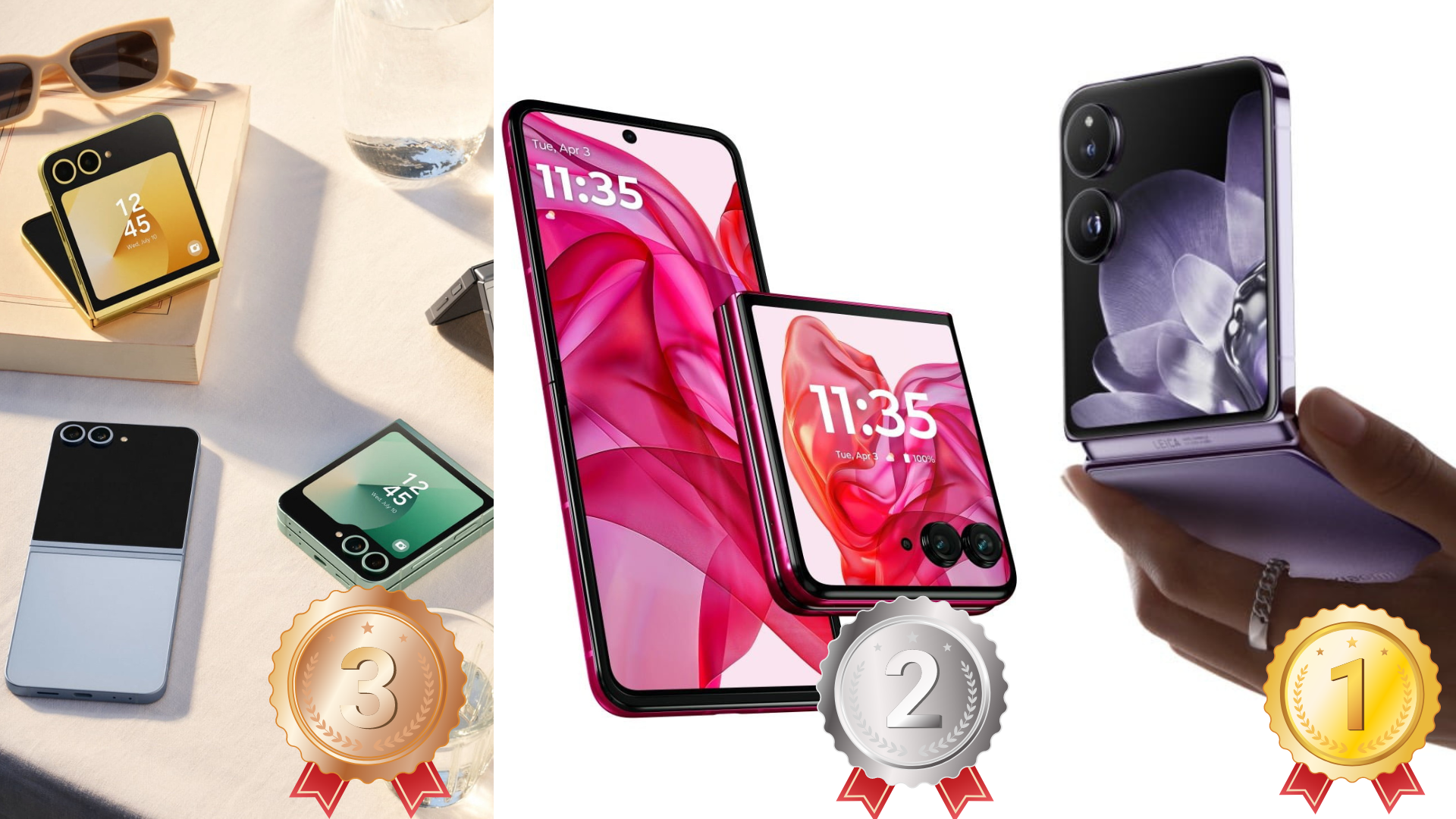
📱Porovnali sme véčkové skladacie smartfóny Samsung Galaxy Z Flip 6, Motorolu Razr 50 Ultra a Xiaomi Mix Flip. Ktorý má najlepšie hardwarové parametre a ktorý naopak skončil tretí? 📱

techarena.sk/2024/07/28/porovn

MereCivilianmcn@social.lol
2024-07-27

#Samsung has released an #Olympic Edition phone every year since 1998 and the 2024 edition is beautiful.

Whats even more cool is that every #olympic athlete will receive their very own #flip6 from Samsung for free.

Tazinian Dos FinianTazinianDosFinian
2024-07-19

@jake4480 Only just got on this social platform so this is a highly delayed response, but came on here just to give my experience only 6 months into using the Flip 5. I highly do not recommend it. The fold area gets cracked easily.

Client Info

Server: https://mastodon.social
Version: 2025.07
Repository: https://github.com/cyevgeniy/lmst