#Fritzing

2026-01-28

Ich verzweifle gerade beim Erstellen eines neuen Bauteils in #Fritzing 😖: Relais in Inkscape mit korrekten Massen (2.54mm Raster) gezeichet, gemäss step-by-step Anleitung [heise.de/ratgeber/Neue-Bauteil] hinzugefügt und eingepflegt.

Nur: Das Bauteil erscheint in Fritzing grösser als ichs gezeichnet habe, but why 🤷🏻‍♂️. Das Raster ist in beiden Programmen 2.54mm (0.1in).

Auf seiner Seite [fritzing.org/fritzings-graphic] schreibt Fritzing "If your part fits on the breadboard, the distance between the footprints should be 100mils (~2.5mm) long." Aber auch mit exakt 2.5mm passts nicht aufs Stripboard.

Kennt jemand dieses Verhalten bereits und hat einen Ansatz oder meinetwegen einen Umrechnungsfaktor zur Behebung?

#fritzinglab #diy #electronic #arduino #cad #prototyping

Screenshot aus Inkscape. Zeigt ein beiges Rechteck mit Markierungen und 10 kleinen Quadraten innerhalb, welche die Pins symbolisieren. Der Abstand zwischen den Pins wird vom Messwerkzeug mit 2.54mm angezeigt.Screenshot aus Fritzing. Zeigt je ein Relais auf dem Hintergrundraster und auf dem Stripboard. Nebenan ist ein kleines Fenster geöffnet, welches das Rastermass 2.54mm anzeigt.

Ich hab meine erste Platine mit #fritzing designt, die ich wirklich plane zu verwenden, und bei @aislerhq in Auftrag gegeben.
Bin sehr gespannt, ob nicht irgendwas darauf in Rauch aufgeht, wenn ich sie bestücke.
Nein, ich zeige euch das Layout nicht, weil sie ist überhaupt nicht hübsch geworden, erst mal nur ein Prototyp. 😅
Ich habs leider auch nicht hinbekommen den Platzhalter für das Aisler Logo für den Rabatt einzufügen in fritzing. 🙈

edit: Gelöst.
Kann ich auf #ubuntu meine #Fritzing installation updaten, ohne für jede neue Version wieder 8€ zahlen zu müssen? Ich zahle ja gerne für gute Software, aber ich nutze die soo selten, da finde ich das etwas unfair. (Hab auch schon zwei mal dafür bezahlt)

Lösung:
Ich hab die Kaufbestätigungsmail von damals gefunden. Der Downloadlink darin führt einen zur aktuellen Version. 😊

Hey, #Inkscape and/or #Fritzing gurus. A documented use of Inkscape is to create a custom outline for a printed circuit board that can then be imported into Fritzing: instructables.com/How-to-Make-

This requires manually creating a file with two sublayers with specific settings, which is tedious and error-prone if you aren't a frequent flyer with Inkscape. How hard would it be to script something to do this automatically - take one SVG with the outline, and output one with the right layers?

Presenting: the double-double and the long-double, two small PCBs intended to break out a two-by-something row of pins to either side of a breadboard. (They are also great for precise soldering practice - just ignore the fact I did one of them upside down.)

There's probably better ways to solve this, but this is mine.

I'm getting close to publishing my portfolio site and these will be on there as files you can download and send off to be made.

#PCB #PCBDesign #Fritzing #electronics

A photo of two small circuit boards. They are long double rows of electrical pins. One is labeled "long double" and the other "double double".A photo of the two circuit boards plugged into a breadboard. They are intended to have a cable or device plugged into the top, and then have the individual pins from that cable broken out into the rows on a breadboard.

Quick note on how I design these #NES controller breakout PCBs. I've not made a "footprint" that is natively understood by #Fritzing or other software as a part, what I'm doing is exporting the vector drawings from my 3D model to SVG (for other users of old versions of #Rhino3D, you will want to install SaveAsSVG: food4rhino.com/en/app/save-sca), adding that as an image within Fritzing, and carefully aligning headers and other holes to that image.

A screenshot from 3D modelling program Rhino 3D, where the model of a Nintendo controller socket is shown on screen. Next to that model is a box with a flattened view of the socket, showing just the outline and where the pins go. Accompanying it is the text "19mm pitch", indicating that there is a 19mm distance from the centre of one socket to the centre of the next, for alignment purposes.A screenshot from circuit board design program Fritzing, showing the dual socket design from the first image on this post imported and placed next to a circuit board.
Boorboor
2025-06-20

@rotopenguin true! 🤣 I did just double-check and it’s an old Acer c720 with *2GB* RAM, I mis-remembered.

I wouldn’t recommend more than a couple tabs, but it is still quite serviceable. I can even run Google apps in browser for light productivity. (Not my preference but our local Cub Scout pack uses Google for all our docs.)

Otherwise it’s still great for kids apps like the Tux series and tinkering stuff like IDE, etc.

Fully Automated! Solarpunk RPGFullyAutomatedRPG@mstdn.games
2025-05-23

Joking aside, #Wireshark is a #FOSS packet sniffing program that will let you monitor traffic on your computer's ethernet or serial ports to directly view the bytes being sent and received!

#Fritzing is a graphical tool for designing pretty schematics for documenting and teaching hardware design & hacking.

I love both very much. 💖

Fully Automated! Solarpunk RPGFullyAutomatedRPG@mstdn.games
2025-05-23

I just discovered #Wireshark and I haven't been this excited since I learned about #Fritzing 🔥 💖 🤯

#hacking #tootsthatmakeverylittlesensetoanyone

Not a lot of free project time the last week or so, but the simple-as-anything breakout I made for my nanoDLA logic analysers arrived. It's just a board that lets you plug a nanoDLA directly into a standard breadboard and access all ten of its channels at once, without having jumper wires untidily trailing to it off the board.

Oh, and that 3D printed NES socket works flawlessly. Next week I'll make a dual socket version to talk to the Four Score properly.

#Arduino #Fritzing #Electronics

A photo of a few hobby electronics components plugged into a breadboard. There's an Arduino microcontroller plugged into USB with a lot of coloured jumper wires trailing off it - those wires go to both a 3D printed Nintendo controller socket board, and another board with a small logic analyser plugged into it. The LA is standing vertically up off the board and has a USB cable plugged into the top of it.A screenshot from circuit board design program Fritzing, showing the logic analyser's board. It's a very simple rectangle with a bank of ten pins down the middle, and two sets of five pins running down the left and right sides. The pins are labeled channel 0 to channel 7, with two ground pins. Extra text on the board reads "nanoDLA breakout" and "@timixretroplays".
2025-04-09

Создаём эмулятор легендарной игры «Ну, Погоди» на базе Raspberry Pi Pico

Многие из тех, кому сейчас за 30, и рождённых в СССР или на постсоветском пространстве, помнят электронную игру «Ну, погоди!». Во времена, когда не было ни интернета, ни ноутбуков, ни мобильных телефонов, а из общедоступных электронных развлечений были только аттракционы в парках культуры и видеосалоны, обладание бытовым компьютером, электронными наручными часами Montana или электронной игрой «Ну, погоди!» было мечтой многих детей. Были ещё и другие электронные игры, но именно «Ну, погоди!» считается классикой. Игре посвящено много ностальгических статей и видео. На различных торговых площадках можно купить её в различном состоянии от убитого до «с хранения» и даже новодел. Лет 10 назад и я купил её в идеальном состоянии, поигрался, вспомнил детство и положил в ящик. Но несколько месяцев назад с разочарованием увидел, что «потекла» нижняя часть экрана. Можно было или отремонтировать, или купить другой экземпляр игры, но я сначала попробовал узнать, как её отремонтировать, а потом решил воссоздать игру на современных компонентах. Я не был одинок в своём желании воссоздать игру, этой теме посвящено также немало статей, но в них обычно создавали симуляторы, а не эмуляторы игры. Симулятор у меня ассоциируется с фразой: «Я художник, я так вижу», эмулятор — это более точное воспроизведение устройства. Формат статьи не позволяет выразить все те ощущения, которые я испытал при путешествии от зарождения идеи до реально работающей игры, практически ничем не отличающейся от оригинала. Много из того, что я узнал в этом путешествии, не поместилось в статью или поместилось в очень сжатом виде. Эмулятор максимально приближен к оригиналу, если не считать экран (он не сегментный, как в оригинале) и корпус (я пока реализовал на беспаечной макетной плате). Если вам интересно, как за несколько вечеров воссоздать у себя эмулятор «Ну, погоди!» на современном микроконтроллере или просто поностальгировать, добро пожаловать под кат.

habr.com/ru/companies/ruvds/ar

#ruvds_статьи #raspberry_pi_pico #pio #dma #эмулятор #ну_погоди #fritzing
2025-04-09

Создаём эмулятор легендарной игры «Ну, Погоди» на базе Raspberry Pi Pico

Многие из тех, кому сейчас за 30, и рождённых в СССР или на постсоветском пространстве, помнят электронную игру «Ну, погоди!». Во времена, когда не было ни интернета, ни ноутбуков, ни мобильных телефонов, а из общедоступных электронных развлечений были только аттракционы в парках культуры и видеосалоны, обладание бытовым компьютером, электронными наручными часами Montana или электронной игрой «Ну, погоди!» было мечтой многих детей. Были ещё и другие электронные игры, но именно «Ну, погоди!» считается классикой. Игре посвящено много ностальгических статей и видео. На различных торговых площадках можно купить её в различном состоянии от убитого до «с хранения» и даже новодел. Лет 10 назад и я купил её в идеальном состоянии, поигрался, вспомнил детство и положил в ящик. Но несколько месяцев назад с разочарованием увидел, что «потекла» нижняя часть экрана. Можно было или отремонтировать, или купить другой экземпляр игры, но я сначала попробовал узнать, как её отремонтировать, а потом решил воссоздать игру на современных компонентах. Я не был одинок в своём желании воссоздать игру, этой теме посвящено также немало статей, но в них обычно создавали симуляторы, а не эмуляторы игры. Симулятор у меня ассоциируется с фразой: «Я художник, я так вижу», эмулятор — это более точное воспроизведение устройства. Формат статьи не позволяет выразить все те ощущения, которые я испытал при путешествии от зарождения идеи до реально работающей игры, практически ничем не отличающейся от оригинала. Много из того, что я узнал в этом путешествии, не поместилось в статью или поместилось в очень сжатом виде. Эмулятор максимально приближен к оригиналу, если не считать экран (он не сегментный, как в оригинале) и корпус (я пока реализовал на беспаечной макетной плате). Если вам интересно, как за несколько вечеров воссоздать у себя эмулятор «Ну, погоди!» на современном микроконтроллере или просто поностальгировать, добро пожаловать под кат.

habr.com/ru/companies/ruvds/ar

#ruvds_статьи #raspberry_pi_pico #pio #dma #эмулятор #ну_погоди #fritzing

#Fritzing has never felt *completely* comfortable to me - it somehow feels both overcomplicated and underpowered for making simple boards like this - but it remains the only PCB design tool I've ever been able to open and just make a thing in without poring over documentation about vias and footprints. You drag and drop stuff, you fettle with the exact positions of things by slightly changing numbers, and you can export everything to a file PCB makers understand - and that works for me.

A screenshot of circuit board design program Fritzing, showing a small board intended to take a microcontroller and a Nintendo controller socket. Text along the sides reads "@timixretroplays" and "NES padapter v0.1".

I see #Fritzing still runs slow as a wet week once you get a few components in PCB view - it goes from being super snappy to only highlighting what part is under your cursor a few times a second, making it feel super laggy when adding wires or new bits and bobs. These aren't four-layer motherboards or anything that complex either - just breakout boards and little adapter's for stuff.

Lowering the grid resolution and turning the visual grid off helps, but CPU still shoots up just mousing around.

צבי הנינג'ה عزيز النينجاzvinj@tooot.im
2025-02-03

Switched from 4*CR2023 batteries to 4*AA ones (also in the #fritzing schematics in the repo because #OCD). Now it's more robust and less tricky to switch. I also glue-gunned a rogue ear.
#crafts

A switched 4*AA battery holder inside the pillow. It's fastened to the felt below the circuits with a recycled underpants rubberThe pillow, covered with a punch-needle image of Asy the asymmetric cat. One of the ears is a bit detached from the pillow and bends outwards. We see a glue gun between the pillow and us
Adam Wilbertawilbert
2025-01-03

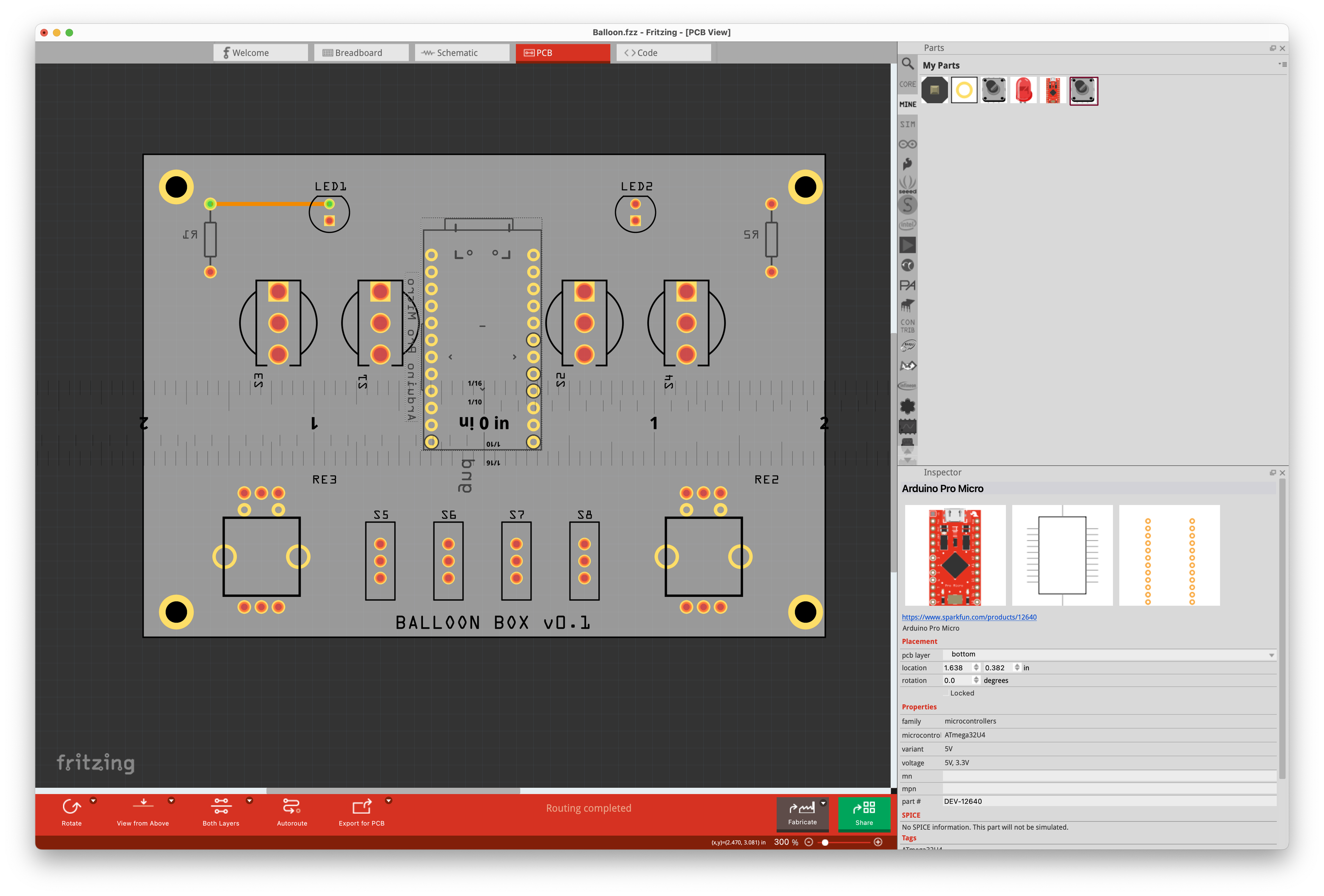
My little electronics projects have always been a tangle of wires, soldered and stuffed into boxes. One of my 2025 goals is to learn how to design and manufacture a few custom electronic PCBs. I'm spending a lot of time in the Fritzing docs and forums. Starting simple, here's a rough component layout draft for my ballooning button box for Flight Sim,

A circuit board layout diagram in the Fritzing design software. Spaces for components such as switches, LEDs, and resistors are arranged on a gray rectangle.
Stewart Russellscruss@xoxo.zone
2024-11-06

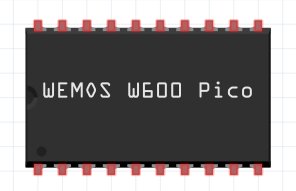
When you absolutely cannot be arsed with the Fritzing parts editor but near enough is good enough

... hey, it's got the right number of pins and is *almost* the right width ...

#electronics #fritzing

A top down diagram of a 20 pin silicon chip. It has a text label WEMOS W600 Pico, which refers to a micro-controller board of the same name which also happens to have 20 pins but looks nothing like this. Fritzing (an electronics layout toy) has a truly terrible parts creation process

Dieses Mal dokumentiere ich aber auch die Verdrahtung. Code und alles andere hatte ich tatsächlich noch, nur hier musste ich mich nochmal neu reindenken. #fritzing

Screenshot: Verdrahtung von Komponenten auf einem Breadboard in der Software Fritzing.Screenshot: Verdrahtung von Komponenten auf einem Breadboard und Platine in der Software Fritzing.

Added a 9-pin header right across the middle with pin labels. The socket mount points in these default DB-9 #Fritzing footprints aren't normally points I can attach wires to, but plonking a via in the middle of each and running a wire between those seems to produce the desired result (top right) - both in OSHPark's and JLCPCB's previews.

I know there's folks looking at this and cringing hard, but I'm not aiming for best practices here, just something that works okay for my purposes.

Screenshot from circuit board design app Fritzing, showing a strange floating connecting wire between two circles in the top right.A screenshot from OSHPark's circuit board preview program, showing the wire connecting the two circles in the top right.
2024-05-21

Reviewing the docs of the software. Pretty dope. Able to work with different parts virtually. Made a simple sketch with an Arduino board.

Client Info

Server: https://mastodon.social
Version: 2025.07
Repository: https://github.com/cyevgeniy/lmst