#博客更新! MacOS折腾日记 - 如何在macOS上优雅地截图上传
https://ghost.feddit.social/macos-tinkering-diary-how-to-elegantly-upload-screenshots-on-macos
本来只想在fedi做个笔记,这么长的话,秉承不浪费的原则,写成博客吧()
#macOS #screenshot #S3 #url #shottr #picgo #pixpin #piclist #cleanshotx
#博客更新! MacOS折腾日记 - 如何在macOS上优雅地截图上传
https://ghost.feddit.social/macos-tinkering-diary-how-to-elegantly-upload-screenshots-on-macos
本来只想在fedi做个笔记,这么长的话,秉承不浪费的原则,写成博客吧()
#macOS #screenshot #S3 #url #shottr #picgo #pixpin #piclist #cleanshotx
🚀🎨 Oh, look, another #open-source hero arrives to dethrone CleanShot X, promising professional quality screenshots—for free! Because, naturally, we all crave the thrill of yet another #GitHub project cluttering our dev environment. 🤦♂️🖼️
https://github.com/KartikLabhshetwar/better-shot #CleanShotX #screenshots #devcommunity #freebies #HackerNews #ngated
Also on the list. They won’t allow #CleanShotX , the recommendation was adobe captivate. Like wtf.
#adobe is not the answer to any question that anyone has ever asked
(2/x)
Here's my 1-minute setup for screen recording 9:16 aspect ratio videos (Shorts) from Safari on a Mac.
This is really handy for demoing features for responsive web apps on social feeds without resizing your entire desktop or using an actual smartphone.
I use Safari's "Responsive Design Mode" dev tool and CleanShot X, which can both set custom resolutions in the same aspect ratio.
Anyone notice the globe key isn't always recognized?
Its used for window resizing on #macos. Globe+Control+F to fill window to screen.
Works with Ivory as you can see (and many others).
But in #FCP it thinks I am pressing Control+F and adds a marker.
#CleanshotX can’t even see the globe key.
A Few Of The MacOS Apps That I Really Like
A few weeks ago I went to the Apple Store at Friendly Center in Greensboro, NC to pick up my M4 Mac Mini. This would be my first official use of MacOS on any kind of a regular basis. Needless to say, I would have a lot of learning to do, especially with regards to apps that would be useful and help make my experience the best it can be.
Now that it’s been a few weeks, I figured I’d jot down some of the apps that I have discovered and started using in my short journey so far. Hopefully by listing these apps others will find them useful or discover something that might make their experience that much easier or more enjoyable.
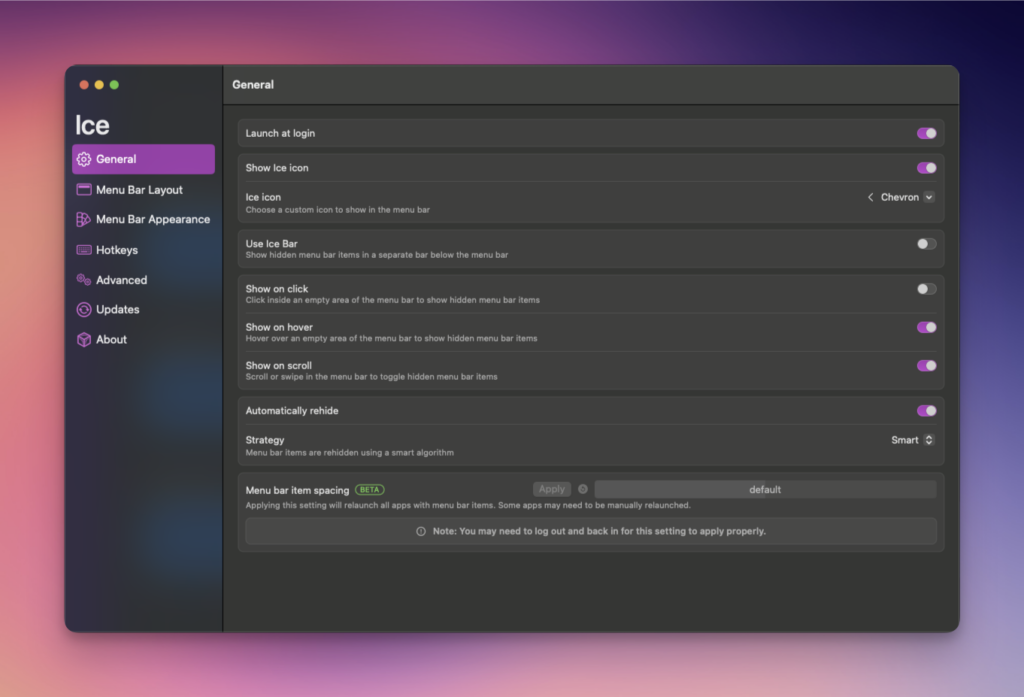
Ice is a powerful menu bar management tool. While its primary function is hiding and showing menu bar items, it aims to cover a wide variety of additional features to make it one of the most versatile menu bar tools available. Some of the features of Ice Menu Bar include.
It doesn’t take long at all to start getting a ton of icons on the menu bar at the top of the screen as I quickly realized. My OCD hated this, so I needed something to make my life better, and Ice Menu Bar was just the app. So many features and options to hide icons, show hidden icons and so much more.
Lickable Menu Bar – the app that brings back classic menu bar styles to your Mac. If you miss the beautiful menu bars of previous macOS versions, this is the app for you. Lickable Menu Bar offers three predefined styles to choose from.
The MacOS menu bar isn’t the best looking, nor is it very configurable by default. Lickable Menu Bar makes it look considerably better and works very well with Ice Menu Bar mentioned above.
AltTab is an app that gives you a much nicer and more configurable window switcher with MacOS. The default that the system uses is pretty boring, but AltTab makes it much more tolerable and has extra features.
I am so used to use AltTab to switch windows as I’ve been doing it for years. The MacOS built-in system is decently ok, but it’s not that nice looking so AltTab provides me with a better looking solution that also has quite a few features to make it that much better.
CleanShot is the ultimate screen recording app made for macOS. With its rich toolkit, CleanShot actually feels like 6 apps in one. You can use it to swiftly capture Mac’s screen without desktop icons, record and trim video, annotate, save screenshots to dedicated cloud, and more.
I take a LOT of screenshots for various things, so having a tool that is quick and easy to use is important. Cleanshot X is just that, but so much more. All of the screenshots included in this article were taken and edited with Cleanshot X.
LocalSend is exactly what it likely sounds like it is, an app that allows you to share files locally to your various devices and to do so with ease. It’s available not only for MacOS, but for Windows, iOS, Linux and Android.
I use LocalSend for sharing files, mostly photos, directly from my iPhone 16 Pro Max to my Windows and MacOS devices. This helps me post them easier on social media or do other things that I might need or want to do.
I wrote a full review of LocalSend a while back here on the SeerOfSouls blog that you can view here: LocalSend: A Fast, Secure Way To Transfer Files Between Devices.
Final Thoughts
The list of apps above are just a few of the apps I’ve discovered in the first few weeks of fully switching to MacOS. There are many others and I’ll be writing about those in the future. The ones I’ve chosen to list here are the ones that I am currently using the most and that make my switch from Windows to MacOS much easier and smoother.
I’d certainly love for you to list any and all MacOS apps that you enjoy or find useful in your daily routine. I’m sure there are many that y’all use that I too would or could find useful and beneficial for the things I do.
#AltTab #Apple #Apps #CleanShotX #Computers #IceMenuBar #LickableMenuBar #LocalSend #MacOS #PC #Technology


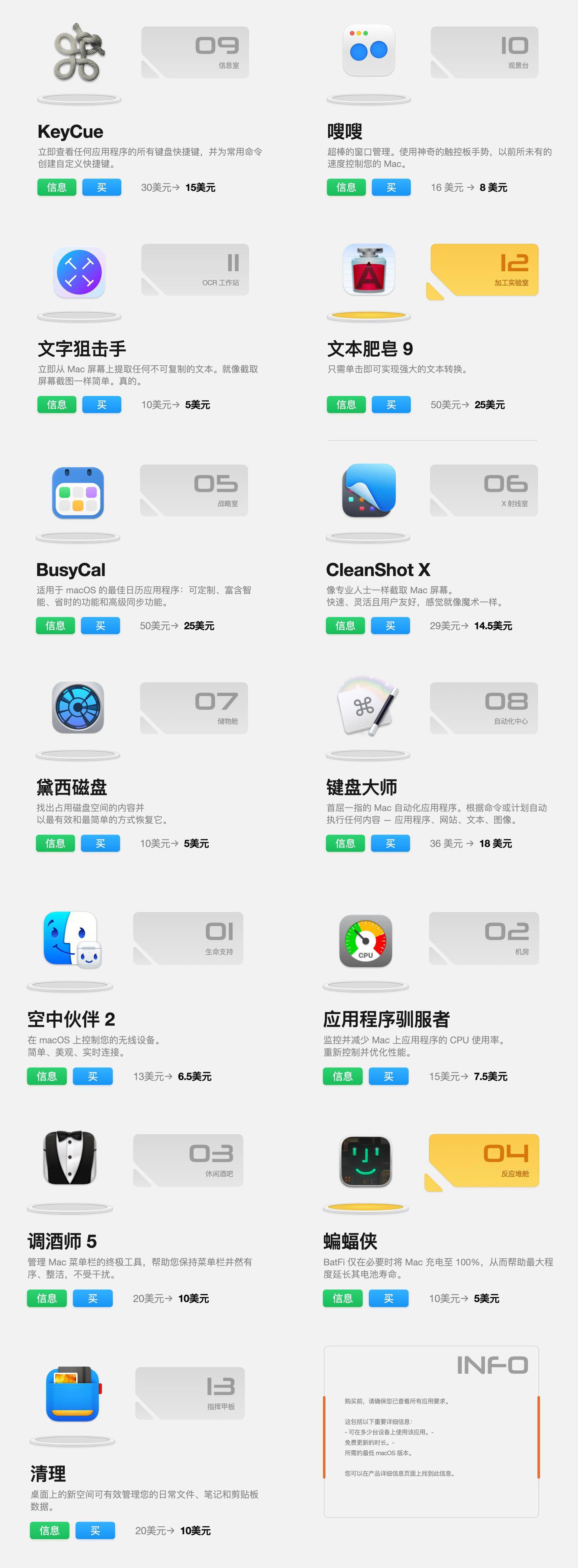
这个网站推出了一个黑五软件特价捆绑包,价格相当实惠,购买看👉🏽 https://unclutterapp.com/bundle/?coupon=SW-BLACKFRIDAY-2024
我算了一下,每款软件单买都是半折,总价值157.5$,但是这个网站是在原价309$的基础上捆绑打2.4折,最后实付74$(约人民币536元),平均一个软件41元。
支付可以用信用卡、贝宝、谷歌、亚马逊和Wire Transfer。
#黑五 #黑色星期五 #mac软件 #macos #打折 #AirBuddy #AppTamer #Bartender #BatFi #BusyCal #CleanshotX #DaisyDisk #KeyboardMaestro #KeyCue #Swish #TextSniper #TextSoap #Unclutter


I finally did it… I gave in and got #CleanShotX for #macOS!
After watching a few of @matt's tutorials on #YouTube, I can confidently say that I already love this app and I regret not buying it earlier 😅
The app is currently on sale if you're interested in trying it out https://unclutterapp.com/bundle/
I also need to decide on a screenshotting tool. I need to give Shottr and Clean Shot X both a serious try and see which I prefer.
I actually take quite a few screenshots, so I'll need/want whichever one works best and easiest for me.
Finally. Working again in macOS Sequoia Beta! CleanShot X is one of the most important tools for me. I rely on it countless times a day. #cleanshotx #macos #sequoia #beta

Can I just take a moment and sing the praises for a couple of tools I use? These are on MacOS, not sure if there are versions for other platforms (I haven’t looked, but if I had to use Linux or Windows I would be searching frantically!).
PopClip: Highlight some text and have a little popup menu appear that allows you to search for the text on the internet, cut/copy/paste, send as a search term to YouTube (or whatever), change the case… LOTS of options available and very customizable. I use it many times a day.
https://www.popclip.app
CleanShot X: A screen capture program on steroids. Capture screenshots, recordings, scrolling screenshots (for that content that doesn’t fit the height of a single window), text recognition ANYWHERE on the screen, you name it. Very flexible, and again, I use it many times a day.
https://cleanshot.com
TextSniper: I actually use this program to capture text on the screen as it has a teeny bit more power than CleanShot X. ANY text you can see ANYWHERE on the screen (including the Menu Bar, for example) can be copied and then pasted elsewhere to your heart’s content. *Very* useful for those situations where some desired text is not normally selectable.
https://www.textsniper.app
All are available as standalone downloads, or through Setapp.
#Setapp #Apple #macOS #PopClip #CleanShotX #TextSniper #Apps
One thing that puzzles me to no end about my on-going problems with Metal (hardware acceleration) in macOS on my 2023 Mac is that, when I have one of the symptoms, e.g. the Redact tool stops working properly in #CleanShotX, if I leave the app open, switch to Safari and quit Safari, the feature starts working again in CleanShot X, even without quitting and relaunching the app!
It’s clearly something systemic, but… what? As an experienced troubleshooter, I am flummoxed. https://toot.community/@betalogue/112128620134688872

TIL that in #CleanShotX you can hold down shift to draw straight lines when highlighting. Prior to this my highlights looked like they were made by a drunken toddler.
Many thanks to Clean Shot's support folks.

Does anyone have a recommendation for a good Mac app to create large multi-colour gradients?
I want to build some backgrounds to use in CleanShot X and some other apps.
Just finished putting together my first major Alfred workflow. i ill be doing a writeup of it on my blog later this week.
This is also my first screenshot using CleanShot X and I am not ever going back to doing it the old way.
This week is demo producing week. Nothing else… No bug corrections,
No documentation. Just video recording with #cleanshotx and #descript. Send me energy 🧪👨🔬
#apple #macapps
> #timing for time tracking
> #sip for color picking
> #drafts for all quick text
> #scrivener for long form text
> #alfred for launch bar
> #tripmode for bandwidth monitoring
> #hazel for automated file.. filing
> #devonthink for all documents
> #bartender for menubar cleanup
> #cleanshotx for screenshots
> #applemotion for motion graphics
> #keynote for animation
> #banktivity for finance
> #kyno for digital asset management
> #spark - mail
> #istatmenus - system monitoring
@andricheli @agngw
> #timing for time tracking
> #sip for color picking
> #drafts for all quick text
> #scrivener for long for text
> #alfred for launch bar
> #tripmode for bandwidth monitoring
> #hazel for automated file.. filing
> #devonthink for all documents
> #hedge for disk copies
> #bartender for menubar cleanup
> #cleanshotx for screenshots
> #applemotion for motion graphics
> #keynote for animation
> #banktivity for finance
> #kyno for digital asset management
Out of space.