#BetterTouchTool

2026-01-10

Macの入力デバイス用ユーティリティ「BetterTouchTool」がLogitech製マウスとキーボードのサポートを大幅に改善。Logitech HID++ 2.0プロトコルの実装によりLogi Options+がなくてもMX Masterマウスの様々な機能が利用可能に。
applech2.com/archives/20260110

#applech2 #BetterTouchTool #Logi_Option #Logitech #Mac #アップデート #アプリ #キーボード #マウス #有料

2025-12-10

Something I often miss on #Linux that's doable on #macOS is something like #BetterTouchTool.

BTT is magic. If your input device has buttons, you can use BTT to make them do damn near anything. I have it set so I hold ctrl and click the left or right mouse buttons to switch between Spaces. The first thing I always do when I set it up on a fresh install is map the scrollwheel button to activate Expose, showing me all the open windows and Spaces. But there are some folks who use it to fire off macros that can do pretty much anything you might want them to do.

The best I can find on Linux is Input Remapper. It works, but is ridiculously limited by comparison. Firstly, you can't combine keyboard and mouse combos, so I can't replicate ctrl+Left/Right mouse to switch between desktops. But also, you can only autoload one preset per device. So I can set it so that mouse button 4+Left switches to the desktop to the left, and so on, and I can map clicking the scroll wheel to Super+W to show all the windows, but I can't have them all active at the same time. So it's largely useless.

I often wish the guy behind BTT could knock out a port for Linux. I'd pay for it all over again if he did.

2025-08-31

Vor rund drei Jahren bin ich von Windows auf macOS gewechselt und obwohl ich mittlerweile recht gut damit klarkomme, vermisse ich die eine oder andere Möglichkeit von Windows. Zum Beispiel das Windowsmenü links unten, das die häufigsten Programme beinhaltete. Klar, irgendwie bekommt man es auch unter macOS hin, aber ich beobachte mich auch, wie ich mit der Maus automatisch nach links unten fahre, um das Menü zu öffnen. […]

littlecompany.de/b/NrV

#betterTouchTool #macos #tutorial

Guillaume-Jean Herbietgjherbiet@mamot.fr
2025-08-22

@tewha Mapping Globe/fn to shortcuts was not possible, the key being somewhat "reserved" for system shortcuts. You had to rely on utilities like #BetterTouchTool to map those.
If #macos #Tahoe now allows this (I haven’t tested because I only have the beta inside a #utm VM), then this is great news!

2025-07-30

@_DigitalWriter_ Auf dem Mac verwende ich das #BetterTouchTool, um aus der Capslock-Taste ein Hyperkey zu machen.

...denn wer braucht schon Capslock? :-D

2025-06-10

💡 If you're on #macOS26 and want to access the new clipboard manager built into #Spotlight with a single keypress (instead of CMD+Space followed by CMD+4), you can use #BetterTouchTool to automate this.

❓Does anyone know if there's a built-in way to accomplish this? 🤔

@llo_ai thanks so much for creating BTT. It has always been the “missing glue" in so many parts of my daily Mac workflow. I don't know what I'd do without it, haha 😅

Screenshot of BetterTouchTool with three actions configured in a row:
1. Send keystroke: CMD + Space (summon Spotlight)
2. Wait 0.2 seconds
3. Send keystroke: CMD + 4 (switch to clipboard history in Spotlight)
cogmodocogmodo
2025-06-05

here are some more walkthroughs for the bettertouchtool app. i hope they are helpful to begin with. among them are topics like context menus, hidden files and the middle mouse button. enjoy!

cogmodo.com/contextmenuswithbe

cogmodocogmodo
2025-06-02

as a longtime sceptic i'm finally all in with the hyperkey. here's how to set it up with the help of the bettertouchtool app

cogmodo.com/hyperkeywithbetter

MacOS Apps That I Use And Really Enjoy

About 3 to 4 months ago I went to the Apple Store at Friendly Center in Greensboro, NC to pick up my M4 Mac Mini. This would be my first official use of MacOS on any kind of a regular basis. I’ve learned a lot along the way and have discovered a lot of different apps. The list below are just a few of the apps that I have discovered and use regularly that I feel others might want to know about and use as well.

Bartender 5

Bartender lets you hide icons on the menu bar, so you can keep only the most important ones visible, while the rest can be displayed when you click Bartender’s icon or even just hover over the menu bar. I was previously using Ice Menu Bar, but discovered that Bartender 5 has a bit more customization that I like and enjoy.

Above is what my menu bar looks like when I have the extra icons hidden that I don’t want to see at all times. It’s very minimal and of course can be even more minimal than this if you so choose.

When I hover over the menu bar, then all of these other icons appear. They are hidden mainly because I rarely use them so I don’t need to see them at all times like I do with the other icons you see in the first screenshot.

There is a free trial of Bartender 5 that you can use for up to 4 weeks so you get a sense of how well the app works for you. If you find it useful enough to keep using it, then pricing is listed below. If you’re a SetApp subscriber, Bartender 5 is available via SetApp at no extra charge to you.

Latest

Latest is a free and open source app for macOS that checks if all your apps are up to date. Get a quick overview of which apps changed and what changed and update them right away. Latest currently supports apps downloaded from the Mac App Store and apps that use Sparkle for updates, which covers most of the apps on the market.

Forgot what was new in that update you installed yesterday? Latest can show you release notes for apps that are already up to date. See what has changed in the update, now in a beautiful uniform design.

Latest helps me keep everything updated as I am one that does not like to have apps or software that aren’t updated to the latest versions at all times. Just something that really bothers me and Latest helps me not worry about.

What’s surprising about Latest is that it’s completely free. There is a donate. option via the developers website if you’d like to donate to help keep the app maintained and updated, but that’s completely optional.

BetterTouchTool

A feature-packed app for customizing all kinds of inputs for your computer. You can define keyboard shortcuts, mouse and trackpad gestures, control Stream Deck, manage your computer from your phone using BTT Remote, customize the content of the Touch Bar, and more.

There’s just so much that BTT can do that is useful and beneficial in my opinion. It’s really changed the way I use my Mac as far as not using the mouse as much as I did when I first made the switch to MacOS a few months ago. I can easily access the things I need and want with the touch of one or two keys on my keyboard.

BetterTouchTool is available to purchase directly from the site, which I linked to above and it’s very affordable especially for everything that it does. Again, if you are a SetApp subscriber, you can get BetterTouchTool for free included with your subscription. Check it out as you won’t be disappointed.

Rectangle

If you’re one who likes or needs to move app windows around in various ways and are looking for a simple, easy to use app that has a ton of shortcuts for doing so, then Rectangle is certainly for you.

Here’s how Rectangle can make your life easier: grab a window, take it to the edge or corner of the screen, and you will see a footprint that illustrates how it will be moved and resized. Depending on where you position the cursor, the window will be resized to cover a certain area of the desktop.

Move it to a corner, and it will be adjusted to take up a quarter of the screen; move it to either side, and it will fill half the desktop; move it to the bottom, and it will cover either one third or two thirds of the screen; finally, move it to the top to quickly make the window full-screen.

Rectangle has a 10-day free trial, or you can upgrade for just $9.99 USD. This is a lifetime license for only $9.99 as well, at least as far as I can tell which again, is a really good deal considering everything it allows you to do.

Final Thoughts

This is obviously just a very short list of the apps I use and have discovered since coming over to MacOS 3 – 4 months ago. There are many others, but I wanted to do a short list as I feel most people will read shorter articles rather than long drawn out articles.

This is also kind of part two of my app series I guess you could say. You can read my first post that I made here a while back: MacOS Apps That I Like.

Tell me some of your favorite apps for MacOS that you enjoy, use regularly and recommend to others. I’m always looking to discover more new apps that I might not have known I needed until someone else recommended it to me! You can list your favorite, most recommended apps in the comments below if you’d like!

#Apple #Apps #Bartender5 #BetterTouchTool #Computers #LatestApp #MacOS #PC #RectangleApp #Technology


A 3D rendered laptop is displayed on a yellow background. The laptop's exterior is a lavender color and it has a yellow keyboard and trackpad. The screen displays a light blue background with a white search bar at the top, and a yellow dot above the screen. There are five colorful squares with icons on the screen. From left to right, the first square is green with a pink square inside, and a yellow person icon inside. The next square is orange with a yellow location icon inside. The next square is white with purple dots. The fourth square is white with a pink triangle icon inside. The last square is blue with a green mountain and an orange sun.
Tim Stringertimstringer
2024-10-18

It was a treat to join @rosemary and @macsparky on the Automators podcast!

We covered a lot of ground, including foundational automation principles, @hookmark, @notionhq, @ArcBrowser, , , , and Plug-Ins (Automators Max).
snailedit.social/@rosemary/113

2024-09-28

folivora、macOS 15 Sequoiaでタイル表示のウィンドウマネージャー機能が追加されたことにより「BetterSnapTool」が不要になったユーザー向けに「BetterTouchTool」のLifetimeライセンスを50%OFFで提供。
applech2.com/archives/20240928

#applech2 #BetterTouchTool #BetterSnapTool #Mac #MacAppStore #アプリ #有料

2024-07-16

Macの入力デバイス・カスタマイズツール「BetterTouchTool」でMacのメニューバーアイテム管理機能がBetaテスト中。
applech2.com/archives/20240716

#applech2 #BetterTouchTool #Bartender #アプリ #トライアル版 #メニューバー #レビュー

Aidan Maurin-Jonesaidanmaurinjones
2024-05-21

OMFG I am soooo excited right now!!! This looks like its going to be AMAZING!! 🤓🎉 🥳😍

2024-04-22

TIL (actually, it was yesterday): You can mimick the base functionality of #Bartender/#HiddenBar/#Vanilla with #BetterTouchTool from @llo_ai. ❤️

#macOS #MenuBar

Went #mechanical a little while back and now that my Devooper Keycap set comes tomorrow, spent some time tinkering with #Macros. #Automator is definitely a better option than #Shortcuts for Mac right now but it’s not that great either.

Tracked down and old Stack issue suggesting #BetterTouchTool, and holy hat does it work well for setting up key combinations to perform very specific actions, including other key combos. (1/2)

Michał Stankiewicz :verified:mstankiewicz@pol.social
2024-03-28

🇺🇸 I forgot to mention that today I published a Hi Notch update :)

🇵🇱 Zapomniałem wspomnieć, że dzisiaj opublikowałem aktualizację Hi Notch :)

[ŚL] Zapōmniołch spōmnieć, iże dzisiej ôpublikowołch aktualizacyjõ Hi Notch :)

mstankiewi.cz/hi-notch

#HiNotch #BTT #BetterTouchTool #macOS #Mac #MacBook #Apple #notch

Michał Stankiewicz :verified:mstankiewicz@pol.social
2024-02-07

Jeśli używasz #MacBook z #Notch i masz na nim apkę #BetterTouchTool, to zachęcam do przetestowania mojego presetu, który zamienia zwykłego bezużyteczngo notcha w Dynamicznego Notcha.

Poznajcie Hi Notch!
community.folivora.ai/t/useles

Jinwenjinwen
2024-02-07

真是好用。想改什么就什么。

2023-12-16

I now have in BetterTouchTool, Clipboard filters for:

1) surrounding text with different characters,
2) transforming text into AP and NYT styles titles
3) Markdown blockquote, unordered list, ordered list
4) HTML list

I also have direct text transformers for removing surrounding characters.

#BetterTouchTool #macOS

Aidan Maurin-Jonesaidanmaurinjones
2023-12-11

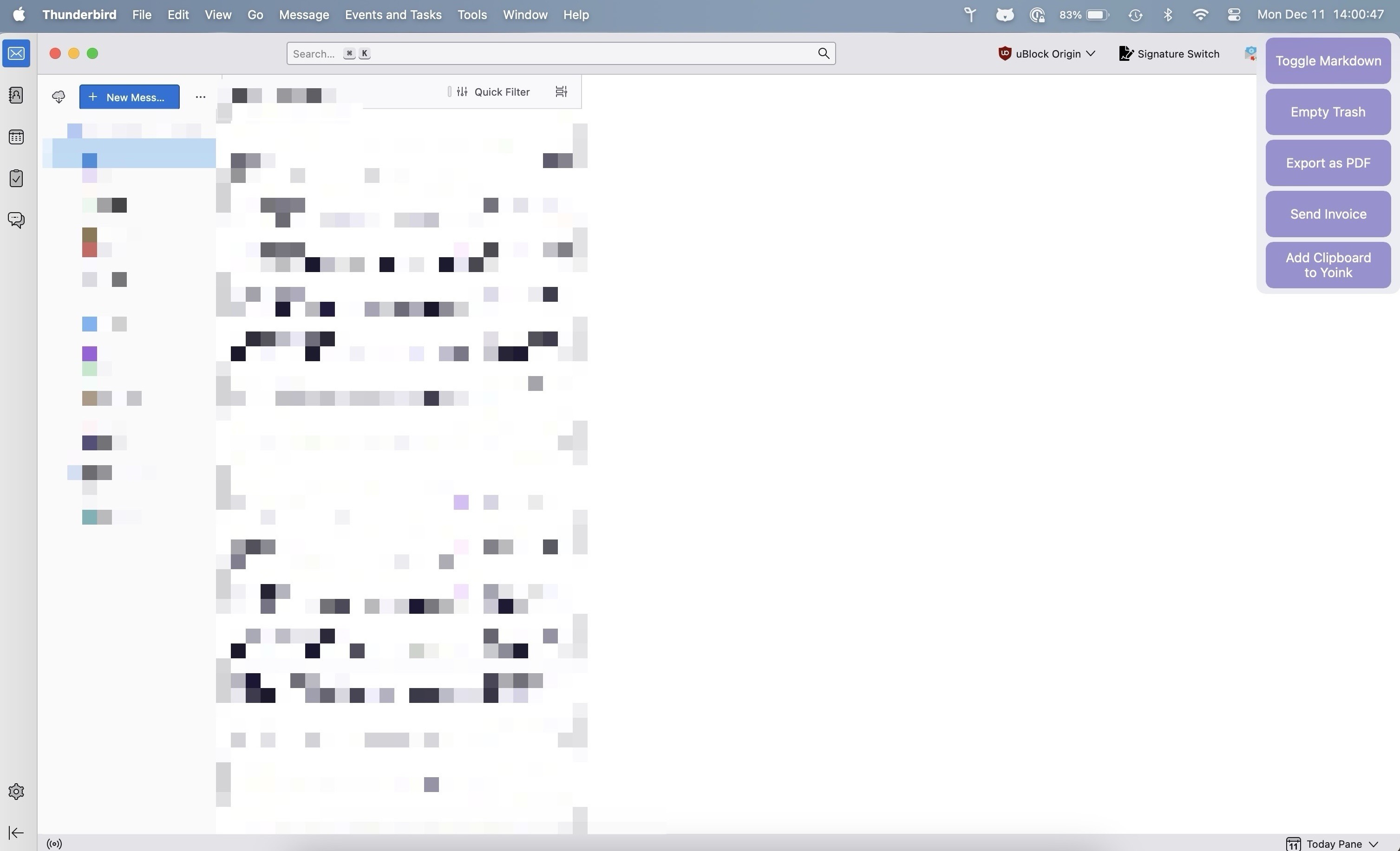
I have been really enjoying using the Custom Floating Menus feature provided by BetterTouchTool. I have made them for several different apps. They give me quick access to run BetterTouchTool automations, Keyboard Maestro macros, Applescripts, Shortcuts, etc. without having to assign a keyboard shortcut or a stream deck button to it.

Client Info

Server: https://mastodon.social
Version: 2025.07
Repository: https://github.com/cyevgeniy/lmst