
Freshly Pressed is back!
We've just relaunched "Freshly Pressed," a curated collection of notable blog posts from the WordPress.com and Jetpack community, originally launched 16 years ago.Go check those authors out, and get them in your Reader of choice!#wordpresscom

Managing multiple client sites often means juggling local setups, updates, and changes across different environments.It works — until the workflow starts getting in your way.
#WordPress #Tools #WordPresscom #WordPressStudio
https://ift.tt/oYSFm8U
Now you can simply ask an AI assistant like Claude, ChatGPT, or Cursor: “Show me my latest posts and how they’re performing.”Within seconds, the results appear, pulled via WordPress.com’s new[…]
#WordPress #WordPresscom #AI #MCP
https://ift.tt/ROGdFoQ

Not just nuts and bolts, please @wordpressdotcom We really need more design inspiration posts like this one from @pootlepress
10 Amazing WordPress Design Resources https://wordpress.com/blog/2024/04/18/wordpress-design-resouces/ #Design, #WordPress, #Wordpresscom
Handcrafted and newly updated! Three (now SIX) Ways You Can Add #Mastodon To Your #WordPresscom Website (and possibly others)! :mastodon:
https://wpcommaven.com/2022/11/20/three-ways-you-can-add-mastodon-to-your-wordpress-com-website/

Choosing the right host for your WordPress site doesn’t have to be overwhelming.
We compared Pressable and WordPress.com side by side on speed, support, and ease of use to help you make an informed choice.
Read the full comparison here:
👉 https://blogrecode.com/pressable-vs-wordpress-com-hosting/
#WordPress #HostingComparison #Pressable #WordPressCom #CreatorTools

Nein, wördpress.com, du benutzerfeindlicher scheißhaufen!
Ich will weder eine „jetpack KI-suche“, noch ein „legacy widget“ (was immer das auch sein soll, die linkliste ist darüber jedenfalls nicht verfügbar), noch ein „facebook seiten plugin“, noch „bevorstehende veranstaltungen“, noch „sternebewertungen“, noch eine „X-einbettung“, noch eine „spotify-einbettung“ (schon vom gedanken kommt mir der kaffee wieder hoch), noch sonstwas von eurer bis zur unbenutzbarkeit modernen scheiß-widget-verwaltung ohne suchmöglichkeit für die gefühlt dreihundert einbettungsmöglichkeiten in meine seitenleiste einbetten, sondern einfach nur wieder die links, die ich angelegt habe, die mir immer noch im bäckend angezeigt werden und die eure räudige krüppelscheiße von moppeliger blogsoftwäjhr eben gerade einfach ratzefummel aus der seitenleiste wegradiert hat, als ich aus dem archiv mal etwas weniger platzraubendes machen wollte… also beim bearbeiten noch nicht einmal die links angefasst habe. Und nein, ich habe da auch nicht versehentlich reingeklickt. Vielleicht hat der mauszeiger mal drüber geschwebt, das lässt sich kaum vermeiden, wenn man woanders hinwill… ich sags ja, bis zur unbenutzbarkeit modern ist sie, eure frisch verscheißbesserte krüppelscheiße.
Ist ja voll nett, dass eure scheiß-widget-verwaltung sich jede bearbeitung der seitenleiste gemerkt hat, die ich hier irgendwann von vor rd. achtzehn jahren im jahr 2008 bis eben gerade gemacht habe und dass ich diesen ganzen kram wieder in die seitenleiste zurückschieben könnte, wenn ich mit der unbeschreiblichen zähigkeit dieses vorganges klarkomme. Bis auf die links, die ihr mir mit eurem softwäjhrarschloch eben gerade ratzefummel weggelöscht habt. Ich bin sowas von erfüllt von dankbarkeit, das könnt ihr euch gar nicht vorstellen! Ich möchte am liebsten einen dankbarkeitsschlagring anlegen und sozjales fiehdbäck geben. Benutzt ihre eure scheiße eigentlich selber? 🤮️🤬️🖕️
(Für die vielen menschen, die mit ihrer lebenszeit etwas besseres anzufangen wissen, als sich mit dieser zum schmalspur-CMS aufgemoppelten blogsoftwäjhr aus der lodernden benutzererfahrungshölle rumzuschlagen: so sieht das bearbeiten der seitenleiste für mich aus. Es bedient sich auch auf einem schnellen webbrauser mit guhgells renderingengine auf einem noch gar nicht so alten kompjuter mit vierkernprozessor so unsäglich zähflüssig mit der grazie eines sich aus dem dicken, tiefen schlamm befreienden faultiers und setzt bildschirmauflösungen voraus, die ich schlicht nicht habe. G’tt, wenn es dich gibt, rette meine seele, falls ich eine habe und lass mich nie, nie, nie wieder für irgendwas wördpress benutzen! Schon diese hier aufgenötigte akismet-krüppelscheiße von spämmfilterung ist ein krampf im arsch, und zwar einer, der nach nicht nachvollziehbaren kriterjen fröhlich rumzensiert, wenn mal jemand ein nicht ganz stubenreines wort benutzt hat. Zum glück hat sich da aber noch keiner der anwendung-im-webbrauser-spezjalexperten bei wordpress punkt com darum bemüht, den vorgang des zurückholens durch modernmachen zu erschweren.)
Nein, wo man einen fehler meldet, findet sich auch nicht mehr so leicht. Sonst hätte ich das schon getan, statt hier rumzuranten wie so ein blogger. So ist mir die zeit zu schade.
Wenn ihr da drüben bei scheiß-wördpress-punkt-com mit euren tonnen von überwachungskohd statistiken führt, um mich noch glücklicher zu machen, werdet ihr sicherlich bemerkt haben, dass ich auch euren tollen scheißeditor, den ihr in wördpress reingekackt habt, jedesmal, wenn ich etwas nachträglich verändere, mit drei scheißklicks umgehe und lieber eurer mechanisch angereichertes HTML editiere. Was meint ihr wohl, warum ich das mache? Ja, das geht immer noch schneller und vor allem viel überraschungsfreier als eurer verkackter scheiß-blockeditor. Was meint ihr wohl, wie geil ich das finde, dass ich das jedesmal machen muss, statt es einmal — zum beispiel in meinem benutzerprofil — konfigurieren zu können. Was meint ihr wohl, warum ich mir — damals, als ihr mit euren beglückungsideen für die idiocracy angefangen habt — ein skript zum bloggen geschrieben habe, damit ich meine texte einfach in meinem editor tippen kann, der im gegensatz zu eurem gestrokel wenigstens fehlerfrei ist und nicht ab und an einfach mal texte verschwinden und formatierungen pogotanzen lässt, während er beim markieren eines wortes oder bereiches das editierfenster irgendwie unkontrolliert rumscrollt? Es liegt daran, dass ich schreiben und veröffentlichen will, ohne mich tief zu bücken und euch die blutbesudelten stiefel zu küssen, mit denen ihr euren nutzern in die fresse tretet und dabei „danke, meine herren“ zu sagen.
WordPress.com, ihr seid das meikrosoft des internetzes geworden! Ihr kackt euren anwendern einfach ins gesicht, weil ihr glaubt, dass ihr unentbehrlich geworden seid.
Für die vormals verlinkten webseits hoffe ich mal, dass der fehler in den näxsten sex bis achtundvierzig monaten behoben wird, wenn den entwicklern mal wieder etwas wichtigeres einfällt, als ihren unbenutzbaren blockeditor noch unbenutzbarer zu machen, bedienbare funkzjonalität durch dysfunkzjonale krüppelscheiße zu ersetzen und sie sich wieder auf die beseitigung von fehlern konzentrieren. Ich gebe für heute auf. Das hat mich jetzt wirklich schon genug stunden gekostet, und den größten teil nur, weil ich mich hilflos durch eine benutzerabschreckungsoberfläche gekwält habe.
Oder, um es mit reklamelügnern zu sagen: weil ich eine „benutzererfahrung“ gemacht habe. 😵️
Fickt euch!

How to Build a Multilingual Website on WordPress.com https://wordpress.com/blog/2025/11/06/how-to-build-a-multilingual-wordpress-website/ #Customization, #WordPress, #Wordpresscom
Top Simple Prompts to Build Your First WordPress Site With AI https://wordpress.com/blog/2025/11/10/best-ai-website-builder-prompts/ #AIWebsiteBuilder, #WordPress, #Wordpresscom
Recommend blogs in the WordPress.com Reader
Over at WordPress.com, we recently added a new feature to the WordPress.com Reader. You can now build a list of blogs you like, and recommend them to others. Here is how one can access recommended blogs, on the web and via the WordPress.com REST APIhttps://herve.bzh/recommend-blogs-in-the-wordpress-com-reader/



The Future Divide: novatopflex.wordpress.com vs. novatopflex.com
novaTopFlex has just identified the novatopflex.com domain as a functional domain, and advertisements can now continue to proceed on the site served by Bluehost. From now on, expect novatopflex.wordpress.com to be the public-facing blog of public-facing personal interest, while novatopflex.com shall be the public-facing blog–and more–of business interest, predominantly focused on technology.

🌎 Sponsor Shoutout | #WCCanada2025
A huge thank you to WordPress.com, our Global Sponsor, for providing everything you need to build, grow, and scale websites—empowering creators, businesses, and innovators worldwide.


Visa’s SavingsEdge is a senseless waste of server space
I paid $96 for another year of WordPress.com Premium last week. It could have been less–perhaps as much as 50 percent less–but managment at a site called Visa SavingsEdge apparently had other ideas.
That site, for those who have been blessed with never having to use it, is a cashback portal run by Visa that lets you sign up for rebates on qualifying business credit cards like my Chase United Club card. It was simple to use–you didn’t need to opt in before a particular purchase–and it saved me a decent amount of money from 2021 through the first half of 2024, all from rebates for bookings at MGM hotels in Las Vegas.
But then Visa decided to fix what was not broken from my perspective. “We’re excited to announce that Visa SavingsEdge will be enhanced to provide even more ways to save on your business purchases,” a Feb. 1, 2024 e-mail informed me.
The new site that debuted last summer still provides automatic rebates on in-store purchases but requires you to click through a “Shop Now” link for online cashbacks–and restricts hotel and car-rental cashbacks to bookings made through that site.
The site itself flunks basic usability guidelines, starting with this idiotic requirement: “For security reasons, passwords must be updated every 90 days.” Password expiration polices were dumb when I wrote a column in the Post criticizing them as a dogmatic relic 20 years ago, Microsoft stopped recommending them six years ago, and the National Institute of Standards and Technology’s security guidelines now outright ban them.
Clicking the “Log In” button–and then clicking almost any other navigational element, from a section heading to a “Load more” button below a list of offers–subjects you to a brief delay in which the entire page blurs and a white circle in the middle of it pulses, as if the page is trying to show off how hard it’s working.
I’ve clocked this lag at anywhere from one to seven seconds, with two seconds the most common wait. Which is a long time for any site to remind me of waiting for an interlaced image file to download over a dial-up connection. And like enforcing a password-expiration policy in 2025, the only thing this visual effect does is flaunt hostility to the user.
I’ve also come across an extra level of authentication annoyance: Navigating away from the site and trying to log back in can get me an error message nonsensically informing me that “A session is already open. Please try again later.” But since I am not, in fact, logged in, this leaves me locked out.
All of that still seemed like it would be worthwhile when an Aug. 13 e-mail tipped me off to a 50 percent cashback deal on “qualifying purchases” here–just in time for my annual renewal. But every time I have clicked on a link for this WordPress.com offer on the SavingsEdge site, I have been dumped on a page devoid of any details except for two asterisked items covering Visa’s policies for travel cashbacks.
Maybe my low-end WordPress.com plan wouldn’t have qualified anyway–the one other SavingsEdge offer that features a service I already pay for, Google Workspace, is only good for Business Standard plans. But one thing is clear: Thumbwrestling with this insult to Web design has cost me time that I will never get back.
#businessCreditCard #cashBack #cashback #creditCard #deals #discounts #passwordExpiration #rebate #SavingsEdge #UX #Visa #VisaSavingsEdge #WordPressCom

WordPress Patterns let you reuse layouts without rebuilding them every time you publish. That means no more duplicating old posts, fixing headers, or untangling spacing issues every week.
#WordPress #WordPresscom #patterns
https://ift.tt/hREKcsq
Newspack publishers can now create custom mobile apps using the Pugpig Bolt plugin.
#WordPress #WordPresscom #Newspack #Pugpig
https://ift.tt/HvJVoIc

WordPress.com Ads on Free Sites – A Nightmare on Your Main Street
13 July 2025 Scam Ad Warning
Many WordPress.com owners of free sites and some with No Ads upgrades are reporting in the community forums that visitors to their sites are being redirected to scam websites.
Perhaps not entirely coincidental, WordPress.com forum staff advised earlier that due to circumstances beyond their control, they had to change ad partners. However, this was in connection to site owners complaining that their WordAds earnings dropped significantly since the last week of June. (No ads are running or should be running on this site. If you see ads here, please contact me on Mastodon.)
Whatever the reason, be aware that free WordPress.com sites are having an issue at the moment and it’s not the fault of the site owner or your device. Hopefully TPTB will box this bug more quickly.
Not that long ago our knitting guild was considering moving its website to WordPress.com. I half-jokingly mentioned to a fellow guild member that I hoped WordPress.com advertising would never be like on our guild’s current free website, hosted elsewhere, that is covered in more ads per pixel than content. Sadly, it seems the day of the zombie apocalypse has arrived here, too.
I recently followed a link in the forum to a photographer’s free WordPress.com website after he complained that ads were covering his photos. While his issue was malware in his web browser, this horror greeted me on his post while I was logged out. If you can stomach it, click to see a full size screedshot.
The ads you see depend on your location and browsing history, among other things.Over the years, ads have become more and more flagrant on free websites. The most recent viral infection is “Sponsored Content” by Outbrain, where the hordes sometimes attack in groups of threes and, sometimes, all nine at once. (Lock your windows! Lock your doors!)
On WordPress.com Free and (legacy) Starter plan sites, we sometimes display advertisements on your blog or site to help pay the bills.
Then and now…
Back in 2013, WordPress.com started letting site owners know (more graphically!) that they sometimes run ads on free websites (since 2006!) by displaying an info banner where ads would appear. They also provided a link to Tell Me More that explained what this was all about and what our (single) option was.
Ad info banner c. 2013Shuffling along to 2022 and, well…
Ad info banner c. October 2022-The message is clearHave you visited a newish Free website recently? Did you spy the top banner promoting sign up for WordPress.com on the site’s front page? You might see that, but the site owner sees an entirely different prompt in that same banner when logged in.
Banner when visiting a free WordPress.com website What the site owner sees on the public side of their site when logged inImages you insert in your post might open in a special page frame promoting WordPress.com sign up. Sometimes.
Back in April, WordPress.com reiterated its commitment to hosting free websites, so that
“…anyone, anywhere can put up a blog or a site, whatever their situation. With the Free plan you’ll still be able to get the word out, create a beautiful site, and take advantage of the fastest WordPress managed hosting on the planet. And when you’re ready to scale up your ambitions,
WordPress Pro* will be waiting in the wings.”*WordPress.com killed off the Pro plan in July 2022 in favor of its previous plans.
And while that is true, the flip side is that free sites are billboards. You might not need or want to “scale up your ambitions”, but you’ll probably cough up to get those ads off your site* if your site is publicly visible to search engines and the Reader.
(*Update 2 November 2022: WordPress.com recently removed the No Ads Add-On from purchase through the Upgrades dashboard. The only way to remove ads for now is by purchasing an upgrade plan for your site.)
I get that advertising helps keep free sites free, but the recent Outbrain injection brings down the standard for everyone, including WordPress.com itself.
Maybe the next phase of this ad infection is WordPress.com offering an upgrade so you won’t SEE those horrible ads anywhere, ever. (If that happens, you heard it here first!)
N.B. Am I still recommending WordPress.com as a host for folks just starting out? Yes, but. Transparency builds trust.
As always, the information in this post is correct as of publication date. Changes are inevitable.


Scam Ad Warning
Many WordPress.com owners of free sites and some with No Ads upgrades are reporting in the community forums that visitors to their sites are being redirected to scam websites.
Perhaps not entirely coincidental, WordPress.com forum staff advised earlier that due to circumstances beyond their control, they had to change ad partners. However, this was in connection to site owners complaining that their WordAds earnings dropped significantly since the last week of June. (No ads are running or should be running on this site. If you see ads here, please contact me on Mastodon.)
Whatever the reason, be aware that free WordPress.com sites are having an issue at the moment and it’s not the fault of the site owner or your device. Hopefully this is a very temporary bug that TPTB will squash quickly.


WordPress.com is another free blog site. It allows you to create blogs freely. Free blogs will appear with a subdomain extension like example.wordPress.com.
To connect to a custom domain, you should go with a premium plan of WordPress.com. It also helps you to install dozens of premium quality themes on your blog. A separate hosting plan is not required for WordPress.com.
Medium, Google Blogger, and Tumblr are other popular free blog sites.

Studio by WordPress.com has been my favorite new tool for WordPress. It has pushed a TON of amazing features over the past year, and they really ramped up the development cycle cadence.
This is snappy local environment that anyone looking to try out WordPress, test themes and plugins, or create a robust developer workflow will enjoy. Hats off to Nick Diego for shepherding Studio!
#wordpress #studio #studiobywordpress #wordpresscom #wordpresscomstudio

AI-powered Typo Hunting: Trust Your Docs, Readers Will
Our documentation has a trust problem, and I just found 142 reasons why. It started with a silly typo I noticed on one of the pages – something like “cotnact” instead of “contact”. It was quick to fix, but it got me thinking: are there more?
Third‑party writing assistants are available as browser extensions, and we also have a spelling mistake checker available within Jetpack. With such tools, it’s easy to catch typos when editing pages, BUT it requires being on a specific page in edit mode.
Why it’s a problem
Typos can negatively impact our company’s credibility, giving the impression of negligence or lack of expertise.
Solution
I wanted a better approach—proactive rather than reactive.
Fortunately, WordPress.com public API made it easy to build an automated solution. Leveraging the WordPress.com API, I scanned all Jetpack.com support pages by sending their content to the GPT‑4o model (a multilingual, multimodal generative pre‑trained transformer developed by OpenAI) with this prompt:
prompt = """Your task is to check the provided text in American English for accidental typos.
    List all obvious typo errors in the provided text and propose a replacement.

    Do not list any of those:
      - punctuation errors,
      - grammar errors,
      - typos in html attributes,
      - typos in code snippets,
      - words including HTML special characters.
    """
Results and next steps
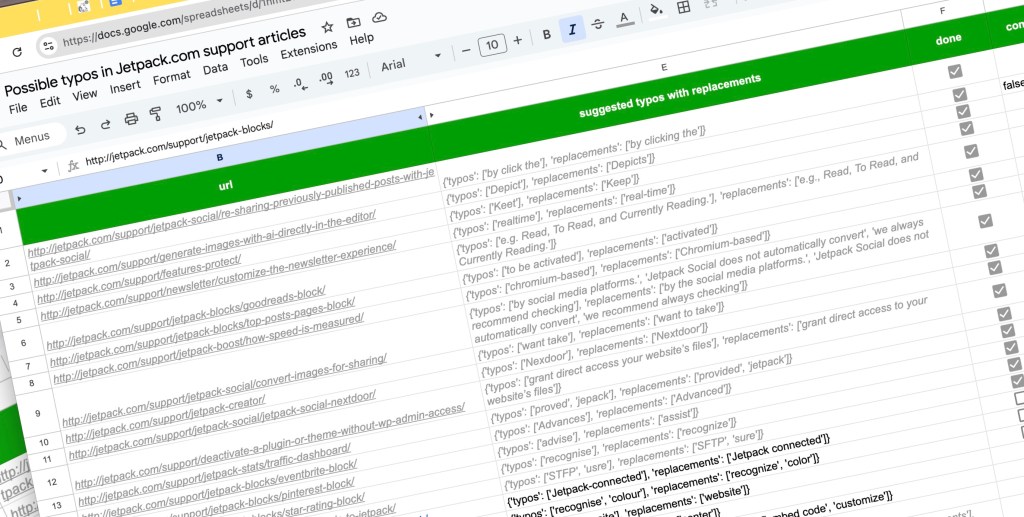
I ended up with 142 pages that required our attention. Some of the detected typos may be false positives, some may need a review by a native speaker, but many are accurately identified typos (“Keet”, “Nexdoor”, “perfomance”).
Cleaning up typos in the Jetpack.com documentation – work in progress.Curious about the technical details? Here’s the code I used:
from openai import OpenAIimport jsonimport requestsimport pandas as pd client = OpenAI() def get_wp_posts(id, type): # Base URL for the WordPress.com API request base_url = f"https://public-api.wordpress.com/rest/v1.1/sites/{id}/posts/?type={type}" page = 1 # Start from the first page # List to store the post IDs and URLs posts_data = [] while True: # Append the page number to the base URL url = f"{base_url}&page={page}" response = requests.get(url) if response.status_code == 200: data = response.json() posts = data.get('posts', []) if not posts: break # Break the loop if no posts are returned for post in posts: posts_data.append({'id': post['ID'], 'url': post['URL'], 'content': post['content']}) page += 1 # Increment the page number for the next request else: print(f"Failed to retrieve data: {response.status_code} {response.text}") break # Convert list of posts to DataFrame return pd.DataFrame(posts_data) def find_typos(x): prompt = """Your task is to check the provided text in American English for accidental typos. List all obvious typo errors in the provided text and propose a replacement. Do not list any of those: - punctuation errors, - grammar errors, - typos in html attributes, - typos in code snippets, - words including HTML special characters. """ response = client.responses.create( model="gpt-4o-2024-08-06", input=[ {"role": "system", "content": prompt}, {"role": "user", "content": x} ], text={ "format": { "type": "json_schema", "name": "typos", "schema": { "type": "object", "properties": { "typos": { "type": "array", "items": { "type": "string" } }, "replacements": { "type": "array", "items": { "type": "string" } }, }, "required": ["typos", "replacements"], "additionalProperties": False }, "strict": True } } ) print(response.output_text) return json.loads(response.output_text) df = get_wp_posts(20115252, "jetpack_support")df["typos"] = df["content"].apply(find_typos) Your turn, it is.
Typos might seem small, but they speak volumes about professionalism and attention to detail. How confident are you about your own content? Have you thought about doing something similar on your site or blog? What approach did you take? Are you ready to try this method? Or maybe you have AI prompt ideas beyond spell‑checking? Let us know in the comments!
#ArtificialIntelligence #NaturalLanguageProcessing #SemanticSearch #WordPressCom

Client Info
Server: https://mastodon.social
Version: 2025.07
Repository: https://github.com/cyevgeniy/lmst