
Speech Recognition Not Working in Windows 11? Fix the “Listening…” Error
🎙️ Learn the 5 Reddit-approved fixes to restore voice typing and Voice Access in Windows 11 fast. From microphone permissions to speech services, we’ve covered it all.
Speech Recognition Not Working in Windows 11? Fix the “Listening…” Error
🎙️ Learn the 5 Reddit-approved fixes to restore voice typing and Voice Access in Windows 11 fast. From microphone permissions to speech services, we’ve covered it all.
Writers! 📝 Tired of typing thousands of words daily?
I found voice dictation that understands context. No more "period comma new paragraph" - just talk naturally.
Genie 007 learns your writing style. Say "write a LinkedIn post" and it sounds like YOU, not generic AI.
Works everywhere - Google Docs, Medium, WordPress, email, social media.
#WritingCommunity #AmWriting #Productivity #VoiceTyping #WriterLife
Tôi đã tạo công cụ AI nhận dạng giọng nói DictaFlow hoạt động trong môi trường khóa chặt như Citrix/RDP! 🎤➡️⌨️
Bằng cách mô phỏng gõ phím vật lý, nó chèn văn bản trực tiếp vào máy ảo mà không cần dùng clipboard.
Hoạt động tốt với Epic, SAP, VS Code qua RDP. Phù hợp cho môi trường doanh nghiệp bảo mật cao!
Đang thử nghiệm — cần góp ý về độ trễ!
#AI #VoiceTyping #DictationTool #RemoteWork #Citrix #RDP #SideProject #WhisperModel #Productivity
#AI #CôngCụNhậnÂm #LàmViệcTừXa #AnNinhCao #S
🚀 Ahsk mac app vừa cập nhật tính năng nhập giọng nói, tốc độ siêu nhanh 300‑500 ms, sánh ngang với Wisprflow! Hơn 7.5k người dùng đã đăng ký, phản hồi tích cực. Hãy thử ngay và chia sẻ cảm nhận nhé! #Ahsk #VoiceTyping #MacApp #CôngNghệ #ỨngDung #wisprflow #TinCôngNghệ
https://www.reddit.com/r/SideProject/comments/1qgmqtw/ahsk_mac_app_now_rival_to_wisprflow/
Bạn đang tìm công cụ ghi âm dịch ngay cho đội ngũ đa ngôn? SaaS này cho phép nói tiếng Tây Ban Nha, tự động nhập tiếng Anh, hỗ trợ >100 ngôn ngữ, tốc độ 220 từ/phút, bảo mật HIPAA. Thị trường: các công ty toàn cầu, giảm rào cản ngôn ngữ. Giá freemium ~10 USD/tháng, có thể cạnh tranh với Google/Microsoft nếu ưu tiên bảo mật. Hiện desktop‑only, phù hợp đa số công việc. Bạn có muốn dùng? #SaaS #VoiceTyping #Translation #Productivity #CôngCụ #ĐaNgônNgữ
🚀 Happy New Year!🚀
I’ve just upgraded Whisper Dictation, Voice Typing and FindAImage.
Try them out and let me know what you think!
#whisper #voicetyping #findaimage #update
🌐https://github.com/themanyone?tab=repositories
🗣️🎤📝 :linux: Speech to Text and Text to Speech on GNU/Linux :disability_flag: 📝🔊💻
Why This Matters to Me (and Maybe You Too)
If you’re anything like me—a Linux user who counts on voice typing and TTS because of visual impairment—you know that accessibility is not a luxury, it’s a necessity. Speaking from experience as someone who depends on voice typing (and TTS) , the quest for a seamless, local, FLOSS speech-to-text (STT) setup on Linux can be frustrating.
Here’s how you can succeed with modern tools using Linux. FLOSS means freedom and privacy; working locally means real control.
Let’s dive in! I’ll tell you what I’ve learned and what I use—and hope you’ll share your favorite tools or tips!
System-Wide Voice Keyboard: Speak Directly in Any App
Want to speak and have your words typed wherever your cursor is—be it a terminal, browser, chat, or IDE? Here’s what actually works and how it feels day-to-day:
- Speak to AI (Offline, Whisper-based, global hotkeys)
This tool is my current go-to. It uses Whisper locally, lets you use global hotkeys (configurable) to type into any focused window, and doesn’t need internet. Runs smoothly on X11 and Wayland; just takes a bit of setup (AppImage available!).
GitHub Repo https://github.com/AshBuk/speak-to-ai) | Dev.to Post https://dev.to/ashbuk/i-built-an-offline-voice-typing-app-for-linux-speak-to-ai-3ab5)
- DIY: RealtimeSTT + PyAutoGUI
For the true tinkerers, RealtimeSTT plus a Python script lets you simulate keystrokes. You control every step, can lower latency with your tweaks, but you’ll need to be comfortable with scripting.
RealtimeSTT Guide https://github.com/KoljaB/RealtimeSTT#readme)
- Handy (Free/Libre, offline, Whisper-based, acts as a keyboard)
I’ve read lots of positive feedback on Handy—even though I haven’t tried it myself. The workflow is simple: press a hotkey, speak, and Handy pastes your text in the active app. It’s fully offline, works on X11 and Wayland, and gets strong accuracy thanks to Whisper.
Heads up: Handy lets you pick your own shortcut key, but it actually overrides the keyboard shortcut for start/stop recording. That means it can clash with other tools that depend on major shortcut combos—including Orca’s custom keybindings if you use a screen reader. If your workflow relies on certain shortcuts, this might need adjustment or careful planning before you commit.
GitHub Repo https://github.com/cjpais/Handy) | Demo https://handy.computer)
Real-Time Transcription in a Window (Copy/Paste Workflow)
If you’re okay with speaking into a dedicated app, then copying, these options offer great GUIs and power features:
- Speech Note by @mkiol https://mastodon.social/@mkiol
FLOSS, offline, multi-language GUI app—perfect for quick notes and batch transcription. Not a system-wide keyboard, but super easy to use and works on both desktops and Linux phones.
Flathub https://flathub.org/apps/net.mkiol.SpeechNote | LinuxPhoneApps https://linuxphoneapps.org/apps/net.mkiol.speechnote/)
- WhisperLive (by Collabora)
Real-time transcription in a terminal or window—great for meetings, lectures, and captions. Manual copy/paste required to get the text to other apps.
GitHub Repo https://github.com/collabora/WhisperLive)
More Tools for Tinkerers
If you like building your own or want extra control, check out:
- Vosk: Lightweight, lots of language support. GitHub https://alphacephei.com/vosk/)
- Kaldi: Powerful, best for custom setups. Website https://kaldi-asr.org/)
- Simon: Voice control automation. Website https://simon-listens.org/)
- voice2json: Phrase-level and command recognition. GitHub https://github.com/synesthesiam/voice2json)
Pro Tips
- Desktop Environment: X11 vs. Wayland affects how keyboard hooks and app focus actually operate.
- Ready-Made vs. DIY: If you want plug-and-play, try Speech Note or Handy first. Into automation or customization? RealtimeSTT is perfect.
- Follow the Community: @thorstenvoice offers tons of open-source voice tech insights.
Screen Reader Integration
Looking for robust screen reader support? Linux has you covered:
- Orca (GNOME/MATE): The most customizable GUI screen reader out there. The default voice (eSpeak) is robotic, but you can swap it for something better and fine-tune verbosity so it reads only what matters.
- Speakup: Console-based, ideal for terminal.
- Emacspeak: The solution for Emacs fans.
💡 Orca is part of my daily toolkit. It took time to get the settings just right (especially verbosity!) but it’s absolutely worth it. If you use a screen reader—what setup makes it bearable or even enjoyable for you?
Final Thoughts
If you’re starting from scratch, try Handy for direct typing (just watch those shortcuts if you use a screen reader!) or Speech Note for GUI-based transcription. Both are privacy-friendly, local, and accessible—ideal for everyday Linux use.
Is there a FLOSS gem missing here?
Sharing what works (and what doesn’t!) helps the entire community.
Resources:
Speech Note on Flathub https://flathub.org/apps/net.mkiol.SpeechNote
Handy GitHub https://github.com/cjpais/Handy
Speak to AI Guide https://dev.to/ashbuk/i-built-an-offline-voice-typing-app-for-linux-speak-to-ai-3ab5
RealtimeSTT https://github.com/KoljaB/RealtimeSTT
#Linux #SpeechToText #FLOSS #Accessibility #VoiceKeyboard #ScreenReader #Whisper #Handy #SpeechNote #OpenSource #Community #voicetyping #LocalSTT #TTStools #SpeechRecognition #A11y #Linuxtools #Voicekeyboard #Whisper #Handy #speech-to-text #SpeechNote #review #ScreenReaders #ORCA #FOSS

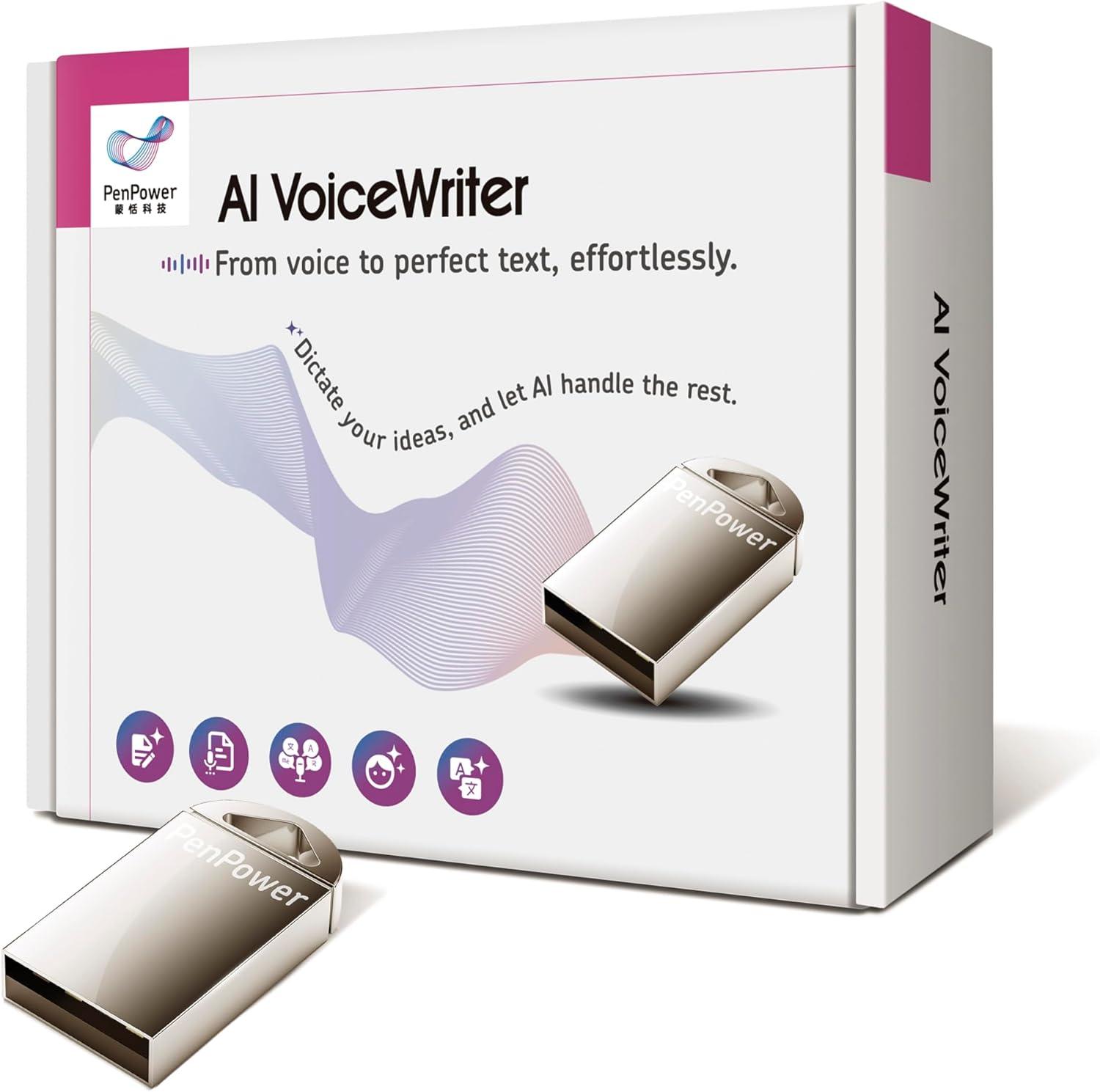
Turn your words into text with the PenPower AI VoiceWriter - speech-to-text, AI proofreading, rewriting, etc. Speak, edit, translate… all through your PC/Mac setup. Order now: #PenPowerVoiceWriter #AI #AIPoweredProducts #VoiceTyping #aimartz #aimartzdotcom
Ứng dụng mã nguồn mở Voice Typing Studio (VTS) thay thế tính năng đọc chính tả của macOS, dành cho lập trình viên và người dùng nâng cao. Ứng dụng cho phép nhập liệu bằng giọng nói ở bất cứ đâu mà không cần chuyển đổi app, sử dụng API của Deepgram, OpenAI hoặc Groq.
#opensource #macos #voicetyping #manguonmo #docchinhta
https://www.reddit.com/r/SideProject/comments/1n323af/opensource_macos_dictation_byo_api_keys/
Lilbits: Hacking the Humane Ai Pin, Liberux NEXX Linux phone, and swearing at your Windows PC
The Humane Ai Pin was supposed to be a wearable device that allowed you to interact with an AI assistant throughout the day without using your phone or computer. But when it hit the streets last year it was widely panned as an overpriced, underpowered device that largely failed to deliver on its promise.
So it wasn’t a huge surprise that when HP acquired the company this year, it shut down […]
#accessibility #ai #aiPin #aokzoeA1x #humane #humaneAiPin #liberuxNexx #lilbits #linuxSmartphones #openSource #penumbraos #profanityFilter #Steam #steamClientBeta #voiceTyping #windows11

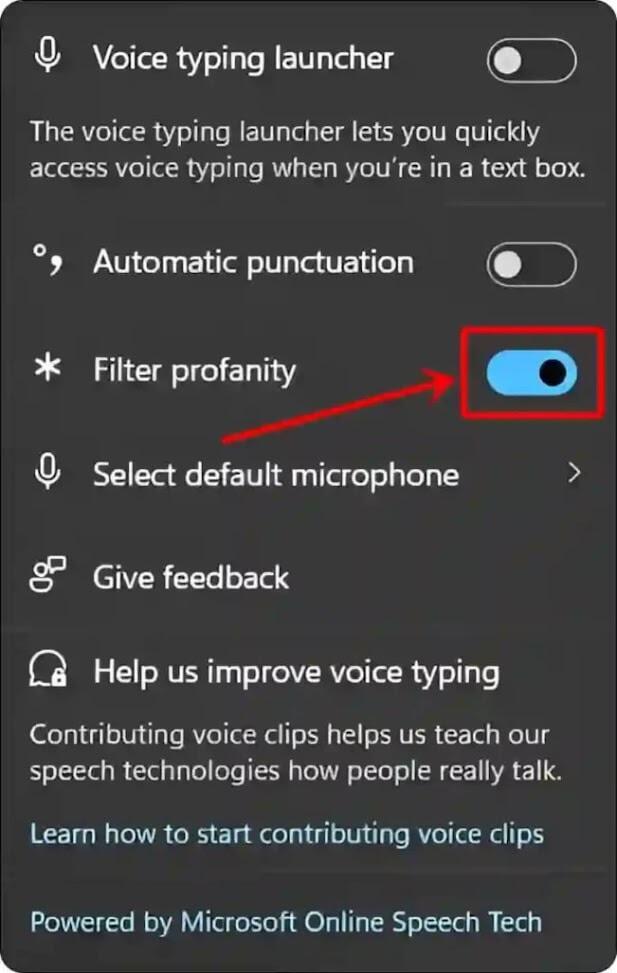
Microsoft adds a profanity filter setting for voice typing in the latest Windows 11 test builds - now you can turn it off and you can swear at your computer (and have it transcribe your foul language). https://blogs.windows.com/windows-insider/2025/06/19/announcing-windows-11-insider-preview-build-27881-canary-channel/ #Windows #Windows11 #Microsoft #VoiceTyping #ProfanityFilter
If you're using an android phone you need this:
https://keyboard.futo.org/
https://www.youtube.com/watch?v=cFP5bp3JvaU
I have been on the lookout for a sensible Gboard replacement that wasn't making my (voice) typing experience painful, and so far only FUTO Keyboard managed to provide that.
It has really good offline voice typing as well, which is something I use a lot.
I can not recommend this enough!
#FUTO #Android #Privacy #SpeechToText #VoiceTyping #Swype #Gboard #Heliboard #Florisboard
So I finally got some time to experiment with #VoiceTyping for #Luanti. But then I realized both main #MinetestCTF server and #JMA have disabled CSMs.
I asked Nanowolf to enable it and he agreed. LandarVargan hasn't given a reply yet.
#minetestcapturetheflag #foss #fossgaming #gaming #opensource #opensourcegaming
Joplin App Notes: Voice Typing and OCR
Joplin is a multiplatform free software that allows us to take and organise notes in markdown: we can link notes, attach audio recordings, drawings, files, or photos to each note, and also save a URL, website, or part of it using the Web Clipper (browser extension).
Recent versions of the app for mobile (not available on the desktop app) also allow for what is called as Voice typing, which means you can talk to the app and it transforms what you say into text. I believe it only works with English (I tried to speak in Portuguese and it was translated to English text), but I’m finding it quite useful. You need to create a new note, click on the three dots on the top right corner and choose Voice typing.
On the desktop app (not available on the mobile app), another nice feature is the ability to extract text from images or pdfs. Just right click on the file and choose View OCR text. You need to make sure it is enabled in the settings.
#FLOSS #Joplin #MobileApp #NoteTaking #NotesApp #OCR #Organization #Technology #VoiceTyping


Windows 11 now lets you disable the voice typing profanity filter—no more asterisks censoring your words. Press Win+H, click the gear icon, and toggle "Filter profanity" off. Available in Insider builds 26120.3941 and 26200.5570. #Windows11 #VoiceTyping
Lilbits: Recall, AI-enhanced search, and Click to Do are rolling out for Copilot+ PCs, Microsoft also preview support for swearing while using voice typing
Microsoft’s Copilot+ PC platform was predicated on the idea that Windows computers with processors that have newfangled neural processing units would be able to do all sorts of nifty things with AI. But the most impressive features that Microsoft promised have been slow to arrive… after the company faced backlash over the potential privacy and security implications.
Now Microsoft is […]
#clickToDo #cosmic #lilbits #microsoft #profanityFilter #recall #retroid #swearing #tariffs #voiceTyping #windows #windowsMaps #windowsSearch

How to Turn On or Off Profanity Filter for #VoiceTyping in #Windows11
https://www.elevenforum.com/t/turn-on-or-off-profanity-filter-for-voice-typing-in-windows-11.35547/

Microsoft is adding a "filter profanity" toggle to Windows voice typing. This lets you DISABLE the filter that is in place by default so that your curse words are spelled out without any * symbols. Apparently this feature was based on "top customer feedback." https://blogs.windows.com/windows-insider/2025/04/25/announcing-windows-11-insider-preview-build-22635-5305-beta-channel/ #VoiceTyping #Windows #Microsoft #Profanity
You may recall, I was trying to find a #privacy-respecting keyboard for Android that could work with FUTO Voice Input.
The best I could figure out was #FlorisBoard.
But suddenly people who made Voice Input published a keyboard...
And it's all I could ever ask for, plus the voice recognition is a couple times faster! It's INSANE.
The software isn't exactly #opensource, it's what I'd call "fair software" (referencing #freesoftware).
One my favorite Windows 10/11 keyboard shortcuts remains Win-H for "voice typing" or voice-to-text recognition. Easy to access, super accurate & built-in the OS.
Here's the list of special phrases to say for punctuation & voice commands:
https://support.microsoft.com/en-us/windows/use-voice-typing-to-talk-instead-of-type-on-your-pc-fec94565-c4bd-329d-e59a-af033fa5689f
#windows10 #windows11 #voicetotext #voicecommand #speechtotext #voicetyping