#speechrecognition

2026-02-10

💬 Dragon speech recognition served us well, but it's 2026.

Why modern professionals are switching to browser-based voice AI:

🔴 Dragon: $300+, desktop-only, limited apps
🟢 Genie 007: £5/mo, works anywhere, learns your style

Dragon converts speech → text
Genie 007 converts speech → ACTION

"Reply to this email professionally" → Done. Automatically.

The evolution is here → genie007.co.uk

Microsoft Research (@MSFTResearch)

음성인식(저자원 언어), 의료 파운데이션 모델, 우주 기반 머신러닝, 뇌-컴퓨터 인터페이스 등 여러 첨단 AI 연구·응용 주제를 요약한 링크를 공유한 트윗입니다. Microsoft 계열의 발표/리포트로 보이며 각 분야의 최신 연구 동향과 실용화 가능성을 안내합니다.

x.com/MSFTResearch/status/2020

#speechrecognition #medicalai #spaceml #bci

Prince Canuma (@Prince_Canuma)

Qwen3-ASR-0.6B(Alibaba Qwen)를 iPad Pro M1에서 완전 온디바이스로 실행해 클라우드/API 호출 없이 동작한다고 발표했다. 새 MLX-Audio-Swift SDK로 구현되었고 1.9GB RAM 환경에서 초당 약 25토큰 처리 성능을 보였음. 프라이버시·저지연 온디바이스 음성인식과 경량화 SDK 측면에서 주목할 만한 소식.

x.com/Prince_Canuma/status/202

#qwen #asr #ondevice #speechrecognition #sdk

Every day I bask in my own stuSerpico@framapiaf.org
2026-02-07

The state of #speechrecognition circa 20 years ago

Source : ER S13E04 timestamp 27:56
Original air date 12 October 2006
according to wikidata.org/wiki/Q18002348

Vivia 🦆🍵:rustacean_ferris:vivia@toot.cat
2026-02-05

Σήμερα συνειδητοποίησα (κατά λάθος) ότι το YouTube πιστεύει πως μπορεί να εμφανίζει αυτόματους υποτίτλους στις ψαλμωδίες. Ουδέν σχόλιον.

Πηγή: youtube.com/watch?v=DmFlY-cdEoU

#σκοιλ_ελικικου #gibberish #SpeechRecognition

όργανων θιασπίστε θεόςγερεύει πάνοφεφώτιεορτν δώ της πίστετης υπέσω
το κνύλιον

新清士@(生成AI)インディゲーム開発者 (@kiyoshi_shin)

알리바바의 Qwen3-ASR에 7초 분량의 음성을 입력해 아스키(ASCII) 원고의 앞부분을 읽게 해본 실험 결과를 공유합니다. 약 30초 분량의 출력에서 원음의 분위기가 상당히 재현되었고, 심지어 3초만으로도 재현 가능하다고 해설되어 소수 초 샘플로도 음성 특성을 복제하는 고성능 음성 모델 능력을 보여줍니다.

x.com/kiyoshi_shin/status/2019

#alibaba #qwen3asr #speechrecognition #voicecloning

Simon Willison (@simonw)

Hugging Face 스페이스의 mistralai/Voxtral-Mini-Realtime 데모 추천: 'No microphone found' 메시지는 무시하고 'Record'를 눌러 브라우저에서 마이크 권한을 허용하면 해결되며, 거의 실시간으로 매우 정확한 음성 전사를 보여준다는 평가.

x.com/simonw/status/2019116012

#huggingface #speechrecognition #realtime #mistral #voxtral

RubikChatrubikchat
2026-01-30

If you’re diving into Voice AI development, building reliable and scalable voice agents isn’t as simple as just integrating speech recognition.

Learn practical solutions to these challenges, powerful AI voice agents that actually work. 🤖✨

👉 Read the full article here:
medium.com/@addisonolivia721/3

vLLM (@vllm_project)

Alibaba의 Qwen3-ASR 출시 소식과 vLLM의 출시 당일(day-0) 지원 발표입니다. Qwen3-ASR은 52개 언어를 지원하고 0.6B 모델에서 2000배 처리량을 달성했으며, 노래 음성 인식 기능과 1.7B 모델에서의 SOTA 정확도를 제공한다고 소개되어 vLLM에서 즉시 서빙 가능함을 알립니다.

x.com/vllm_project/status/2016

#qwen3asr #vllm #speechrecognition #multilingual #asr

2026-01-29

Qwen3-ASR: Gia đình mô hình nhận diện giọng nói & căn chỉnh âm-thứ 52 ngôn ngữ, 11 ngôn ngữ. Đa chức năng, độ tin cậy cao, sẵn sàng sản xuất. #AI #SpeechRecognition #CôngNghệ #SángTạoAI 🤖

reddit.com/r/singularity/comme

AssemblyAI (@AssemblyAI)

자동화 시스템에 같은 말을 여러 번 반복하게 되는 경험을 언급하며, 조사 수치로 55%가 최우선 불만을 '반복해야 함'으로, 45%가 '단어를 자주 잘못 인식함'으로, 거의 절반은 문장 중간에 대화가 끊긴다고 보고되었다고 제시함. 음성·대화형 AI의 인식 정확도와 문맥 연속성 개선 필요를 시사하는 사용자 조사 결과.

x.com/AssemblyAI/status/201584

#voice #ux #speechrecognition #conversationalai

Lotto (@LottoLabs)

Whisper를 이용한 턴 기반 실시간 번역 앱을 지금 당장 만들어야 한다고 제안하는 트윗입니다. 실시간 음성인식(Whisper)과 번역을 결합한 대화형·턴 기반 인터페이스라는 혁신적 사용 사례를 촉구하는 내용입니다.

x.com/LottoLabs/status/2011907

#whisper #translation #realtime #speechrecognition #app

AI Daily Postaidailypost
2026-01-14

Deepgram's massive $130M Series C funding signals a major leap in Voice AI technology! 🚀 The San Francisco startup just hit a $1.3B valuation, pushing boundaries in speech recognition and language understanding. Curious how AI is transforming how we interact with technology? This breakthrough is worth exploring.

🔗 aidailypost.com/news/deepgram-

2026-01-09

@Cheeseness I hadn't encountered Julius for #SpeechRecognition before - thanks for the pointer!

AI Daily Postaidailypost
2025-12-17

A new open‑source audio dataset on Hugging Face is raising the bar for speech recognition and audio classification. It covers diverse accents, real‑world noise, and precise timing, helping multimodal AI models get more robust. Dive in to see how MRSAudio can boost your projects!

🔗 aidailypost.com/news/audio-dat

2025-12-17

I Wanted Podcast Transcriptions. iOS 26 Delivered (and Nearly Melted My Phone).

Testing iOS 26’s on-device speech recognition: faster than realtime, but your phone might disagree

Apple’s iOS 26 introduced SpeechTranscriber – a promise of on-device, private, offline podcast transcription. No cloud, no subscription, just pure silicon magic. I built it into my RSS reader app. Here’s what actually happened.

The Setup

The Good News: It’s Actually Fast

EpisodeDurationTranscription TimeRealtime FactorWordsWords/secTalk Show #4361h 35m15m 22s6.2x17,30318.8Upgrade #5941h 46m20m 4s5.3x19,97516.6ATP #6681h 54m24m 49s4.6x23,89216.0

4.6x to 6.2x faster than realtime. Nearly 2-hour podcasts transcribed in under 25 minutes. The Neural Engine absolutely crushes this.

The Pipeline Breakdown

The transcription happens in two phases (example from Upgrade #594):

  1. Audio Analysis: 2m 2s
    • Initial pass through the audio file
    • Roughly 1 second of analysis per minute of audio
  2. Results Collection: 18m 0s
    • Iterating through ~1,288 speech segments
    • Each segment yields transcribed text

The Bad News: Thermal Throttling Is Real

During my first test, I made a critical mistake: running two transcriptions simultaneously while charging.

The result? My phone got noticeably hot. Battery optimization warnings appeared. And performance dropped dramatically:

ConditionRealtime FactorPerformance HitSingle transcription4.6x – 6.2xBaselineTwo parallel transcriptions2.7x46% slower

The logs showed alternating progress updates as iOS juggled both workloads:

🎙️ 📝 Progress: 34% - 88 segments   // Transcription A🎙️ 📝 Progress: 44% - 98 segments   // Transcription B🎙️ 📝 Progress: 37% - 98 segments   // Transcription A

The Neural Engine throttles hard when thermals get bad. When I ran a single transcription without charging, the ETA stayed consistent and completed on schedule.

The Ugly: iOS Kills Background Tasks

Even with BGTaskScheduler, iOS terminated my background transcription:

🎙️ Background transcription task triggered by iOS⏱️ Background transcription task expired (iOS terminated it)

For long podcasts, you need to keep the app in foreground. iOS’s aggressive app suspension doesn’t play nice with hour-long ML workloads.

AI Chapter Generation: The Real Win

Here’s where it gets interesting. Once you have a transcript, generating AI chapters is blazingly fast.

Note: ATP, Talk Show, and Upgrade already include chapters via ID3 tags – this is an experiment to see what on-device AI can generate. But Planet Money doesn’t have chapters, making it a real use case where AI generation adds genuine value.

And we’re not alone in this approach. As Mike Hurley and Jason Snell discussed on Upgrade #594, Apple is doing exactly this in iOS 26.2’s Podcasts app:

“One of the most interesting things to me is the changes in the podcast app in 26.2… AI generated chapters for podcasts that do not support them… They are creating their own chapters based on the topics.”

Jason nailed the insight: “The transcripts [are] a feature that unlocks a lot of other features, because now they kind of understand the content of the podcast.”

That’s exactly what we’re doing here – using on-device transcription as a foundation for AI-powered chapter generation:

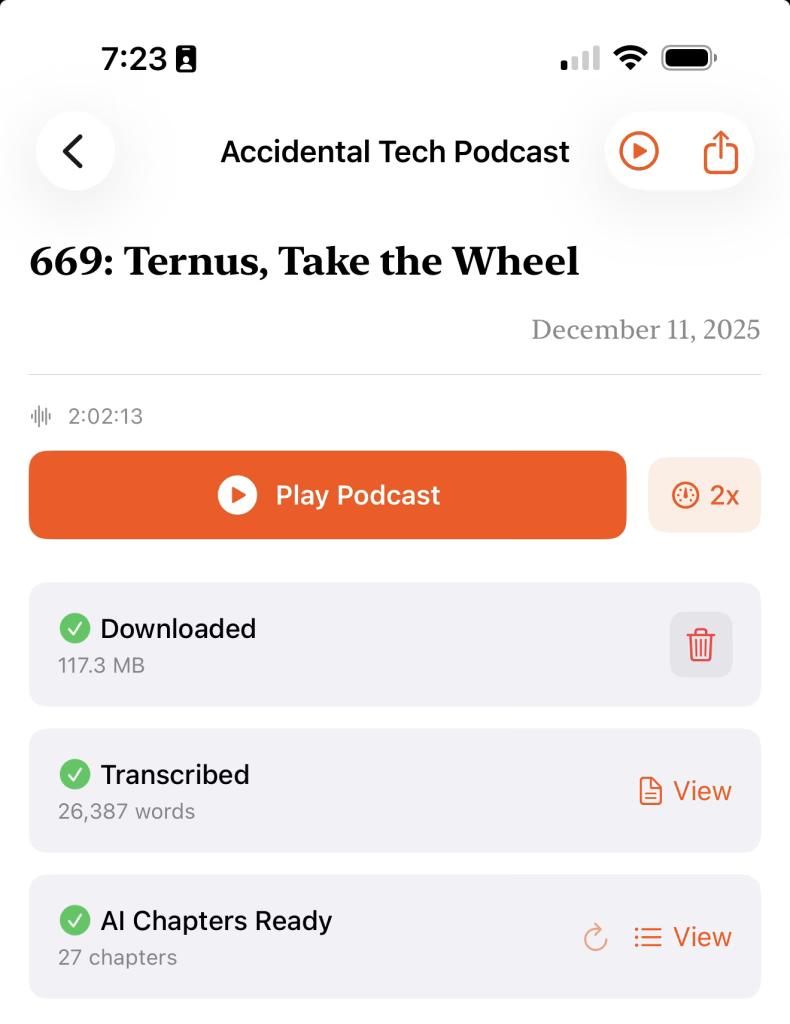
EpisodeTranscript SizeChapters GeneratedTimeATP #669143,603 chars (~26,387 words)27 chapters2m 1sTalk Show #436~17,303 words13 chapters1m 40s

The AI identified topic changes, extracted key phrases for timestamps, and generated descriptive chapter titles – all in under 2 minutes for multi-hour podcasts.

Sample generated chapters:

📍 0:00-2:18: Snowfall in Richmond📍 42:43-49:11: Intel-Apple Chip Collaboration Speculations📍 62:46-65:00: Executive Transitions at Apple📍 95:56-105:04: Core Values and Apple's Evolution

The Code

Using iOS 26’s SpeechTranscriber is surprisingly clean:

@available(iOS 26.0, *)func transcribe(fileURL: URL) async throws -> String {    let locale = try await findSupportedLocale(preferring: "en")    let transcriber = SpeechTranscriber(locale: locale, preset: .transcription)    let analyzer = SpeechAnalyzer(modules: [transcriber])    let audioFile = try AVAudioFile(forReading: fileURL)    if let lastSample = try await analyzer.analyzeSequence(from: audioFile) {        try await analyzer.finalizeAndFinish(through: lastSample)    }    var transcription = ""    for try await result in transcriber.results {        if result.isFinal {            transcription += String(result.text.characters) + " "        }    }    return transcription}

Fast vs Accurate Mode: A Surprising Finding

iOS 26 offers two main transcription presets:

  • .transcription – Standard accurate mode
  • .progressiveTranscription – “Fast” mode with progressive results

I assumed Fast mode would be… faster. The results were mixed.

EpisodeModeConditionRealtime FactorWords/secTalk Show #436AccurateSolo, cold6.2x18.8Upgrade #594AccurateSolo5.3x16.6ATP #668AccurateSolo4.6x16.0Planet MoneyFastSolo3.8x12.2Planet MoneyAccurateSolo, warm3.5x11.4

On the same 31-minute episode, Fast mode (3.8x) was slightly faster than Accurate (3.5x). But both were significantly slower than the longer episode tests – likely due to residual heat from previous runs.

The “progressive” preset appears optimized for live/streaming transcription. For batch processing of pre-recorded files, results are similar when thermals are equivalent.

Lesson: Don’t assume “fast” means faster for your use case. Profile both.

Recommendations

  1. Use .transcription for downloaded files – It’s actually faster for batch processing
  2. Don’t charge while transcribing – Thermal throttling is real
  3. One transcription at a time – The Neural Engine doesn’t parallelize well
  4. Keep the app in foreground – iOS will kill background ML tasks
  5. Expect ~5x realtime – About 12-13 minutes per hour of audio under ideal conditions

The Verdict

iOS 26’s on-device transcription is genuinely impressive:

  • Privacy: Audio never leaves your device
  • Speed: 5x faster than realtime (when not throttled)
  • Quality: Surprisingly accurate for conversational podcasts
  • Offline: Once the model is downloaded, no internet required

The main gotchas are thermal management and iOS’s background task limitations. But for a first-generation on-device transcription API? Apple’s Neural Engine delivers.

Now if you’ll excuse me, I have 26,387 words of ATP to search through.

Tested on iPhone 17 Pro Max running iOS 26.x. Your mileage may vary on older devices.

Raw Test Data

Upgrade #594

  • Audio Duration: 1h 46m 24s (106 min)
  • Audio Analysis Phase: 2m 2s
  • Results Collection Phase: 18m 0s
  • Total Transcription Time: 20m 4s
  • Realtime Factor: 5.3x (faster than audio playback)
  • Words Transcribed: 19,975
  • Processing Rate: 16.6 words/sec
  • Segments Processed: 1,288

ATP #668

  • Audio Duration: 1h 53m 54s (114 min)
  • Audio Analysis Phase: 2m 20s
  • Results Collection Phase: 22m 28s
  • Total Transcription Time: 24m 49s
  • Realtime Factor: 4.6x (faster than audio playback)
  • Words Transcribed: 23,892
  • Processing Rate: 16.0 words/sec
  • Segments Processed: 1,557

ATP #669 Chapter Generation

  • Audio Duration: 2h 2m 13s (122 min)
  • Transcription Size: 143,603 characters, ~26,387 words
  • Chapters Generated: 27
  • Total Time: 2m 1s
  • Processing Rate: ~219 words/sec

Talk Show #436

  • Audio Duration: 1h 35m 52s (95 min)
  • Audio Analysis Phase: 1m 37s
  • Results Collection Phase: 13m 44s
  • Total Transcription Time: 15m 22s
  • Realtime Factor: 6.2x (faster than audio playback) ← Fastest test!
  • Words Transcribed: 17,303
  • Processing Rate: 18.8 words/sec
  • Segments Processed: 971

Talk Show #436 Chapter Generation

  • Transcription Size: ~17,303 words
  • Chapters Generated: 13
  • Total Time: 1m 40s

Planet Money – Chicago Parking Meters (Fast Mode)

  • Audio Duration: 30m 56s (31 min)
  • Audio Analysis Phase: 1m 3s
  • Results Collection Phase: 7m 5s
  • Total Transcription Time: 8m 9s
  • Realtime Factor: 3.8x
  • Words Transcribed: 5,981
  • Processing Rate: 12.2 words/sec
  • Segments Processed: 472
  • Mode.progressiveTranscription (Fast)

Planet Money Chapter Generation (Fast Mode)

  • Transcription Size: ~5,981 words
  • Chapters Generated: 8
  • Total Time: 31.9 sec

Planet Money – Accurate Mode (Parallel Stress Test)

  • Audio Duration: 30m 56s (31 min)
  • Audio Analysis Phase: 1m 9s
  • Results Collection Phase: 10m 8s
  • Total Transcription Time: 11m 19s
  • Realtime Factor: 2.7x ← Severely throttled (ran 2 simultaneous)
  • Words Transcribed: 5,983
  • Processing Rate: 8.8 words/sec
  • Segments Processed: 476
  • Mode.transcription (Accurate)
  • Note: Ran in parallel with another transcription – 46% performance hit

Planet Money – Accurate Mode (Solo, Warm Device)

  • Audio Duration: 30m 56s (31 min)
  • Audio Analysis Phase: 1m 11s
  • Results Collection Phase: 7m 32s
  • Total Transcription Time: 8m 44s
  • Realtime Factor: 3.5x ← Device still warm from previous tests
  • Words Transcribed: 5,983
  • Processing Rate: 11.4 words/sec
  • Segments Processed: 477
  • Mode.transcription (Accurate)
  • Note: Slightly slower than Fast mode on same episode (thermal impact)

Device Observations

  • Thermal: Significant heat when running multiple transcriptions while charging
  • Thermal Carryover: Running tests back-to-back shows degraded performance (6.2x cold → 3.5x warm)
  • Cool-down Recommended: Wait 5-10 minutes between long transcriptions for optimal performance
  • Battery Notifications: Battery optimization warnings triggered during parallel operations
  • Background Tasks: iOS terminated BGTaskScheduler tasks during long transcriptions
  • Beta WarningCannot use modules with unallocated locales [en_US (fixed en_US)] – appears in logs but doesn’t block functionality

#AppleIntelligence #iOS26 #NeuralEngine #onDeviceML #podcastTranscription #SpeechRecognition #SpeechTranscriber #Swift

Podcast transcription and chapter generation
Tanguy ⧓ Herrmanndolanor@hachyderm.io
2025-12-08

TL;DR: I'm using WhisperIMEplus on my phone, and I think I will finally live in the XXIst century with my phone.
github.com/woheller69/whisperI

I refrained myself from using speech recognition on my android since the beginning because I didn't like the idea of my voice used for other reasons than my need which would have been speech-to-text.

And having on-device speech recognition was pretty niche for a while (I was interested in mycroft and snips at that time). Then there was Mozilla with CommonVoice and deepspeech, unfortunately, DeepSpeech has been shut down (it seems), and the results are far from the Whisper model from OpenAI.

I'm clearly not an OpenAI fan (if you haven't figured it out yet, you will soon if you follow me), but Whisper seems to be the best thing that got out of this, mostly because it's way more open than any other things from OpenAI which are not open at all.

Anyway, I found that now, there is a project called WhisperIMEplus that is used as a keyboard on my android, and it processes my voice, locally, on my device. And the app has NO internet connection rights, so, even if OpenAI added some backdoor to send data online in their Whisper model, well, Android app rights wouldn't allow it.

I'm fine with all of this, so now, I can finally take notes by talking to my phone, in English and French, without having second thoughts about it.

It's good when technology helps you, instead of trying to screw you in different and sneaky ways.

#SpeechRecognition #android #privacy #SpeechToText #OpenAI #whisper #ai

2025-11-24

@linuxiac

> Removing PulseAudio..continuing the shift to PipeWire

My #GoPiGo3 robot just shuddered in fear of becoming deaf and mute.

#espeak-ng #Vosk #SpeechRecognition #TTS #LinuxAudio

Debby ‬⁂📎🐧:disability_flag:debby@hear-me.social
2025-11-21

🗣️🎤📝 :linux: Speech to Text and Text to Speech on GNU/Linux :disability_flag: 📝🔊💻

Why This Matters to Me (and Maybe You Too)

If you’re anything like me—a Linux user who counts on voice typing and TTS because of visual impairment—you know that accessibility is not a luxury, it’s a necessity. Speaking from experience as someone who depends on voice typing (and TTS) , the quest for a seamless, local, FLOSS speech-to-text (STT) setup on Linux can be frustrating.
Here’s how you can succeed with modern tools using Linux. FLOSS means freedom and privacy; working locally means real control.
Let’s dive in! I’ll tell you what I’ve learned and what I use—and hope you’ll share your favorite tools or tips!

System-Wide Voice Keyboard: Speak Directly in Any App

Want to speak and have your words typed wherever your cursor is—be it a terminal, browser, chat, or IDE? Here’s what actually works and how it feels day-to-day:

- Speak to AI (Offline, Whisper-based, global hotkeys)
This tool is my current go-to. It uses Whisper locally, lets you use global hotkeys (configurable) to type into any focused window, and doesn’t need internet. Runs smoothly on X11 and Wayland; just takes a bit of setup (AppImage available!).
GitHub Repo github.com/AshBuk/speak-to-ai) | Dev.to Post dev.to/ashbuk/i-built-an-offli)

- DIY: RealtimeSTT + PyAutoGUI
For the true tinkerers, RealtimeSTT plus a Python script lets you simulate keystrokes. You control every step, can lower latency with your tweaks, but you’ll need to be comfortable with scripting.
RealtimeSTT Guide github.com/KoljaB/RealtimeSTT#)

- Handy (Free/Libre, offline, Whisper-based, acts as a keyboard)
I’ve read lots of positive feedback on Handy—even though I haven’t tried it myself. The workflow is simple: press a hotkey, speak, and Handy pastes your text in the active app. It’s fully offline, works on X11 and Wayland, and gets strong accuracy thanks to Whisper.
Heads up: Handy lets you pick your own shortcut key, but it actually overrides the keyboard shortcut for start/stop recording. That means it can clash with other tools that depend on major shortcut combos—including Orca’s custom keybindings if you use a screen reader. If your workflow relies on certain shortcuts, this might need adjustment or careful planning before you commit.
GitHub Repo github.com/cjpais/Handy) | Demo handy.computer)

Real-Time Transcription in a Window (Copy/Paste Workflow)

If you’re okay with speaking into a dedicated app, then copying, these options offer great GUIs and power features:

- Speech Note by @mkiol mastodon.social/@mkiol
FLOSS, offline, multi-language GUI app—perfect for quick notes and batch transcription. Not a system-wide keyboard, but super easy to use and works on both desktops and Linux phones.
Flathub flathub.org/apps/net.mkiol.Spe | LinuxPhoneApps linuxphoneapps.org/apps/net.mk)

- WhisperLive (by Collabora)
Real-time transcription in a terminal or window—great for meetings, lectures, and captions. Manual copy/paste required to get the text to other apps.
GitHub Repo github.com/collabora/WhisperLi)

More Tools for Tinkerers

If you like building your own or want extra control, check out:
- Vosk: Lightweight, lots of language support. GitHub alphacephei.com/vosk/)
- Kaldi: Powerful, best for custom setups. Website kaldi-asr.org/)
- Simon: Voice control automation. Website simon-listens.org/)
- voice2json: Phrase-level and command recognition. GitHub github.com/synesthesiam/voice2)

Pro Tips

- Desktop Environment: X11 vs. Wayland affects how keyboard hooks and app focus actually operate.
- Ready-Made vs. DIY: If you want plug-and-play, try Speech Note or Handy first. Into automation or customization? RealtimeSTT is perfect.
- Follow the Community: @thorstenvoice offers tons of open-source voice tech insights.

Screen Reader Integration

Looking for robust screen reader support? Linux has you covered:

- Orca (GNOME/MATE): The most customizable GUI screen reader out there. The default voice (eSpeak) is robotic, but you can swap it for something better and fine-tune verbosity so it reads only what matters.
- Speakup: Console-based, ideal for terminal.
- Emacspeak: The solution for Emacs fans.

💡 Orca is part of my daily toolkit. It took time to get the settings just right (especially verbosity!) but it’s absolutely worth it. If you use a screen reader—what setup makes it bearable or even enjoyable for you?

Final Thoughts

If you’re starting from scratch, try Handy for direct typing (just watch those shortcuts if you use a screen reader!) or Speech Note for GUI-based transcription. Both are privacy-friendly, local, and accessible—ideal for everyday Linux use.

Is there a FLOSS gem missing here?
Sharing what works (and what doesn’t!) helps the entire community.

Resources:
Speech Note on Flathub flathub.org/apps/net.mkiol.Spe
Handy GitHub github.com/cjpais/Handy
Speak to AI Guide dev.to/ashbuk/i-built-an-offli
RealtimeSTT github.com/KoljaB/RealtimeSTT

#Linux #SpeechToText #FLOSS #Accessibility #VoiceKeyboard #ScreenReader #Whisper #Handy #SpeechNote #OpenSource #Community #voicetyping #LocalSTT #TTStools #SpeechRecognition #A11y #Linuxtools #Voicekeyboard #Whisper #Handy #speech-to-text #SpeechNote #review #ScreenReaders #ORCA #FOSS

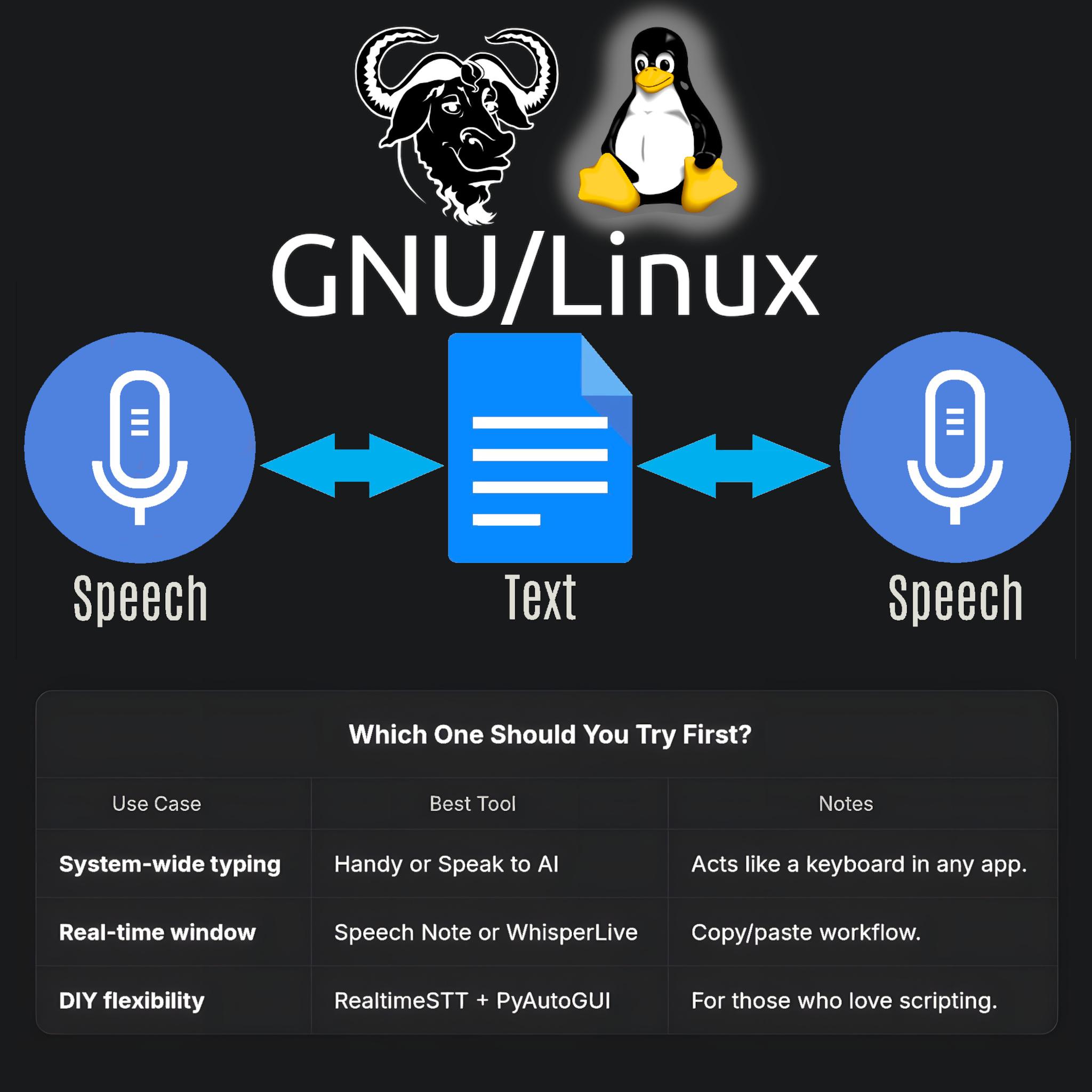
Speech to Text and Text to Speech on GNU/Linux 
A diagram showing the flow of speech to text and back to speech on GNU/Linux, with microphone, text document, and Linux logo icons illustrating open-source voice tools flexibility. 

Quick Comparison Table:
 Which One Should You Try First?
| Use Case               | Best Tool               | Notes                                  |
--------------------------
| System-wide typing | Handy or Speak to AI     | Acts like a keyboard in any app.     |
| Real-time window   | Speech Note or WhisperLive | Copy/paste workflow.                  |
| DIY flexibility    | RealtimeSTT + PyAutoGUI | For those who love scripting.        |

Client Info

Server: https://mastodon.social
Version: 2025.07
Repository: https://github.com/cyevgeniy/lmst