#ResumeTemplate

Career ReloadCareerReload
2026-02-02

What exactly makes a document readable by ATS, how you can build one yourself, and 17 top ATS-friendly resume templates to get you started immediately.

Read more: careerreload.com/best-ats-frie

2026-01-29

A modern, grid-based resume template inspired by technology, data, and clarity — built for software engineers and digital professionals who want a CV that feels current, clean, and confident.

CVIYA

GreenGrid – Modern Tech Resume Template
2026-01-25

Do Recruiters Really Care About the Resume Design?

Visual competence acts as your silent ambassador before you ever enter the interview room. You simply cannot separate the message from the medium in professional communication. Therefore, resume design dictates how a recruiter perceives your professional value within seconds. Most candidates mistakenly believe that content alone carries the weight of their application. However, a messy layout instantly signals a lack of attention to detail. Consequently, the recruiter rejects the application without reading a single bullet point. We call this phenomenon the “Cognitive Friction Index.” This metric measures how much effort a human brain requires to process your document.

High friction leads to immediate rejection. Conversely, excellent resume design smooths the path for the reader. It transforms complex career data into digestible insights. Thus, designers and creatives must prioritize structure over mere decoration. We will analyze the specific mechanics of successful CVs. This article introduces the “Functional Clarity Matrix,” a framework for evaluating your document’s effectiveness. We will also explore why professional tools like Adobe InDesign outperform basic text editors.

Do recruiters really care about the resume design or just the data?

Recruiters absolutely care about resume design, but not for the reasons you might think. They do not look for artistic flair or decorative elements. Instead, they seek efficiency, hierarchy, and immediate readability. A recruiter reviews hundreds of applications daily. Therefore, they develop a subconscious filter against clutter. Your resume design must respect their time.

The “Six-Second Scan Barrier”

Industry data suggests recruiters spend approximately six seconds on their initial scan. We define this critical window as the “Six-Second Scan Barrier.” Your resume design must communicate three things within this timeframe. First, it must show your role. Second, it must display your current company. Third, it must highlight your total years of experience. If your layout hides this data, you fail the test. Consequently, the recruiter moves to the next candidate.

Layout structure serves as the primary tool to break this barrier. You should use a grid-based approach. This technique organizes information into logical zones. For example, a sidebar for skills allows for quick scanning. Meanwhile, the main column details your work history. This separation reduces the cognitive load on the reader. Furthermore, clear section headers act as signposts. They guide the recruiter’s eye exactly where you want it to go. Thus, good resume design effectively manipulates the reader’s attention.

The “Visual ROI” of Typography

Typography constitutes the backbone of effective resume design. However, many creatives choose fonts based on personality rather than legibility. This mistake destroys your Visual ROI (Return on Investment). You must prioritize high x-height sans-serif fonts or sturdy serif fonts. For instance, Helvetica, Proxima Nova, or Garamond work exceptionally well. They remain readable even at small sizes.

Bad typography hurts your credibility. Specifically, tight leading (line spacing) makes text look like a solid block. Recruiters ignore text blocks. Therefore, you must increase leading to let the text breathe. Additionally, kerning (letter spacing) matters. Poor kerning suggests a lack of professional polish. As a creative, you cannot afford these micro-errors. They scream incompetence. Your resume design ultimately proves your mastery of visual communication principles.

Why does ATS compatibility dictate your layout choices?

You face a machine before you ever face a human. Applicant Tracking Systems (ATS) parse your document to extract data. Unfortunately, complex resume design often confuses these bots. If the ATS cannot read your file, the human recruiter never sees it. Therefore, we must discuss the “ATS-Aesthetic Equilibrium.”

The “ATS-Aesthetic Equilibrium”

This framework requires you to balance visual appeal with machine readability. You might want to use infographics to show your skills. However, an ATS sees a graphic as a blank space. Consequently, your skill rating drops to zero. You must use text to describe your skills. A simple bar chart is fine for humans, but back it up with keywords.

Additionally, columns cause parsing errors in older systems. The bot might read straight across both columns, jumbling your text. Therefore, modern resume design favors single-column layouts for the main content. Alternatively, you can use robust header tags to define sections. Professional software handles this tagging better than word processors.

Keywords are design elements

You must treat keywords as vital components of your resume design. They need visual prominence. Do not bury technical skills in a dense paragraph. Instead, list them clearly. Bold your job titles. Use bullet points to separate achievements. This structure helps both the bot and the human. Furthermore, it integrates SEO principles into your personal branding. You are essentially optimizing your paper website for a search engine.

How does Visual Hierarchy influence the recruiter’s decision?

Visual hierarchy tells the reader what matters most. Without it, your resume design becomes a flat, monotonous list. You must establish a clear order of importance. Name and title come first. Experience follows. Education usually comes last for experienced professionals.

Implementing the “Z-Pattern Layout”

Western readers scan content in a Z-pattern. They start top-left, move across, cut diagonally, and read across the bottom. Your resume design should leverage this natural behavior. Place your most critical value proposition in the top-left quadrant. This area acts as prime real estate. Do not waste it on a massive logo. Use it for your summary or current title.

Contrast creates hierarchy. You should use bold weight for titles and regular weight for body text. However, avoid using more than two font families. Too many fonts create visual noise. Consistency creates trust. A chaotic resume design implies a chaotic employee. Conversely, a structured layout implies an organized mind.

White space is a functional asset

White space is not empty space; it is an active design element. It provides the eye with a resting place. Furthermore, it groups related information. Tight margins make a document feel claustrophobic. You should use generous margins to frame your content. This approach elevates the perceived value of the document. It looks sophisticated. It looks intentional. Therefore, mastery of white space defines premium resume design.

Why should you use professional InDesign templates?

Many candidates rely on generic Word templates. However, these tools limit your creative control. They frustrate users with jumping text and rigid formatting. For a truly professional resume design, you need professional software. Adobe InDesign remains the industry standard for layout.

This professional resume template for Adobe InDesign was designed by Roverto Castillo. Download the template from Adobe Stock

The precision of InDesign

InDesign offers pixel-perfect control over typography and grids. You can set global styles for headers and body text. This feature ensures absolute consistency throughout the document. Moreover, InDesign handles PDF export better than any other tool. It preserves layers and text tags. This aids in maintaining ATS compatibility.

Customization vs. Cookie-Cutter

Using a pre-made template is acceptable, provided you customize it. High-quality resume design templates for InDesign provide a strong foundation. They set up the grid and styles for you. Then, you inject your personality. You adjust the color palette. You refine the typography. This process saves time while ensuring a unique result.

Visual creatives must demonstrate their software skills. Submitting a Word document suggests you do not know the Adobe Creative Cloud. Therefore, using InDesign serves as a portfolio piece in itself. It proves you know how to handle professional typesetting.

What are the future trends in resume architecture?

We predict a shift toward “Hybrid-Interaction Resumes.” These documents function as static PDFs but contain live links to deep portfolios. The resume design of the future acts as a portal. It serves as a landing page for your professional identity.

The rise of “Modular Content Blocks.”

Future resume design will rely on modularity. You will swap content blocks based on the specific job application. This approach allows for hyper-personalization. You retain the core design structure but modify the narrative. This strategy aligns with the “Answer Engine Optimization” trend. You answer the specific needs of the employer directly.

Furthermore, we anticipate the decline of the “objective statement.” It will be replaced by a “Value Proposition Header.” This section will focus on what you offer, not what you want. Your resume design must highlight this proposition visually. It needs to pop off the page.

Authenticity through minimalism

Complex visuals will fade away. “Functional Minimalism” will dominate the landscape. This style strips away all non-essential elements. It focuses entirely on data clarity. Recruiters prefer this style because it is honest. It hides nothing. Therefore, the best resume design is often the simplest one.

FAQ: Common Questions About Resume Strategy

Is a two-column resume design bad for ATS?

Modern ATS can parse two-column layouts if the backend structure is correct. However, single-column layouts remain the safest bet for older systems. If you use columns, ensure you use distinct text boxes or tables.

Should I include a photo in my resume design?

In the US and UK, you should generally avoid photos to prevent bias. However, in many European countries, a professional photo is standard. Always research the specific cultural norms of the target company.

Which font is best for a modern CV?

Clean sans-serif fonts like Helvetica, Roboto, or Open Sans offer the best readability. They render well on screens and in print. Avoid decorative scripts or Times New Roman, which looks dated.

How long should my resume be?

For most professionals, one page is ideal. However, senior creatives with extensive experience can use two pages. Your resume design should never sacrifice readability just to fit on one page.

Can I use color in my resume design?

Yes, but use it strategically. Use color to highlight headers or key data points. Do not use color for body text. Stick to dark, professional colors like navy, charcoal, or forest green.

Do creative resumes work for non-creative jobs?

Generally, no. Conservative industries prefer traditional layouts. However, a clean, well-typeset resume design works universally. Good design is invisible; it just looks professional.

How do I check if my resume design is ATS-friendly?

Convert your PDF to a plain text file. If the text stays in the correct order, it is likely readable. If the text jumbles, you need to simplify your layout structure.

Check out WE YND THE COLOR’s Graphic Design and Templates categories for more.

Subscribe to our newsletter!

[newsletter_form type=”minimal”]

#AdobeInDesign #AdobeStock #cv #resume #resumeDesign #resumeTemplate

Professional Curriculum Vitae Template for Adobe InDesignProfessional Curriculum Vitae Template for Adobe InDesign
Career ReloadCareerReload
2026-01-14

A well-structured resume still matters in 2026. Download this free Word resume template and focus on your skills, experience, and results.

Free download: careerreload.com/template/resu

Career ReloadCareerReload
2026-01-13

Need a simple resume that works with applicant tracking systems? This free Word resume template is designed for clarity and readability. Direct download, no signup required.

Download now: careerreload.com/template/resu

Career ReloadCareerReload
2026-01-06

New year. New opportunities. New resume template. Download this free Word resume and update your resume in minutes.

Instant download: careerreload.com/template/micr

Career ReloadCareerReload
2026-01-05

Make your next move count this year. This new free Word resume template is simple, editable, and ATS-friendly.

Download now: careerreload.com/template/resu

2025-12-20

Resume Layout Strategy: Why This Minimalist InDesign Template Is Not Your Ordinary CV

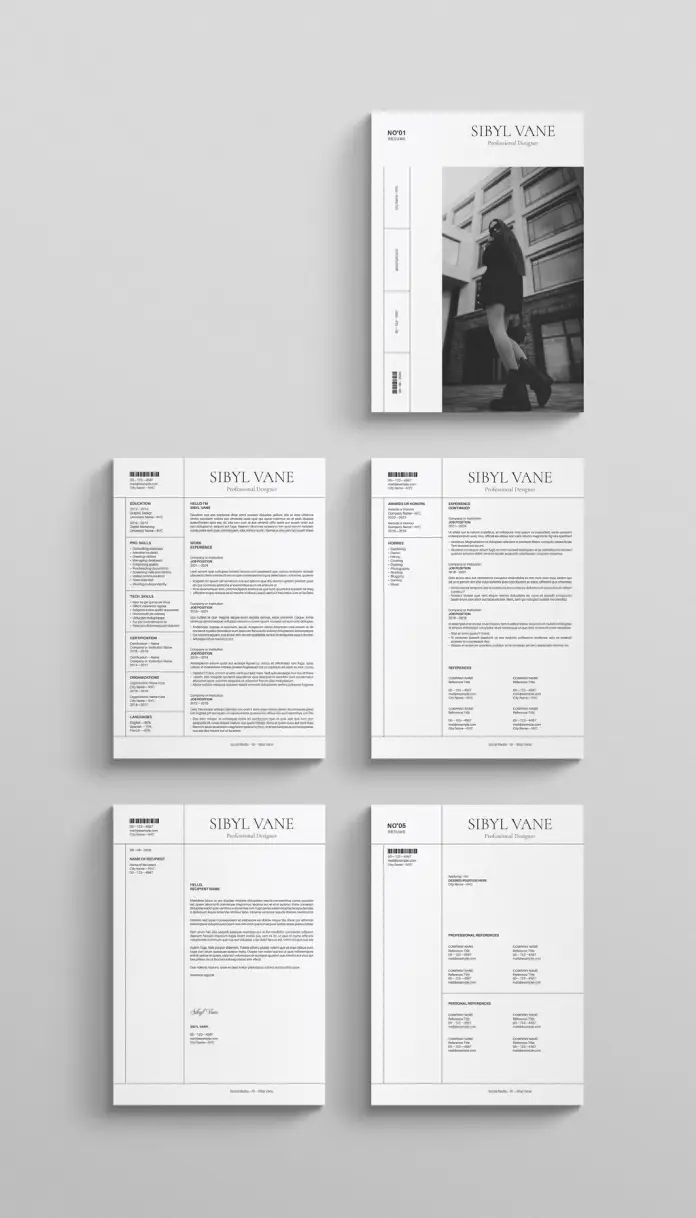
Standard applications often fail because they lack visual hierarchy and character. This specific resume layout defies conventional expectations by adopting a distinct editorial aesthetic. RedGiant, the Adobe Stock contributor, crafted this design to treat a career history like a feature story rather than a data sheet. It immediately signals that the candidate understands branding, spacing, and modern typography. A hiring manager sees hundreds of documents daily. Therefore, a document that utilizes high-end design principles stops the scroll and demands attention. This article analyzes why this template works and how it elevates personal branding.

Download from Adobe Stock

Please note that this professional graphic design template requires Adobe InDesign installed on your computer. Whether you use Mac or PC, the latest version is available on the Adobe Creative Cloud website—take a look here.

Minimalist Resum/CV and Cover Letter Template Design with Photo Space by RedGiant for Adobe InDesign Download from Adobe Stock

How Does a Grid-Based Design Alter the Effectiveness of a Resume Layout?

Most applicants clutter their pages with excessive text. This template breathes. It uses a strong, invisible grid system to organize information. The eye travels easily from the skills section to the experience timeline. Designers call this “white space.” It is not empty space. It is an active design element. Consequently, the reader feels relaxed rather than overwhelmed. A strong resume layout relies on this balance to guide the viewer.

The template features a bold, sans-serif header. This establishes authority immediately. Furthermore, the alignment creates a sense of order. The design splits content into digestible columns. One column handles contact info and skills. The wider column manages the narrative of work experience. This structure mimics high-quality magazine layouts. Thus, the candidate appears sophisticated and organized before the recruiter reads a single word.

The Power of Visual Storytelling in Recruitment

Visuals process faster than text in the human brain. This resume layout includes a prominent placeholder for photography. A professional portrait humanizes the application. It creates a connection. However, this design choice requires high-quality imagery. A blurry selfie would ruin the aesthetic. The image placement on the cover page sets a tone of confidence.

RedGiant designed this template in two standard sizes, US Letter and A4. This ensures compatibility across different regions. It includes 5 fully customizable pages. Users can duplicate pages for longer work histories. The layout supports a portfolio approach. One page allows for a cover letter that matches the resume perfectly. Consistency builds trust. A cohesive visual identity across all five pages suggests attention to detail.

Why Adobe InDesign Outperforms Word Processors

Word processors struggle with complex design elements. In contrast, Adobe InDesign handles typography with precision. This template utilizes that power. Users can adjust kerning and leading easily. These subtle adjustments make the text look professional. A crisp resume layout depends on these typographic details.

The file comes ready for print. It uses CMYK color mode. However, it also looks stunning as a digital PDF. The placeholder text is merely a guide. People can add their own information easily in Adobe InDesign. The layers are organized. Consequently, customization becomes a straightforward process. Even those with basic software skills can manipulate the elements.

Strategic Use of Typography and Hierarchy

The choice of font plays a crucial role here. The template uses a classic serif font for headings. This evokes tradition and elegance. Simultaneously, it uses a clean sans-serif for body text. This ensures readability. The contrast between the two fonts adds visual interest. A monotonous resume layout bores the reader. This combination keeps them engaged.

Bullet points are kept to a minimum. The design encourages concise writing. Long paragraphs break the visual flow. Therefore, the user must curate their content carefully. This restriction actually improves the quality of the resume. It forces the writer to focus on achievements rather than duties.

Who Should Use This Editorial Style?

This layout is not for everyone. It suits creative professionals best. Graphic designers, fashion stylists, and architects will find it appropriate. Marketers and brand managers can also leverage this style. It demonstrates an eye for aesthetics. However, corporate finance roles might require something more conservative.

Choosing this resume layout is a strategic move. It says the candidate values presentation. It implies they deliver high-quality work. In a competitive market, design is a differentiator. The “Sibyl Vane” header in the example acts as a personal logo. It creates brand recognition.

Practical Customization Tips

Download the file and install the necessary fonts first. Open the file in Adobe InDesign. The structure is locked in layers for safety. Unlock the text layer to begin editing. Replace the placeholder image with a black and white portrait. This maintains the monochromatic scheme. Color can be added, but it might disrupt the minimalist vibe.

Download from Adobe Stock

Keep the text alignment consistent. Do not overfill the text boxes. If the content is too long, edit the text. Do not shrink the font size below 9 points. Readability is paramount in any resume layout. Finally, export the file as an interactive PDF for email applications.

FAQ: Understanding the Template Specs

What software do I need to edit this template?
You need Adobe InDesign. It is not compatible with Microsoft Word or Google Docs.

Does the template include the photos shown in the preview?
No. The images are placeholders. You must supply your own professional photography.

Can I change the number of pages?
Yes. The template includes 5 layouts, but you can duplicate or delete pages within InDesign.

Is this resume layout suitable for Applicant Tracking Systems (ATS)?
PDFs from InDesign can be read by modern ATS. However, standard text-based Word documents are sometimes safer for very old systems.

Can I change the fonts?
Yes. You can swap the fonts for your own brand typefaces using the paragraph styles panel.

Does it come in different sizes?
Yes. The download includes both US Letter and A4 sizes.

Feel free to find other recommended design templates here at WE AND THE COLOR.

Subscribe to our newsletter!

[newsletter_form type=”minimal”]

#AdobeInDesign #AdobeStock #cv #resume #resumeLayout #resumeTemplate

Minimalist Resum/CV and Cover Letter Template Design with Photo Space by RedGiant for Adobe InDesignMinimalist Resum/CV and Cover Letter Template Design with Photo Space by RedGiant for Adobe InDesign
Career ReloadCareerReload
2025-12-12

Free modern resume template that comes with matching cover letter template. Available in 2 colors: blue and beige.

Download here: careerreload.com/template/temp

2025-12-05

Digital Resume Presentation Template: Those InDesign Layouts are the Bold New Standard for Creative Professionals

Hiring managers often spend less than ten seconds scanning a standard application. Consequently, you must grab their attention immediately. A static text document rarely achieves this goal in the creative industry. Therefore, ambitious designers and marketers are shifting strategies. They are adopting the digital resume presentation template to showcase their value. This format transforms a boring list of duties into a compelling visual narrative. Specifically, this Adobe InDesign layout by contributor E-Tpe offers a striking solution. It empowers you to treat your career history like a high-stakes client pitch.

Download from Adobe Stock

Please note that this professional graphic design template requires Adobe InDesign installed on your computer. Whether you use Mac or PC, the latest version is available on the Adobe Creative Cloud website—take a look here.

This digital resume presentation template by E-Type is ideal for outstanding job applications, especially for creative professionals like social media managers or graphic designers. Download from Adobe Stock

Why Is a Digital Resume Presentation Template Essential for Modern Creatives?

Standard Word documents fail to demonstrate design skills. Conversely, a digital resume presentation template serves as immediate proof of competence. It shows the employer exactly what you can do before they even read a word. Furthermore, this format aligns perfectly with the needs of social media managers, art directors, and graphic designers. These roles require strong visual storytelling abilities. Thus, your application itself becomes your first portfolio piece.

This specific template moves beyond traditional aesthetics. It utilizes a bold, neo-brutalist style that commands attention. The design uses high contrast to guide the eye. Deep black typography sits heavily against a cream background, while sharp red accents highlight crucial data. It creates a rhythm that keeps the viewer engaged. Ultimately, this approach signals confidence and modernity.

Mastering the Swiss-Style Aesthetic

E-Tpe designed this layout with a clear nod to the International Typographic Style, also known as Swiss Style. The digital resume presentation template prioritizes readability and objective photography. Massive sans-serif headers dominate the composition. Consequently, the hierarchy is unmistakable. The viewer knows exactly where to look.

For example, the “About Me” slide does not hide in the corner. It takes center stage. Large block text contrasts with structured negative space. Additionally, the “Technical Skills” section abandons tiny lists. It uses massive bar charts and percentage indicators. This design choice forces the recruiter to acknowledge your proficiency levels. It is not subtle; it is effective.

Utilizing Adobe InDesign for Maximum Impact

Adobe InDesign remains the industry standard for multipage layout design. Therefore, this digital resume presentation template leverages the software’s full potential. The template includes 12 fully customizable pages. You can easily adjust the master pages to suit your personal branding.

Furthermore, the grid system in InDesign ensures consistency. You simply drop your images into the placeholders. The text frames are already linked and styled. This setup saves hours of formatting time. You focus on the content, while the template handles the structure. It allows for a polished, agency-quality output that Microsoft Word simply cannot replicate.

Structuring Your Professional Narrative

A presentation format changes how you organize information. You are no longer limited to a chronological list. Instead, you guide the viewer through sections like “Experience,” “Education,” and “Works.” This digital resume presentation template organizes these sections logically.

Key sections included in the layout:

  • Cover Slide: Establishes your personal brand immediately.
  • Table of Contents: Sets expectations for the presentation.
  • About Me: Offers a human connection behind the skills.
  • Portfolio Grid: Showcases visual proof of your past projects.
  • Contact Page: Provides a clear call to action for the hiring manager.

Each slide functions as a standalone chapter. However, they work together to form a cohesive story. This structure keeps the reader interested from the first slide to the last.

Customizing the Visual Experience

Flexibility helps you stand out. Although the template comes with a specific look, you maintain full control. You might prefer a different color palette. Perhaps your personal brand uses blue instead of red. Fortunately, changing global colors in InDesign takes only a few clicks.

Moreover, the typography is fully editable. You can swap the bold display fonts for something more understated if necessary. However, the current font choice adds significant character. It balances professional minimal design with an edgy, editorial vibe. This balance is difficult to achieve from scratch. Therefore, using a pre-made digital resume presentation template provides a significant head start.

The Strategic Advantage of a Slide Deck

Think about how agencies win business. They do not send a letter; they pitch a deck. You are essentially selling your services to an employer. Thus, adopting a pitch-deck mentality makes sense. This digital resume presentation template facilitates that mindset shift.

You can export the final file as an interactive PDF. This format allows for easy sharing via email. Alternatively, you can host it online and send a link. This accessibility ensures your resume looks perfect on any screen. Whether viewed on a tablet or a desktop, the layout remains intact. This reliability gives you peace of mind during the application process.

Final Thoughts on Modern Job Applications

The job market creates intense competition. Generic applications often get lost in the digital pile. However, a well-executed digital resume presentation template disrupts this pattern. It demands attention through high-quality layout and strategic content flow.

E-Tpe’s design offers a sophisticated canvas for your career history. It merges the functional requirements of a CV with the visual impact of a portfolio. For creative professionals, this is not just an option; it is a powerful tool for career advancement. Invest in your presentation, and the results will likely follow.

Download from Adobe Stock

Check out other professional graphic design templates here at WE AND THE COLOR.

Subscribe to our newsletter!

[newsletter_form type=”minimal”]

#AdobeInDesign #AdobeStock #cv #graphicDesign #resume #resumePresentation #resumeTemplate

This digital resume presentation template by E-Type is ideal for outstanding job applications, especially for creative professionals like social media managers or graphic designers.This digital resume presentation template by E-Type is ideal for outstanding job applications, especially for creative professionals like social media managers or graphic designers.
Career ReloadCareerReload
2025-11-15

Working in Google Docs? Pick a free resume template, make a copy, and customize it in minutes. Great for quick edits on any device.

👉 careerreload.com/google-docs-r

2025-11-15

This InDesign Resume Layout Will Get You Hired. Here’s Why.

Your resume is your first handshake in a crowded digital job market. It acts as a silent ambassador, speaking volumes before you ever enter a room. Therefore, its design is not merely about aesthetics; it is a powerful strategic tool. A professional InDesign resume layout, like the one by Adobe Stock contributor ContestDesign, provides a clear advantage. It presents your qualifications with unmatched clarity and sophistication. Consequently, this helps you stand out to recruiters scanning countless applications. This specific InDesign resume layout is a game-changer.

Download the template from Adobe Stock

Please note that this professional graphic design template requires Adobe InDesign installed on your computer. Whether you use Mac or PC, the latest version is available on the Adobe Creative Cloud website—take a look here.

A Professional InDesign Resume (CV) and Cover Letter Template by ContestDesign in a Minimalist Layout. Download the template from Adobe Stock

Why Should a Minimalist InDesign Resume Layout Be Your Top Choice?

Hiring managers spend very little time on each resume they review. This fleeting window means your document must be immediately impactful. A minimalist InDesign resume layout truly excels in this high-pressure scenario. By prioritizing clean lines and generous white space, it masterfully guides the eye. It directs the reader straight to your most crucial information. Ultimately, this uncluttered approach ensures exceptional readability.

Furthermore, a professionally designed template shows an impressive attention to detail. Employers highly value this quality in potential candidates. It signals that you are someone who understands professional presentation. This particular InDesign resume layout, with its clean structure, is a testament to that principle. It communicates competence without saying a word. Your choice of a refined InDesign resume layout reflects your professional standards.

The Unmatched Power of Adobe InDesign

Many job seekers, unfortunately rely on standard word processors for their resumes. However, Adobe InDesign offers unparalleled control over typography and page design. This professional software is the industry standard for a reason. It allows for the precise alignment of every element. This precision guarantees a polished and cohesive final document. With InDesign, you can easily customize the template to create a resume that is uniquely yours.

Here is what truly sets a professional InDesign resume layout apart:

  • Superior Typographic Control: InDesign gives you extensive options for managing fonts, spacing, and styles. This ensures your resume is not just legible but also visually elegant.
  • Consistent Personal Branding: You can create a strong personal brand with this template. Use the same design elements across your resume, cover letter, and portfolio. This consistency effectively reinforces your professional identity.
  • Print-Ready Perfection: This template was made in standard A4 size. Additionally, it uses CMYK color mode, making it completely print-ready. This is perfect for interviews where you need a flawless physical copy.

A Closer Look at the ContestDesign Template

This exceptional three-page template from ContestDesign is a masterclass in minimalist design. It provides a structured yet flexible framework for your professional story. The inclusion of a matching cover letter is a significant advantage. A visually aligned application package creates a much stronger impression on hiring managers. An effective InDesign resume layout should always be part of a set.

The layout is also fully editable. This allows you to tailor it perfectly to your specific needs. You can easily replace the placeholder text with your own information. You can also adjust color schemes to match your personal brand. This level of customization ensures your resume will be a unique representation of your experience.

How to Make This InDesign Resume Layout Work for You

Downloading this template is a great first step. However, you must approach its use with a strategic mindset. Think of this InDesign resume layout as your canvas. You are painting a compelling picture of your professional journey for an eager audience.

Tailoring the InDesign Resume Layout to Your Industry

A minimalist design is incredibly versatile. It can be adapted for a wide range of professions with ease. For corporate roles, you should stick to a classic, muted color palette. Also, choose a traditional and highly readable font. If you are in a creative field, you might introduce a subtle pop of color. You could even use a more unique typeface to showcase your creative personality. The key is to ensure your design choices align with industry expectations. Your InDesign resume layout must feel appropriate for the job you want.

Consider these industry-specific tips:

  • Creative Fields: For roles in design or marketing, your resume is an extension of your portfolio. Therefore, use this InDesign resume layout to demonstrate your keen design sensibilities.
  • Corporate and Tech Roles: In these sectors, clarity and conciseness are paramount. The minimalist structure of this template is perfect for highlighting your skills in a straightforward way.
  • Academic and Research Positions: These roles often require more extensive information, such as publications. The template’s three-page format provides ample space without sacrificing a clean look.

The Importance of a Cohesive Application

A strong resume is only one piece of the puzzle. Your cover letter is a vital opportunity to tell your story. It helps you connect with the hiring manager on a more personal level. This InDesign resume layout conveniently includes a matching cover letter template. This is a crucial element for creating a professional and cohesive application package.

Using a consistent design across all your materials reinforces your personal brand. Moreover, it demonstrates a high level of professionalism and care. It clearly shows that you have put thought into every aspect of your application.

Download the template from Adobe Stock

First impressions are everything, and a thoughtfully designed resume can be your most powerful asset. This professional InDesign resume layout from ContestDesign provides the perfect foundation. By leveraging minimalist design and the precision of InDesign, you can craft a resume that gets you noticed. This, in turn, can significantly increase your chances of landing that coveted interview.

Check out other professional graphic design templates here at WE AND THE COLOR.

Subscribe to our newsletter!

[newsletter_form type=”minimal”]

#AdobeInDesign #AdobeStock #cv #InDesignTemplate #resume #resumeLayout #resumeTemplate

A Professional InDesign Resume (CV) and Cover Letter Template by ContestDesign in a Minimalist Layout.A Professional InDesign Resume (CV) and Cover Letter Template by ContestDesign in a Minimalist Layout.
Career ReloadCareerReload
2025-11-14

Need a clean resume you can edit in Word? Grab a ready layout and start filling it in. Simple, polished, and easy to update.

Visit: careerreload.com/word-resume-t

2025-11-03

Beyond the Bullet Point: This Resume Template Is Your Visual Handshake

A piece of paper can’t capture your ambition. It can’t articulate your drive. Yet, we rely on a single document—the resume—to make the most critical first impression of our careers. In a sea of black-and-white, Arial-font lists, how do you ensure your story isn’t just read, but felt? The answer lies in a design that speaks before you do. This isn’t just about finding a job; it’s about commanding the attention your talent deserves. Your resume is not a summary of tasks; it is the prologue to your next great chapter.

Download from Adobe Stock

Please note that this professional graphic design template requires Adobe InDesign installed on your computer. Whether you use Mac or PC, the latest version is available on the Adobe Creative Cloud website—take a look here.

This is a super elegant resume/CV template with a cover letter by ContestDesign for Adobe InDesign. Download from Adobe Stock

The Anatomy of an Elegant Resume

Let’s break down what makes this particular design so effective. It moves beyond the tired templates that have flooded the internet. Instead, it offers a structure that is both classic and contemporary, proving that a professional CV doesn’t have to be boring.

A Statement in Simplicity

Designed by the talented Adobe Stock contributor ContestDesign, this template for Adobe InDesign presents a masterclass in minimalist aesthetics. It features a clean, two-column layout that guides the recruiter’s eye naturally through your career narrative. The left column serves as a stable anchor for essential, at-a-glance information: education, contact details, and skills. Meanwhile, the more expansive right column is dedicated to the heart of your story—your experience and professional summary. This deliberate separation creates a visual hierarchy that makes your resume incredibly easy to scan, a crucial factor when a hiring manager might only spend six seconds on their initial review.

Typography that Speaks Volumes

The font choice is where this resume truly sings. A bold, elegant serif font is used for the applicant’s name, “Elizabeth Jones,” turning a simple identifier into a memorable brand mark. This contrasts beautifully with the clean, sans-serif font used for the body text, ensuring maximum readability. It’s a sophisticated pairing that conveys confidence and style. This isn’t just text on a page; it’s a carefully considered typographic system that elevates your personal brand. Why settle for Times New Roman when your resume could communicate so much more?

Why This CV Template Works in Today’s Market

In a competitive job market, differentiation is key. A generic resume signals a generic candidate. This template, however, is a strategic tool designed for impact. It understands that in creative and professional fields alike, presentation matters.

The Power of a Professional First Impression

Imagine a recruiter sifting through a hundred applications. Most will look identical. Then, they see this resume. Its clean lines, strategic use of white space, and refined typography immediately set it apart. It suggests a candidate who is detail-oriented, modern, and invested in presenting themselves professionally. This elegant CV template acts as your silent ambassador, communicating your high standards before a single word of your experience is even read. It’s a visual argument for your own excellence.

More Than a Resume: A Cohesive Branding Package

This isn’t just a single document. The package includes a matching cover letter, allowing you to present a completely cohesive and professional application. This continuity shows a level of thoughtfulness and organization that employers value. It transforms your application from a collection of documents into a polished, personal branding suite. It answers the implicit question: is this candidate professional and organized? The design answers with a resounding yes.

Making It Your Own: How to Customize Your New Resume

The true power of this Adobe InDesign template lies in its full customizability. It was built to be a foundation, not a rigid box. You have the freedom to infuse it with your personality while maintaining its professional integrity.

Simple Steps to a Personalized CV

Created in the international standard A4 size and designed with CMYK color mode, this template is completely print-ready. Every element is on a separate layer, making edits straightforward, even for those with basic InDesign skills. You can easily change the color scheme to match your personal brand or the company you’re applying to. The text is all placeholder, allowing you to drop in your own information seamlessly. This is the practical “how” – a simple process for creating a deeply personalized and effective resume. Think about it: in less than an hour, you could transform your entire professional identity on paper. What’s holding you back from crafting the perfect modern CV that truly represents you?

Download from Adobe Stock

This template by ContestDesign isn’t just a document; it’s a strategic advantage. It recognizes that in our visually-driven world, the package is just as important as the contents. It’s a tool for professionals who understand that the first step to landing the dream job is to look the part. This resume ensures you do.

Check out other professional graphic design templates here at WE AND THE COLOR.

Subscribe to our newsletter!

[newsletter_form type=”minimal”]

#AdobeInDesign #cv #InDesignTemplate #resume #resumeTemplate

This is a super elegant resume/CV template with cover letter by ContestDesign for Adobe InDesign.This is a super elegant resume/CV template with cover letter by ContestDesign for Adobe InDesign.
Career ReloadCareerReload
2025-10-26

Highlight both skills and creativity with this free resume template. Perfect for anyone in a creative field.

Instant download: careerreload.com/template/mode

Client Info

Server: https://mastodon.social
Version: 2025.07
Repository: https://github.com/cyevgeniy/lmst