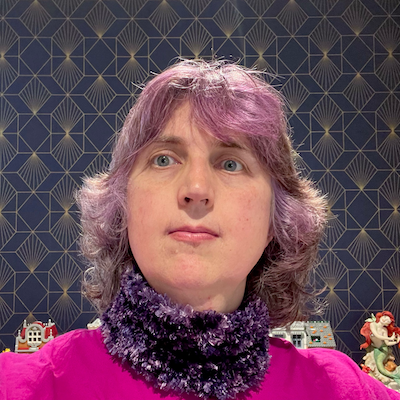
This is what my corrected vision looks like. They’re both bad but the double images are easier to ignore when it’s dark-on-light. #LightMode #Accessibility #Disability

Shibaprasad Bhattacharya
Math, Stats, and Data nerd. An ordinary man.
Sharing experiences, and occasional rants.
I generally post about #DataAnalytics, #DataScience, #Tech, #Football, #Coffee, #India, #Podcast, etc.
Follow my newsletter related to Data & Analytics:
https://datasignal.substack.com


@micdan Thanks! Will look for plugins.
@jessdkant 99% Tidyverse tbh.
Shibaprasad Bhattacharya boosted:
As much as tidy/dplyr and especially magrittr have changed my life, I keep coming back to base-R. Curious about others in #rstats land
@micdan Interesting! What plug-ins do you use?
Yeah, I also use it to gather my ideas and write it down.
Shibaprasad Bhattacharya boosted:

@shibaprasad I use Simplenote. Doesn't have a lot of features but it is available on every platform.
@nachiketh Just came across this - looks solid!
Shibaprasad Bhattacharya boosted:

What an insult! The SC is merely asking, and not on its knees, grovelling and begging in front of the mighty Modi/BJP. Who does the SC think it is... some popularly elected—thrice—public representative?

Is Antonio Conte's UCL record genuinely bad, or just the "Elite Tax" of facing tougher opponents?
I analyzed Conte, Guardiola, and Klopp using statistical tests. Only one manager's performance drop is abnormal.
Full analysis:
https://www.shibaprasadb.com/2026/01/20/tale-of-two-contes.html
Shibaprasad Bhattacharya boosted:

Notepad++ versions and update mechanisms had been compromised since June until December 2025. Please update to 8.9.1 wherever you have this tool. It's unclear what malicious versions of the tool might do. I Recommend activating incident response for affected hosts.
https://notepad-plus-plus.org/news/hijacked-incident-info-update/
RE: https://mastinsaan.in/@mehluv/115996566132139054
Keeping the relevant ones.
✉️ Mail service: Outlook
📬 Mail client(s): Default
✅ Tasks: TickTick
🗞️ RSS client: Feedly
☁️ Cloud storage: GDrive
🌅 Photo library: GPhotos
🌐 Web browser: Vivaldi & FF
📆 Calendar: Google Calendar
📖 Reading: Kindle
🌤️ Weather: Inbuilt
🎙️ Podcasts: Pocketcast
🎶 Music: YTM
🔐 Passwords: Default Apple
🍿 Movie discovery/tracking: None
💁🏻♂️ Social: Mstdn, Instagram, Threads
🎮 First game I play each morning: None
📝 Notes: Obsidian
🧮 Code Editor: Positron
👨🏻💻 AI Code Assistant: Claude
I've just contributed to mstdn.party. Consider supporting them too — every little helps! https://opencollective.com/mstdnparty
Shibaprasad Bhattacharya boosted:

I’ve a question about using boosts with the #WordPress #ActivityPub plugin.
If I have two WordPress sites, both with the plugin, can I boost a full post from one to the other? Will it appear as a post in the second site? Has anyone written about this?
Will shortly test but thought I’d check if someone has tackled this and written it up first.
cc @pfefferle.
Shibaprasad Bhattacharya boosted:

Vivaldi 7.8: No AI Slop. Just Powerful Features.
Vivaldi is built for people who love exploring the web, and who demand more from their browser.
With Vivaldi 7.8, we raise the bar, yet again. This release puts Tab Tiling front and center, or on the left. Or the right. Or above. Or below. Tab Tiling now has faster interactions, smarter workflows, and new ways to work with multiple pages at once, without breaking your flow.
It’s a powerful start to the year, focused on real productivity and real control.
Tab Tiling, Built for Real Work
Tab Tiling is one of those features that can fundamentally change how a browser feels, once tiling becomes part of your workflow.
Instead of constantly switching back and forth between tabs, you work with them together. Like ebony and ivory, in perfect harmony, but not just side-by-side; they can also be above and below, or in a grid. Tab Tiling lets you compare, reference, monitor, and think in parallel.
With Vivaldi 7.8, we’ve focused on making Tab Tiling feel less like a feature you activate and more like a natural extension of how you browse.
Drag to Tile
Creating tiled layouts is now as simple as dragging a tab (or multiple) from the Tab Bar into the main content window of your currently active tab. By hovering the dragged tabs over different areas you can choose how to tile.
Just drop it where it makes sense, and Vivaldi does the rest.
Vertical Tab TilingHorizontal Tab TilingOnce your layout is in place, you’re not locked into it. You can rearrange tiles on the fly, resize them, or drag in additional tabs at any time. Your workspace stays flexible, adapting instantly as your task evolves.
And because tiled tabs behave like regular tabs, you can combine tiling with other Vivaldi features. For example, set periodic reloading on selected tiles to keep live content up to date, while the rest of your layout stays exactly as it is. It’s perfect for monitoring changing information without constant manual refreshes.
This makes tiling something you can use exactly when you need it. You might start with a single page, then quickly pull in a second tab to compare prices, review documentation, or keep a reference visible while you work. The layout adapts instantly, without interrupting your flow.
It’s especially useful when:
- Writing or researching and keeping sources visible alongside your main document.
- Comparing offers, designs, product specs, or data across multiple pages.
- Following live updates while continuing to work in another tab.
The key difference is speed. A moment after you think “I want to see these side by side”, you already are.
Open Link as Tiled Tab
Once you start working with tiled layouts, it quickly becomes a browser super power, and you want a quick way of tiling new tabs.
That’s where “Open as Tiled Tab” comes in.
Instead of opening a link full screen and rearranging your layout afterward, you can open it directly into a tiled view. Your main tab stays put, your context stays visible, and the new content appears beside it.
Combining the power of other Vivaldi features, you can trigger this instantly with a Mouse Gesture, making it effortless to open in a Tiled Tab when needed.
More Than Multitasking
Together, these improvements turn Tab Tiling into something you can use casually, frequently, and creatively.
You can start small with two tabs, then grow into more complex layouts as your task demands it. You can rearrange on the fly. You can build a workspace that matches how you think.
This is what best-in-class features look like in a browser: not complicated, just deeply effective once you start using it.
Tabs That Work the Way You Expect
Managing many tabs should feel empowering, not fragile. Vivaldi 7.8 strengthens tab handling in ways that support complex, long-running sessions.
Pinned Tabs, Now Smarter
Pinned tabs now support domain restriction.
This keeps pinned tabs predictable. A pinned mail tab stays mail. A pinned project tool stays exactly where you expect it.
And yes, this finally makes pinned tabs behave the way they always should have. As Tony, our Chief Tab Tester asked, “Why didn’t they always do this?”. The answer is: we didn’t think of it before. We’ll own that one. Luckily, our community did think of it, and we listen to our users.
https://vimeo.com/1159205943/ef058edfbf
Mail, Now Across Your Workspaces and Windows
Speaking of pinned tabs, if you’re using Vivaldi Mail, our built-in mail client, there’s an extra bonus. Pin your mail tab, and it stays pinned across all Workspaces. Your inbox is always there when you need it.
And not only that! Mail now works across all your Vivaldi windows. Previously, your mail view lived in a single window, which meant switching windows if you wanted to check or write mail while working elsewhere. With Vivaldi 7.8, that limitation is gone.
Open a new Window, switch Workspaces, or reorganize your setup. Your mail is still there.
Because mail is built directly into Vivaldi, it behaves like part of the browser, not a separate app bolted on the side. Making it available across all windows turns it into what it should be: a core tool that’s always within reach, exactly when you need it.
Combined with smarter pinned tabs and Workspace support, mail now fits naturally into even the most complex setups.
A Fresh Start Page, Every Day
Are you the kind of person who needs a new perspective every day? The kind of person who just needs a bit of extra spice to your day? Do we have something fantastic for you! The Daily Image option for your Start Page.
When enabled, your background updates automatically each day with high-quality photography from Unsplash. It’s a small touch that adds variety without distraction.
As always, it’s optional, like any other Vivaldi feature you decide whether to enable it or not. It’s your browser.
Polished Where It Matters
Beyond the headline features, this update comes with improvements in several areas that shape the overall experience.
- Important stability improvements: Significant effort has gone into improving stability. With a new and improved crash logging system we have been able to fix more crashes than ever. QA estimates “two full buckets of crash fixes” and are happy to report all known crashes in our own code are fixed. That said there is still a slim chance you encounter a random crash, “which could literally be caused by your neighbor’s microwave and cosmic radiation screwing up your PC’s RAM. What can be fixed, is fixed” – Vivaldi QA team.
- Caret browsing as a dedicated setting, giving you clear control over keyboard-based navigation and text selection. It’s a great accessibility feature that lets you navigate websites using the keyboard as if they were text documents.
- A new installer for Windows that makes setup smoother and more reliable.
A Browser That Puts You First
Every Vivaldi release, large or small, builds on the same idea.
We don’t answer to investors pushing features that benefit them instead of you. We don’t track your behavior or treat your data as a business model. We focus on building a browser that adapts to how you work, respects your choices, and gives you real control over your experience.
We believe browsing should push you to explore, chase ideas, and make your own decisions. It should light up your brain. When an artificial assistant sits between you and the web, it filters what you see and decides what you don’t see, it’s outsourcing your judgment.
So we have taken a stand. We choose humans over hype, and we will not turn the joy of exploring into inactive spectatorship.
That philosophy runs through Vivaldi 7.8. From powerful Tab Tiling to thoughtful refinements across the browser, every change serves one goal: making the web work better for you.
If you enjoy using Vivaldi, please tell someone about us. Recommendations from people who actually use the browser matters more to us than any advertisement ever could.
Vivaldi 7.8 is ready today. Download it and put your tabs to work.
Download it nowAs always, thank you for being part of the Vivaldi community. Together, we’re fighting for a better web, one release at a time.
Changelog Vivaldi browser 7.7 to 7.8
New
- [New][Tab][Tiling] Allow tab tiling via drag and drop (VB-36736)
- [New][Daily Image][Dashboard] Offer to automatically replace background (VB-39681)
- [New][Tabs] Pinned tabs contained to one domain (VB-122107)
- [New][Windows][Installer] UI redesign (VB-103241)
- [New][Mail] Allow in multiple tabs and windows (VB-120089)
- [New][Mail] Pin mail tabs across Workspaces (VB-122067)
- [New][Tabs] Add copy and paste of tabs (VB-120633)
Address Field
- [Address Field] Don’t fill Address Field when opening item in background tab (VB-121952)
- [Address Field][Settings][Search] When “Search in Address field” is disabled, do not search (VB-122207)
- [Address Field][Settings] Search engine nicknames can appear in query string (VB-122810)
Bookmarks
- [Bookmarks] Keep selected item visible when clearing filter (VB-122117)
- [Bookmarks] Nickname disappears when switching folder (VB-123161)
- [Bookmarks] Search that matches folder name no longer displays folder contents (VB-122152)
- [Bookmarks] Searching does not work in the bookmarks drop down (VB-122554)
- [Bookmarks] ‘Add Page to Bookmarks’ always creates two duplicate bookmarks (VB-123285)
Crash
- [Crash] Accessing website settings in private window (VB-122093)
- [Crash] Check that infobar’s delegate exists before using it (VB-112006)
- [Crash] Drag out stack with tiles (VB-121855)
- [Crash] In Extension Function Dispatcher (VB-123763)
- [Crash] In report NC mouse position (VB-123986)
- [Crash] JavaScript callback handling (VB-122297)
- [Crash] On chrome:new-tab-page and tabs.create (VB-122472)
- [Crash] On various confirmation dialogs (VB-123999)
- [Crash] Opening a Speed Dial folder on the Dashboard (VB-122368)
- [Crash] Pointer lock event handling (VB-123342)
- [Crash] Socket API cleanup during shutdown (VB-121956)
- [Crash] TypeError: Cannot read properties of undefined (reading ‘length’) (VB-118483)
- [Crash] When autofill show update address profile bubble is to be shown (VB-123406)
- [Crash] When displaying a password bubble (VB-123442)
- [Crash] When dragging file after download (VB-118888)
- [Crash][Ad Blocker] During Request Handling (VB-122950)
- [Crash][Extensions] Tile tab extension (VB-122900)
- [Crash][Linux] When importing passwords created from a very old Chromium (VB-121975)
- [Crash][Mail] Errors when turning off/on mail (VB-122814)
- [Crash][Mail] On deleting label (VB-123962)
- [Crash][Mail] When clicking Mail from NTP navbar in secondary window (VB-122265)
- [Crash][Menus] Context menu handling (VB-123147)
- [Crash][Search] Dialog to suggest alternative providers crashes when list is empty (VB-122356)
- [Crash][Spatial Navigation] On a local mHTML page (VB-118013)
- [Crash][Sync] Whenever I try and log in (VB-116861)
Crash reporting
- [Crash Reporting] Opt-in toolbar after crash (VB-122502)
- [Crash Reporting] Crashpad handler not launched on first run (VB-104996)
- [Crash Reporting][Settings] Crash Report checkbox not working (VB-123308)
Keyboard
- [Keyboard] F2 to rename bookmark/note/session etc also opens Quick Commands (VB-122753)
- [Keyboard][A11Y] Support caret browsing (VB-7520)
- [Keyboard][Settings] “Prioritize Website Shortcuts” blocks Ctrl+C and Ctrl+V (VB-117929)
- [Mail] Add affiliate links to account setup (VB-120497)
- [Mail] Add your first account dialog looks broken (VB-124124)
- [Mail] Attempting to delete one e-mail that is in multiple IMAP inboxes displays UI without any option selected (VB-120143)
- [Mail] Changing sorting of list not reflected in list header until selecting a message (VB-121577)
- [Mail] Clear all Labels not for multiple selections (VB-98242)
- [Mail] Columns removed are not persisted (VB-122353)
- [Mail] Date Sent column information not consistent (VB-122619)
- [Mail] Date column information in Trash is not consistent (VB-122859)
- [Mail] Duplicating e-mails in folders (VB-123182)
- [Mail] Error in Mail Search Database: prompt to rebuild (VB-123368)
- [Mail] Error when adding first account (VB-123465)
- [Mail] Incorrect sorting when switching folders (VB-122861)
- [Mail] List entry thread not updated correctly when threading data changes (VB-122374)
- [Mail] Mark as read button disabled on starting with a mail tab (VB-97544)
- [Mail] Messages sent to self are not threaded (VB-123203)
- [Mail] Missing gap below thread (VB-124000)
- [Mail] Overlapping buttons with address bar hidden and tabs on side (VB-121847)
- [Mail] Remove border under collapsed threads (VB-122618)
- [Mail] Save as filter from “see messages to and from” does not work (VB-121032)
- [Mail] Some messages not found found in search (VB-122267)
- [Mail] Sorted data not maintained correctly (VB-122612)
- [Mail] Strange delete confirmation dialog behaviour (VB-74708)
- [Mail] There are two Date entries for column selection (VB-122293)
- [Mail] Update unseen regardless of its current state (VB-121196)
- [Mail] Wrong order on incoming mails (VB-123482)
- [Mail][Calendar] Delete of mail and calendar accounts fail (VB-122837)
- [Mail][Welcome] Add proton certificate step to adding new account steps (VB-121742)
- [Mail][Workspaces][Settings][Tabs] Allow to pin tabs across Workspaces (VB-122067)
Menus
- [Menus] Hot keys always open menu in the latest window (VB-104760)
- [Menus] Second click on the Vivaldi menu does not close it (VB-121902)
- [Menus][Bookmarks] Right click menu doesn’t work in the bookmark bar, “Add Active Tab” (VB-123541)
Settings
- [Settings] Added calendar view looks identical to add calendar view (VB-121573)
- [Settings] Cannot delete a website from the Declined Sites option in Passwords (VB-122290)
- [Settings] Disabling “Allow Vertical Text Direction” leaves you stuck in vertical mode (VB-122842)
- [Settings] Improvements and fixes to the site permissions (VB-114658)
- [Settings] Password list is truncated to single line (VB-124197)
- [Settings] Restore Default Keys resets mouse gestures (VB-123084)
- [Settings] Restore button cannot be pressed (VB-123084)
- [Settings] Set as Default button overlaps its column in Spanish (VB-124332)
- [Settings] Sync settings may steal search field focus (VB-119920)
- [Settings][Search] Search engine setting requires reopening search to update (VB-123560)
- [Settings][Tabs] Restrict pinned tab to domain menu setting does not stick on first attempt (VB-123219)
- [Settings][Themes] Check boxes in theme editor do not work (VB-123268)
- [Settings][Themes] Dropdown menu in the editor does not work (VB-122979)
- [Settings][Themes] Theme editor UI not updated with changes (VB-123080)
Start Page
- [Start Page] Folder selection flickers when opening new tab (VB-124184)
- [Start Page] Jerky animation with thumbnails (VB-123370)
- [Start Page] Show only the Speed Dial folder can cause bookmark popup to close on selection (VB-122211)
- [Start Page] Speed Dial transitions are jerky, won’t respect reduce-motion setting (VB-123617)
- [Start Page] Speed Dial folders order resets on restart (VB-124190)
- [Start Page] When moving Speed Dial in folders everything disappears (VB-122961)
- [Start Page] Widgets disappear after adding a bookmark via the Dashboard (VB-121760)
- [Start Page] Widgets should not appear when you navigate to a sub folder (VB-122323)
- [Start Page][Bookmark] Widget’s folder choice and scrolling broken (VB-123955)
- [Start Page][Settings] Quick Settings panel does not close when clicking on the background (VB-120407)
Tabs
- [Tabs] Clicking on speaker button activates the tab (VB-123395)
- [Tabs] Sharing banner not disappearing if stopped and duplicates when tab switches (VB-123372)
- [Tabs] Switch tabs on mouse down again (VB-123713)
- [Tabs][Keyboard] Cannot cycle tabs when browser is full screened or chrome-less (VB-122344)
- [Tabs][Media] Narrow tabs and audio-icon conflicting (VB-122548)
- [Tabs][Media] Too easy to accidentally mute tab (VB-115076)
- [Tabs][Menu] Stacking is visible in context menu even when disabled (VB-123887)
- [Tabs][Settings] Wrong text in Settings for stacking tabs (VB-123887)
- [Tabs][Settings] “Tabs → Tab Features → Minimise Active Tab” is broken (VB-122622)
Widgets
- [Widgets] Add Mini calendar in the date widget (VB-124027)
- [Widgets] Privacy widget flickers and goes out of view (VB-124098)
- [Widgets][Performance] Privacy Statistics widget flashes (VB-122986)
Other
- [AdBlocker] Not retrieving and updating the ad and tracker blocker sources (VB-123849)
- [Calendar] Alarm description not encoded on export (VB-123359)
- [Chromium] Update to 144.0.7559.114
- [Commands] Focus panel command fails to focus panel (VB-104364)
- [Commands] Missing command “Copy page address” (VB-120369)
- [Dashboard] Bookmark widget not showing correct title (VB-123027)
- [Downloads] Can’t download files in pop-up windows (VB-118840)
- [Downloads] Download chart animates incorrectly (VB-123770)
- [Extensions] Installed Screen freezes browser (VB-123583)
- [Gestures][Tabs][Commands] Make “Open Link in Tiled Tab (Over a Link)” an option that can be mapped (VB-124153)
- [Linux] Rotate keys in packaging and add KEY12
- [macOS][Import] Safari not visible on Welcome page (VB-123345)
- [macOS][Popout Video] Picture in Picture on Google Meet doesn’t work (VB-99252)
- [macOS][Toolbars] Add a “share” button (VB-121758)
- [Media][Popout Video] PiP Volume control in the separate video window does not work (VB-123256)
- [Notes] Create Note with Selection output option in Capture Tool dialog fails to create a note (VB-124092)
- [Profiles] Open popup window on Guest Profile (VB-123041)
- [Profiles] Opening Settings in one profile freezes the other profile windows (VB-122127)
- [Quick Commands] Order of tabs shown is random (VB-121426)
- [Search] Confusing message when trying to delete a search engine (VB-117706)
- [Status bar] Prevent menu content calculation on each render (VB-123985)
- [Themes][Settings] Reset button for default themes is unresponsive after making a change (VB-123973)
- [Thumbnails] Update thumbnail on page refresh (VB-120589)
- [Touch] Dialogs and pop-outs not dismissed when clicking outside them but on a web page (VB-119265)
- [UI] Redesign the session recovery interface to make it cleaner and easier to understand (VB-122468)
- [Windows Panel] Invisible text in panel during mouse drags (VB-123087)
- [Workspaces] Avoid layout shift when moving between Workspaces (VB-124192)


The same binary thinking that turns Gandhi into saint or sellout is what reduces every policy debate to patriot vs traitor. Wrote about cultural binaries and an education system that actively discourages analytical thinking.
https://ordinaryanalysis.substack.com/p/bapu-and-binaries
#Blogpost #substack #writing #blog #blogging #India @mastodonindians
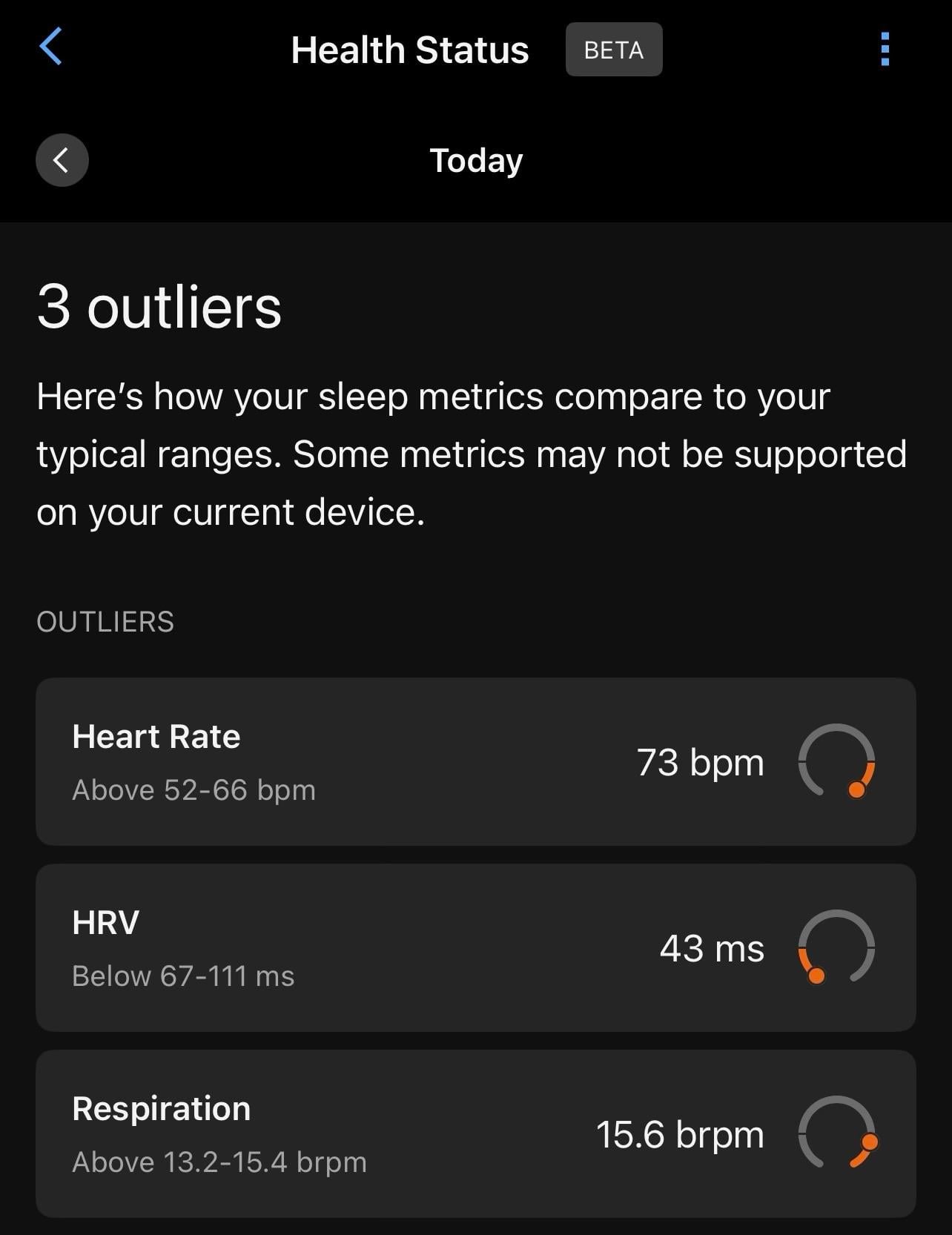
I drank a bit and ate junk yesterday. Today I received this alert about last night’s sleep.
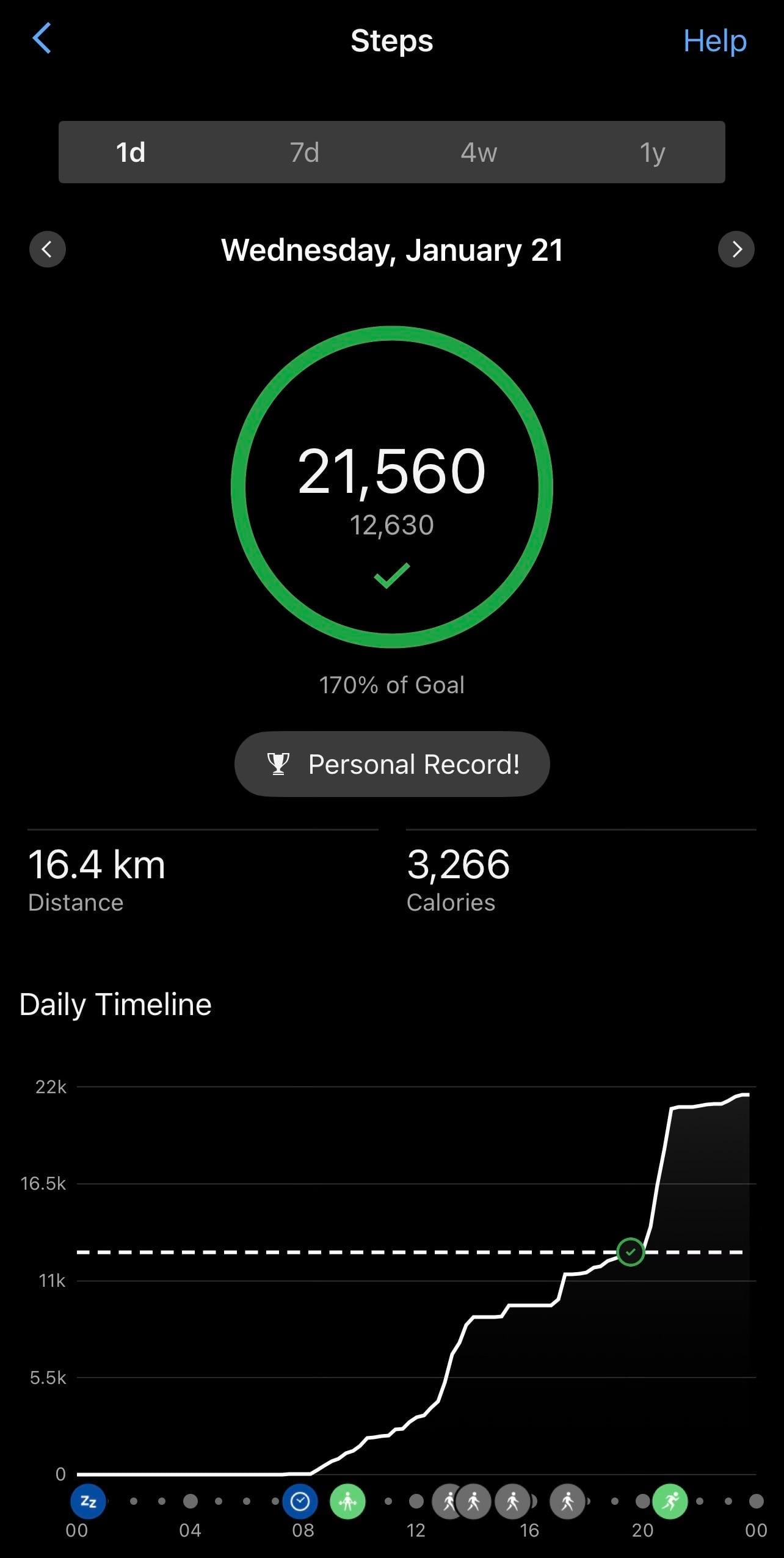
Yesterday was insane.
Gym + Office + Running.
Had a Sundae after dinner, too.
Recently had an LLM API call that was 75% accurate on a production task. It wasn't good enough.
Couldn't improve the model. Couldn't change the prompt much. I applied the "wisdom of crowds" principle instead. Multiple calls, smart aggregation.Turns out ensembling LLM outputs works surprisingly well when you understand your failure mode. Got to 99.6% accuracy.
Link to the BlogPost:
https://www.shibaprasadb.com/2026/01/20/llm-ensemble.html
#LLM #GenerativeAI #ML #Tech #TechBlog #Blogging #Writing #DataScience #DataAnalytics
Client Info
Server: https://mastodon.social
Version: 2025.07
Repository: https://github.com/cyevgeniy/lmst