@donkey @matthewcassinelli sort of, but it relies on using the x-callback url scheme and is a bit finicky to use
Mark Van Alstine
I enjoy coding, Apple Shortcuts, spending time with my family, and learning new things.
📍
Michigan, USA
Brief
Engineer / Tech Nerd / Dad
Mark Van Alstine boosted:

The app has been entirely rewritten in SwiftUI, and the result is a more beautiful app, less crashes and better usability all around.
Also, widgets *FINALLY* update correctly!

Mark Van Alstine boosted:
And everything is ready for iOS 26, including new Liquid Glass icons!

Mark Van Alstine boosted:

Here’s how to schedule light mode and dark mode on a time schedule on macOS. In system settings you can only choose Auto which does it via sunrise sunset.
#Shortcuts #macOS #DarkMode
https://youtu.be/vpVGPWmeqz0
@wiersdorf did you find a fix?
Mark Van Alstine boosted:

I need help reproducing a bug in Apple Shortcuts. If you have an iPhone, please try out this shortcut:
https://www.icloud.com/shortcuts/70ad266b5fa44055aadf10854b2dfb06
What it is supposed to do is replace spaces with “:” like s/ +/:/ on the input text.
If I put in *specifically* the string “Blog teaching” (tags for a note I’m writing) it comes up *empty*. Every other input I’ve tried has worked.
I’m on iOS 26.2. Please let me know if you are able to reproduce and/or know how to file a bug with Apple.
Mark Van Alstine boosted:
Really hope Apple Home & Shortcuts get some better time based automations like recurring every # duration of minutes/hours. #Shortcuts

Mark Van Alstine boosted:

🔗 https://stephvee.ca/blog/tutorials/how-to-make-a-simple-activity-reminder-with-apple-shortcuts/
I'm trying to reduce my reliance on third-party apps for basic everyday tasks, and Apple Shortcuts helps with that! In this post, I show you how I created a simple shortcut that reminds me to get up and start moving after thirty minutes of seated inactivity.

Mark Van Alstine boosted:

Cool #Shortcuts automation I started to run weekly to cleanup @drafts.
I often create temporary lists or notes that I definitely don’t need to keep long term.
It annoyed me that they clutter up my INBOX workspace. Now I tag them „autoclean“ and if they are not updated since ten days they get auto trashed 💪
https://www.icloud.com/shortcuts/89a18a4c3fea45d4979d32dcc5291b96

Mark Van Alstine boosted:

[Tip] Running JavaScript in #Shortcuts
https://talk.automators.fm/t/16575
@martinschuhmann what are you building?
Mark Van Alstine boosted:

Timix just got two big updates
Timix is a modern timer where you can now run Shortcuts and open URLs from your timers — on iPhone, iPad, and Mac.
Earlier this month, TimixAI arrived on iOS 26 — powered by Apple Intelligence — with a new Alarm trigger and Liquid Glass icon.
Timix has 15 triggers you can combine to build powerful automations — all native, no ads or tracking.
https://apps.apple.com/app/id6477807870
#iPad #iOS #macOS #Shortcuts #Automation #AppleIntelligence #IndieDev #TimixApp #BuildInPublic
Mark Van Alstine boosted:
You can change #Shortcuts color to any RGB + alpha using ‘Shortcut Source Tool’
(Alpha has a weird gradient effect and custom colors don’t show up correctly in many places, though)


Mark Van Alstine boosted:

Apple, please add Dual Capture and Landscape Selfies to #Shortcuts
Filed as FB20772988
https://matthewcassinelli.com/iphone-dual-capture-landscape-selfies-shortcuts/

Mark Van Alstine boosted:

The one thing that the #Android ecosystem lacks and #iOS does incredibly well: Not the apps, not even the UI, certainly not browser politics. It's fucking #Shortcuts.
Yes, there is #Tasker. And it can do a lot. If you hate yourself or have the resources to fill in the gaps with code.
But can you create WordPress entries and post sharepics on socials based on a calendar event of CalDAV subscribed calendar? Or transcribe a podcast and summarize it on a push of a button? Or generate HTML?
Mark Van Alstine boosted:
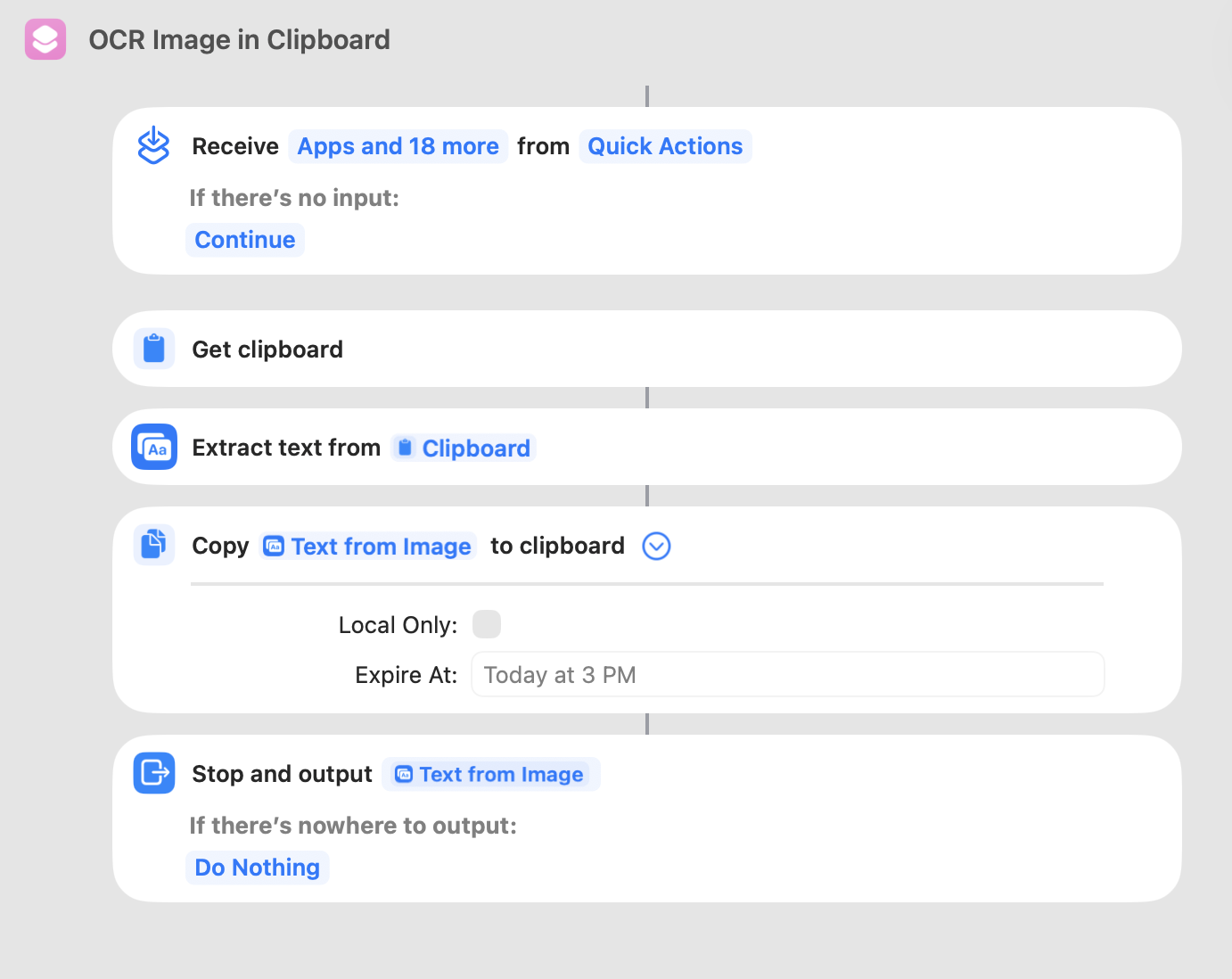
One of my #HandyShortcuts, cmd+shift+4 to select a piece of the screen, then cmd+option+v to paste the text from the image. #Apple #Shortcuts #MacOS
Mark Van Alstine boosted:
`WFWorkflowClientVersion` of #Shortcuts became
3612.0.2.1 → 3612.0.1.1
(iOS 18.6 → 18.7)
and
4033.0.4.3 → 4033.0.3.5
(iOS 26.0 → 26.0.1)
🤔 Rollbacks?
Mark Van Alstine boosted:

Home Assistant Widgets with Scriptable
Mark Van Alstine boosted:

After updating my #homeassistant setup I rewrote my #scriptable widget for lockscreen and home screen to rely only on Home Assistant. If you want to use it I put it on github: https://github.com/toto/homeassistant-solar-widget-scriptable


Client Info
Server: https://mastodon.social
Version: 2025.07
Repository: https://github.com/cyevgeniy/lmst